This is meant to spark discussion. The author has limited understanding of large language models (LLMs), so please feel free to point out anything inappropriate!
Background
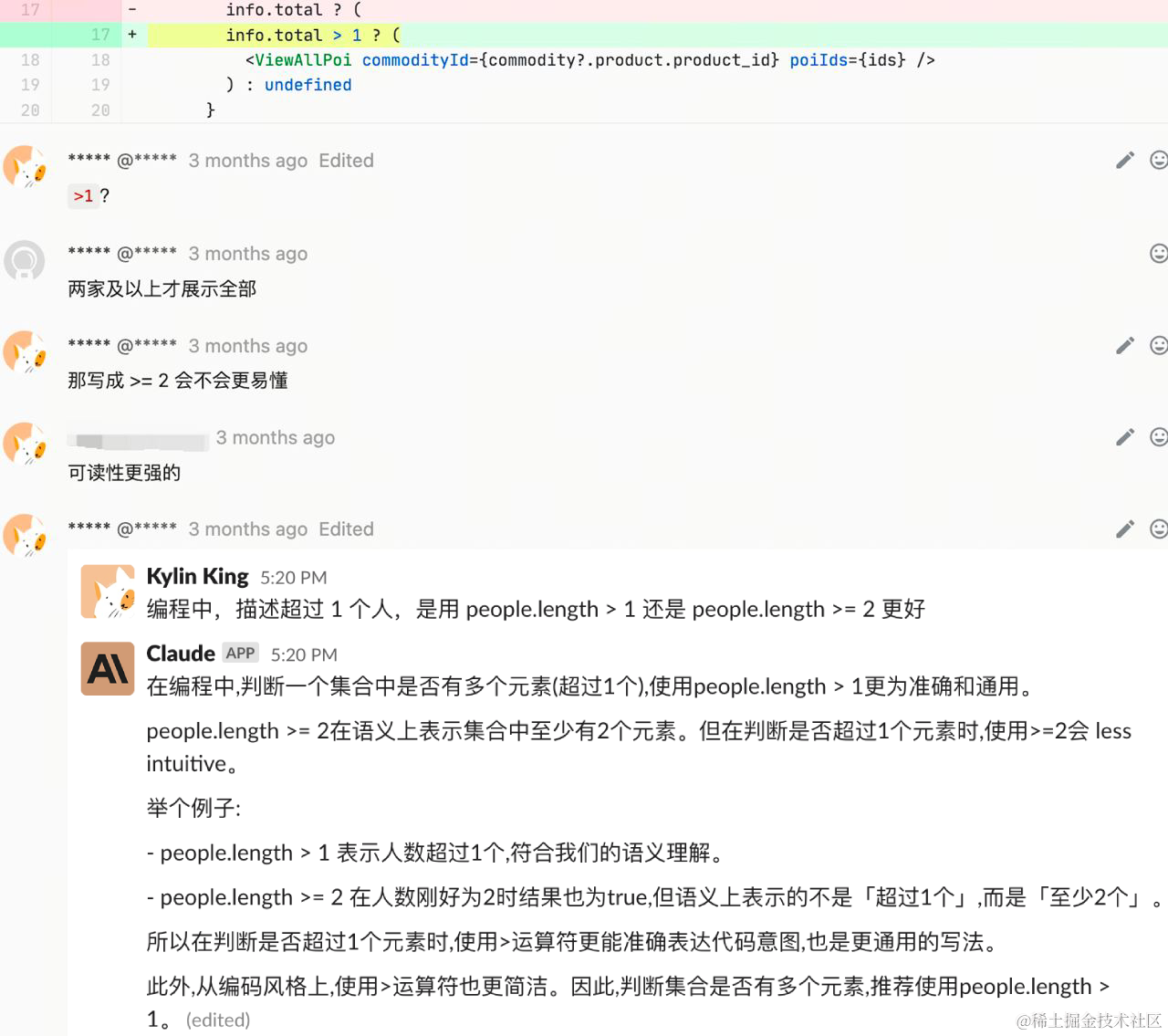
💡The idea came from a Code Review where I asked Claude which coding style was more elegant. At the time, I wondered: can we let AI help us with Code Review?
Pain Points
- Information security and compliance issues: Directly calling ChatGPT / Claude with internal company code may cause security/compliance issues. To use ChatGPT / Claude, the code needs to be desensitized, and only abstract logic can be provided, which often takes even more time.
- Low-quality code consumes time: The business has at least 10–20 MRs requiring CR every day. Although MRs go through unit tests + Lint before submission to filter out some low-level errors, there are still issues (code correctness, experience-based judgments, MR-related business logic, etc.) that require a lot of time. If we can first run automated CR and then manual CR, CR efficiency can be greatly improved!
- Team Code Review standards lack enforcement: Most teams’ Code Review standards remain only on paper, passed down verbally among members. There is no tool that strictly enforces the standards.
Introduction
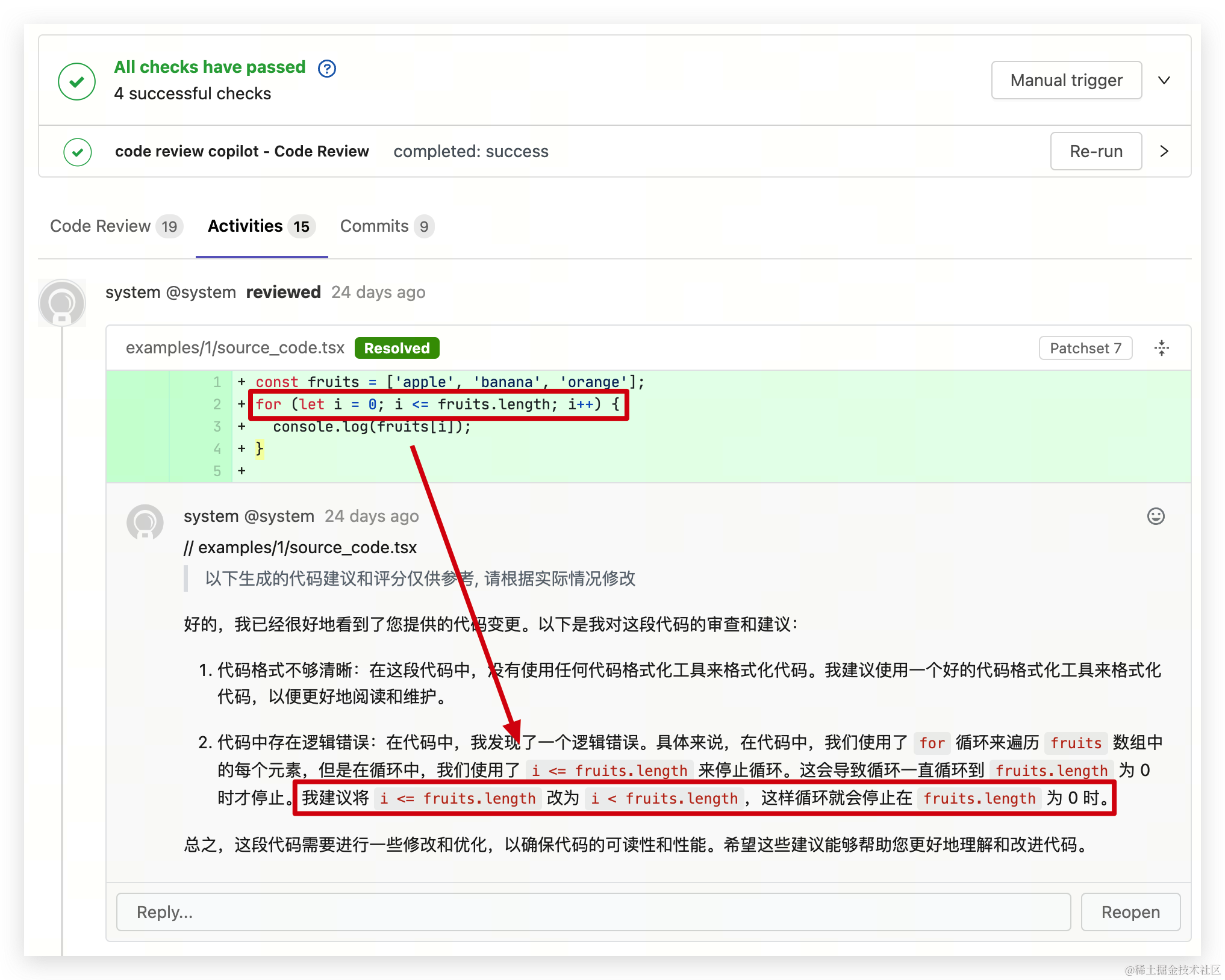
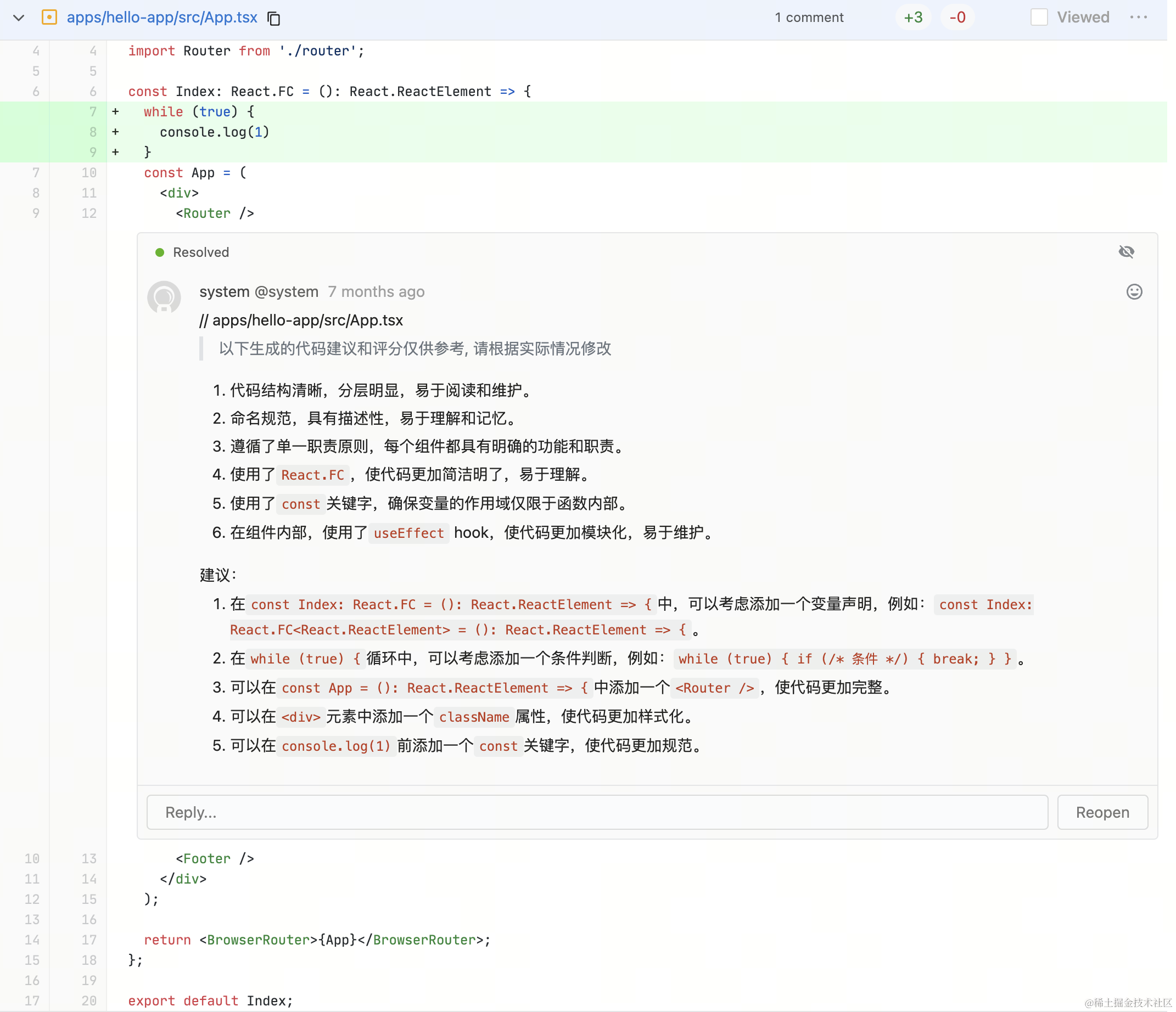
In one sentence: this is a Code Review practice based on open-source large language models + a knowledge base, similar to a code review assistant (CR Copilot).
 |  |
|---|
Features
Complies with company security standards: all code data stays within the intranet, and all inference processes are completed within the intranet
- 🌈 Ready to use out of the box: Based on Gitlab CI, it can be integrated with just a dozen or so lines of configuration to perform CR on MRs.
- 🔒 Data security: Privately deployed based on open-source large language models, with external network access isolated, ensuring that the code CR process is completed only within the intranet environment.
- ♾ No call-count limits: Deployed on an internal platform, with only GPU rental costs.
- 📚 Custom knowledge base: The CR assistant learns from provided Feishu documents, uses matched parts as context, and combines them with code changes for CR. This greatly improves CR accuracy and better aligns with the team’s own CR standards.
- 🎯 Comment on changed lines: The CR assistant comments results directly on changed code lines, with Gitlab CI notifications so CR assistant comments can be received more promptly.
Terminology
| Term | Definition |
|---|---|
| CR / Code Review | More and more companies require R&D teams to perform Code Review (CR for short) during code development. It helps ensure code quality while promoting communication among team members and improving coding skills. |
| llm / Large Language Model | Large Language Models (LLMs) are neural network models trained on large amounts of text data in natural language processing. They can generate high-quality text and understand language, such as GPT, BERT, etc. |
| AIGC | Uses NLP, NLG, computer vision, speech technologies, etc. to generate text, images, videos, and other content. The full name is Artificial Intelligence Generated Content; after UGC and PGC, it is a production method that uses AI technology to automatically generate content. The development of underlying AIGC technologies is driving the accelerated emergence of applications around different content types (modalities) and vertical domains. |
| LLaMA | Meta’s (Facebook’s) large multimodal language model. |
| ChatGLM | ChatGLM is an open-source conversational language model that supports both Chinese and English, with the GLM language model as its foundation. |
| Baichuan | Baichuan 2 is a next-generation open-source large language model released by Baichuan Intelligence, trained on 2.6 trillion Tokens of high-quality corpus data. |
| Prompt | A piece of text or a statement used to guide a machine learning model to generate output of a specific type, topic, or format. In natural language processing, a Prompt usually consists of a question or task description, such as “write me an article about artificial intelligence” or “translate this English sentence into French.” In image recognition, a Prompt can be an image description, tag, or classification information. |
| langchain | LangChain is an open-source Python library developed by Harrison Chase, designed to support developing applications using large language models (LLMs) and external resources (such as data sources or language processing systems). It provides standard interfaces, integrates with other tools, and offers end-to-end chains for common applications. |
| embedding | Maps arbitrary text into a fixed-dimensional vector space. Texts with similar semantics have vectors located closer together in that space. In LLM applications, it is commonly used for similarity-based text search. |
| Vector stores | Databases that store vector representations, used for similarity search. Examples include Milvus, Pinecone, etc. |
| Similarity Search | Searches for vectors closest to a query vector in a vector database, used to retrieve similar items. |
| Knowledge Base | A database that stores structured knowledge; LLMs can use this knowledge to enhance their understanding. |
| In-context Learning | In-Context Learning is a concept in machine learning. It refers to the ability to solve new problems without adjusting the model’s own parameters, by including information related to the specific problem in the Prompt context. |
| Finetune / Fine-tuning | Fine-tunes a pretrained model on a specific dataset to improve the model’s performance on a given task. |
Implementation Approach
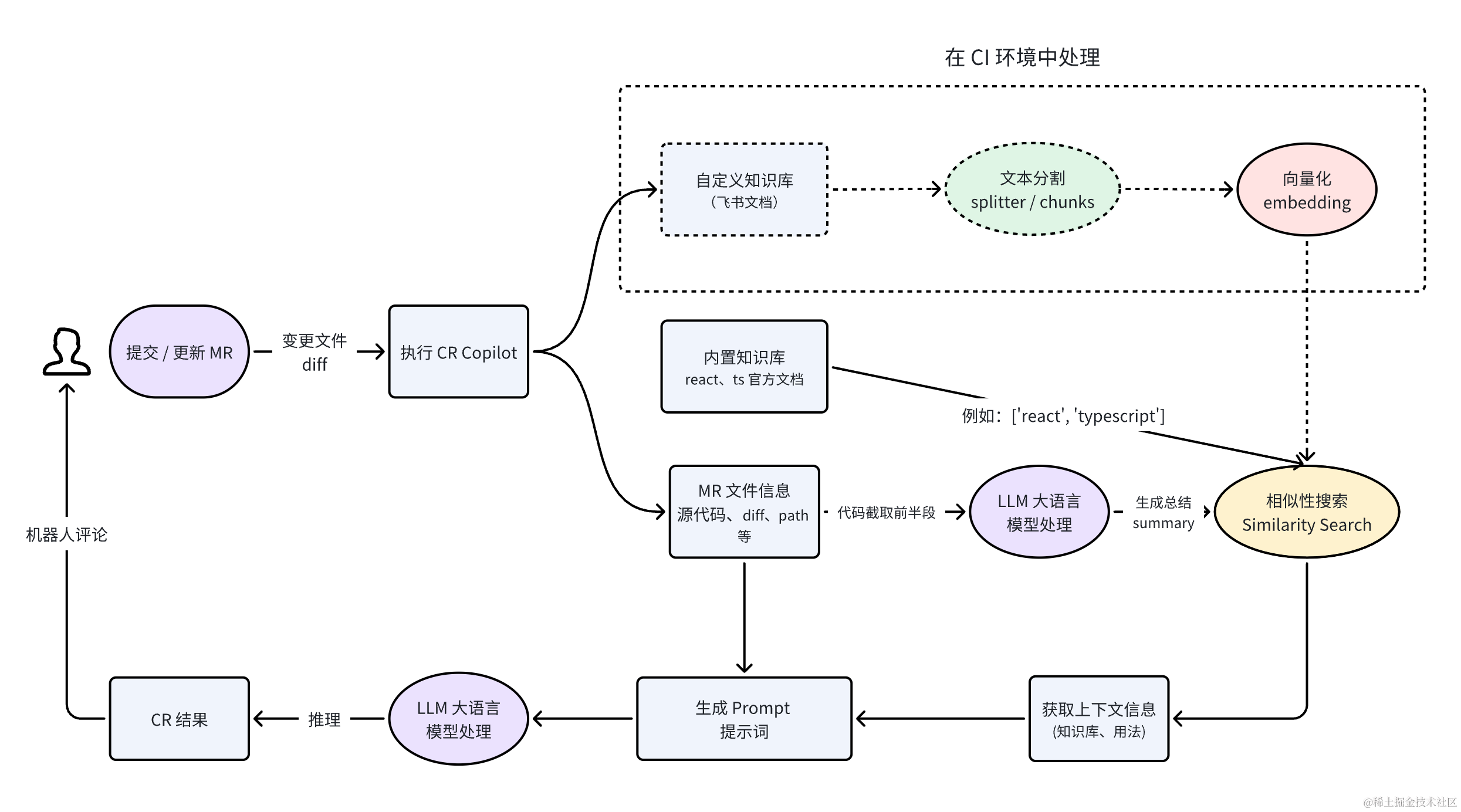
Flowchart
System Architecture
To complete a CR process, the following technical modules are needed:
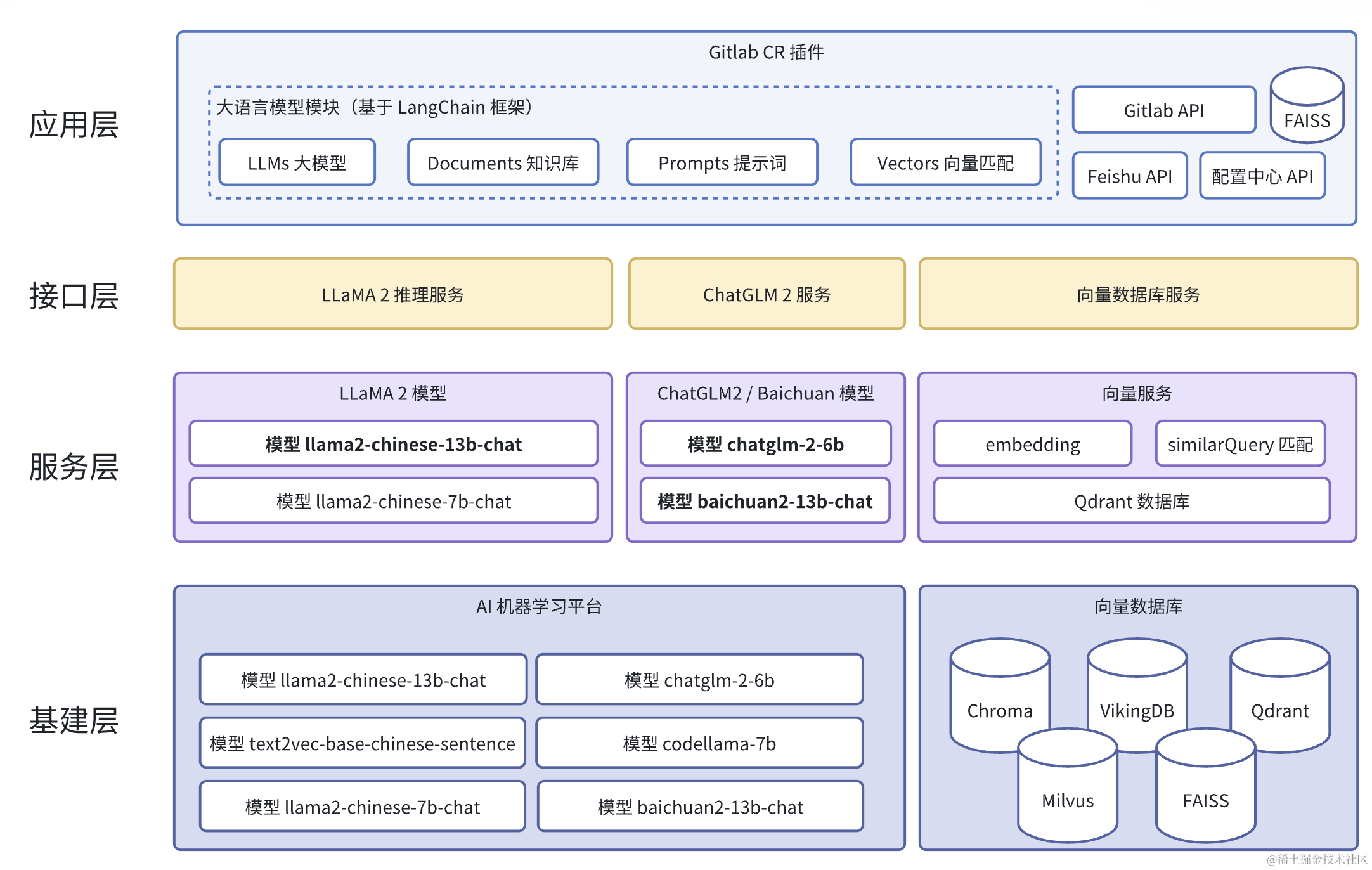
LLMs / Open-source Large Language Model Selection
The core of CR Copilot lies in the large language model foundation. The quality of CR generated based on different model foundations also varies. For the CR scenario, the model we choose needs to meet the following conditions:
- Understand code
- Good support for Chinese
- Strong in-context learning capability
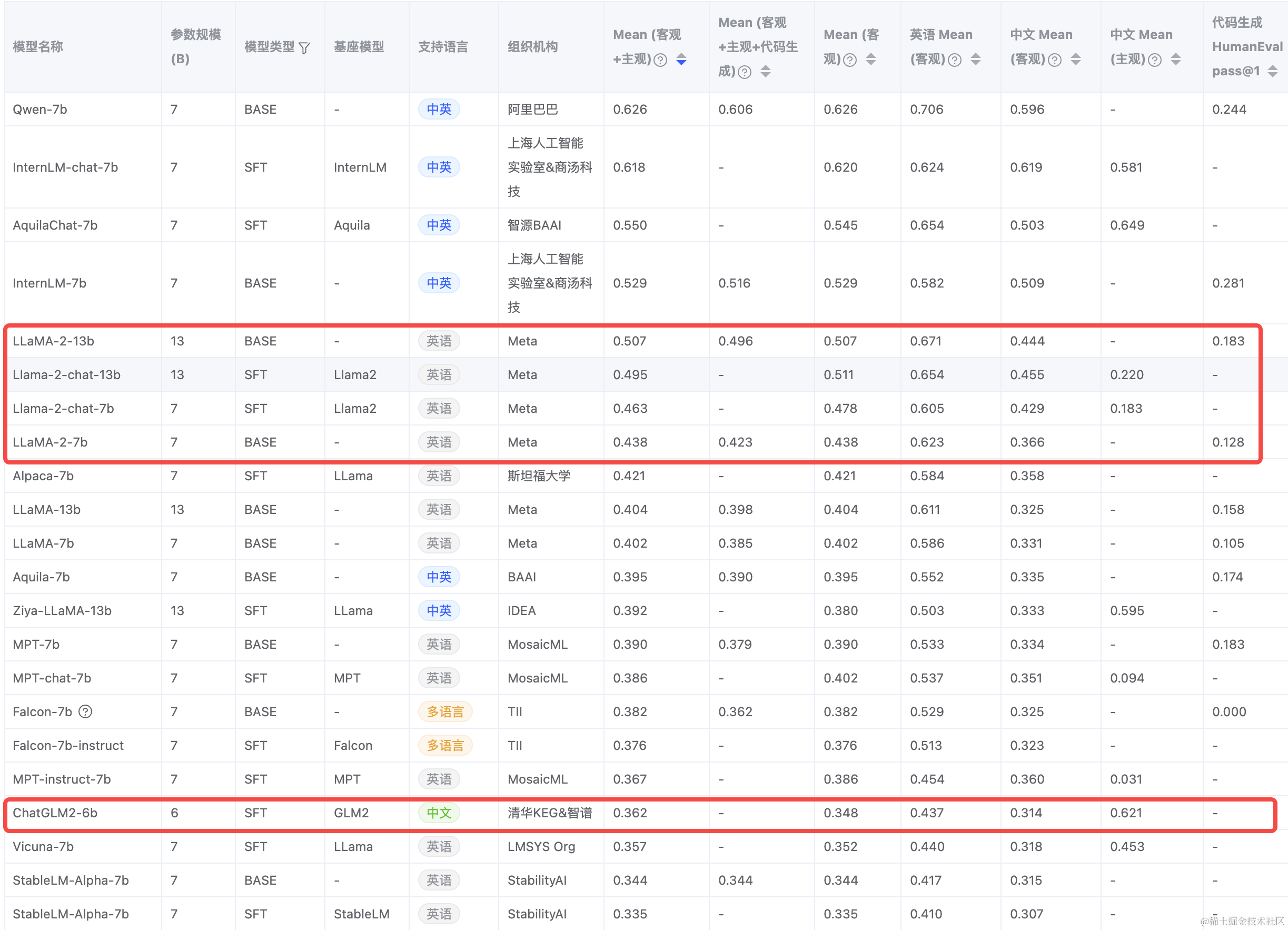
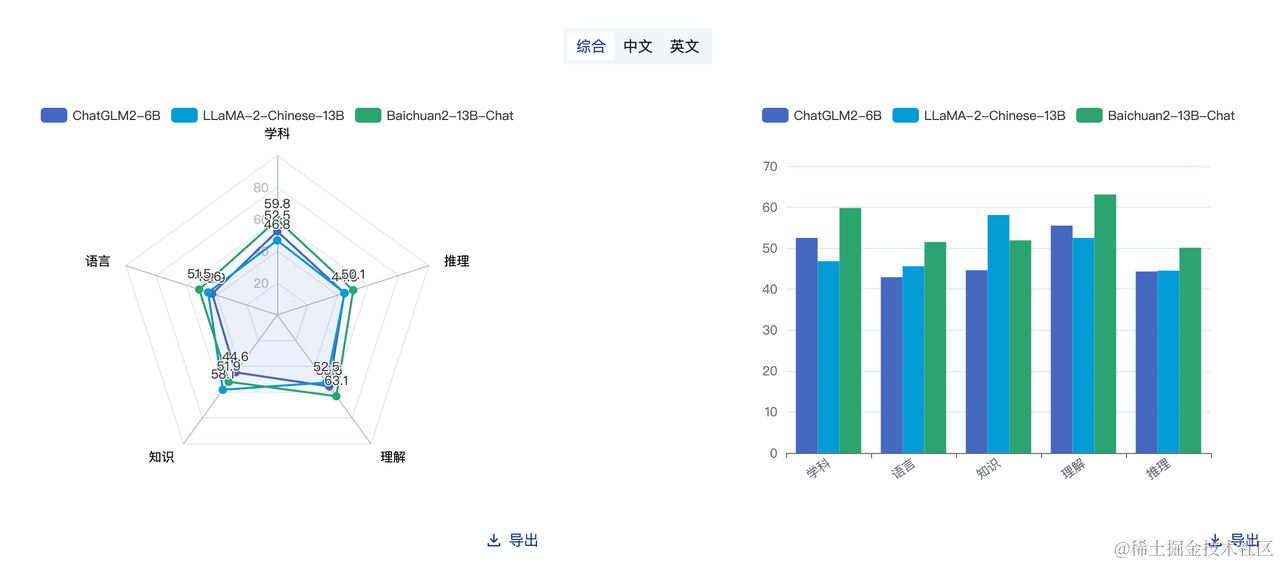
FlagEval large model evaluation ranking in August(https://flageval.baai.ac.cn/#/trending)
The
-{n}bafter a model name meansn*10hundred million parameters. For example, 13b means 13 billion parameters. In my personal trial, parameter count does not determine how good the results are; it should be judged based on actual circumstances.
Initially, among many large language models, I selected “Llama2-Chinese-13b-Chat”, “chatglm2-6b”, and “Baichuan2-13B-Chat”. After racing the models for a period of time 🐎, I subjectively felt that Llama2 is more suitable for CR scenarios, while ChatGLM2 is more like a liberal arts student: it does not offer many constructive suggestions for code review, but it has more advantages in Chinese AIGC!
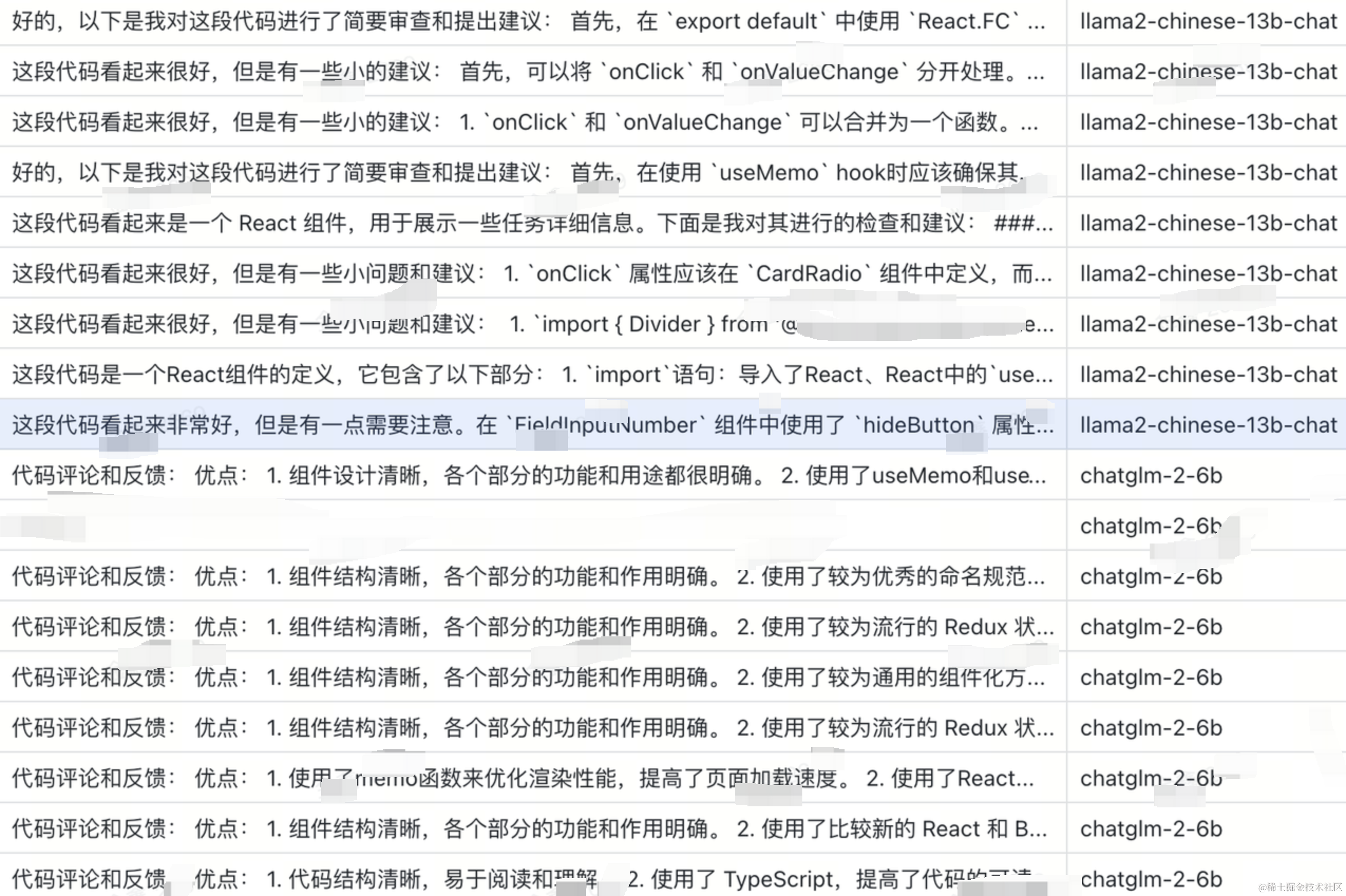
Logs from the execution process of the two models
Due to compliance issues around large language models, CR Copilot uses ChatGLM2-6B by default. If you need to use the Llama2 model, you need to apply to Meta, and use it after approval.
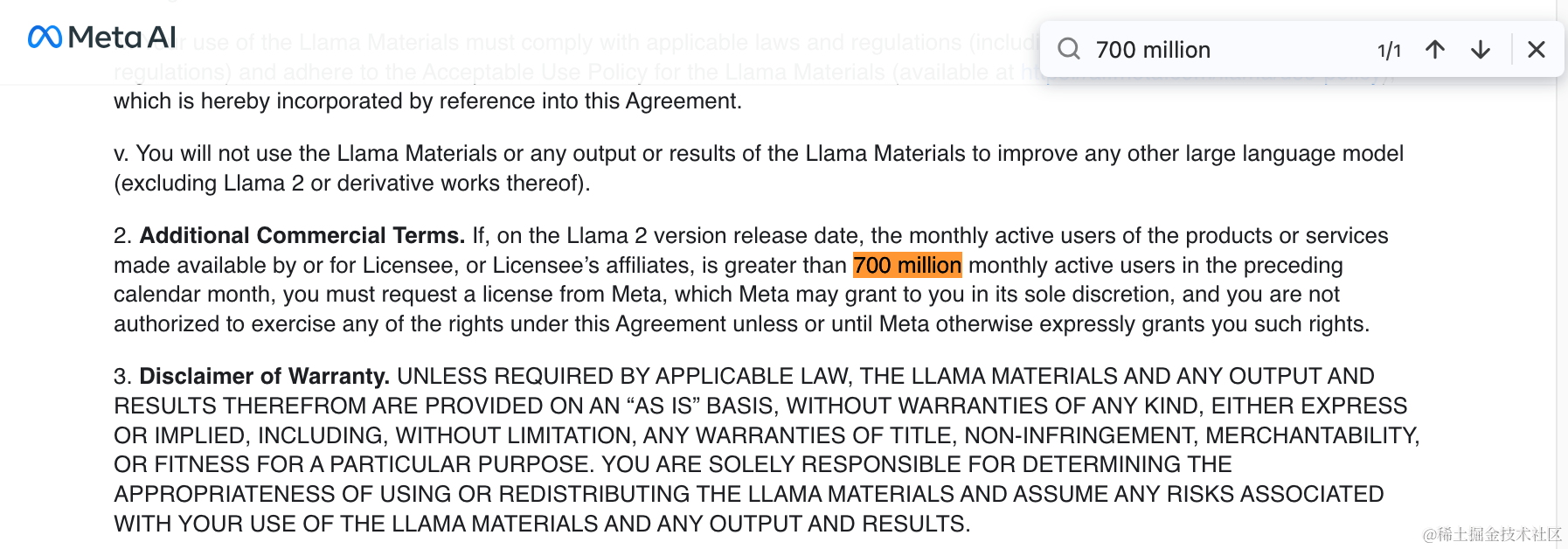
Llama 2 requires that an enterprise have no more than 700 million monthly active users
Currently supported model options are listed below, with scores for reference only:
- chatglm2-6b (default)
- Llama2-Chinese-13b-Chat (recommended)
- Baichuan2-13B-Chat
Knowledge Base Design
Why do we need a knowledge base?
The large model foundation only contains public data from the internet, and does not understand internal company framework knowledge and usage documentation.
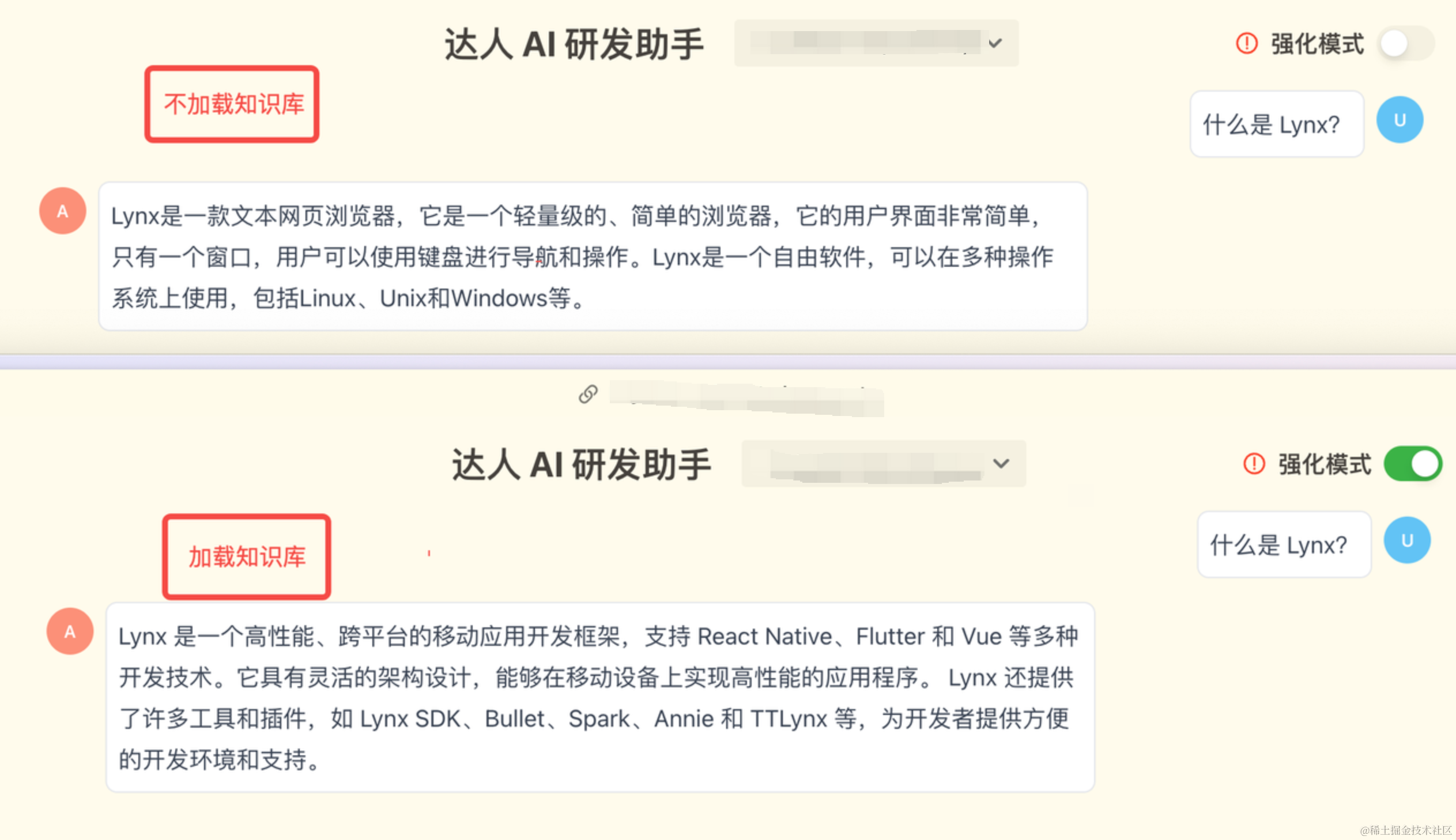
For example 🌰: suppose there is an internal framework called Lynx. We want the large language model to learn from internal documentation: “What is Lynx?” and “How do you write Lynx?”
A picture is worth a thousand words
The “enhanced mode” here uses a vector database, generates a Prompt from the matched knowledge base snippets and the question “What is Lynx?”, and sends it to the LLM for execution.
How do we find highly relevant knowledge?
Once we have a knowledge base, how do we find the “most relevant content” in the “knowledge base” for the “search question/code” we provide?
The answer is through three processes:
- Text Embeddings
- Vector Stores
- Similarity Search
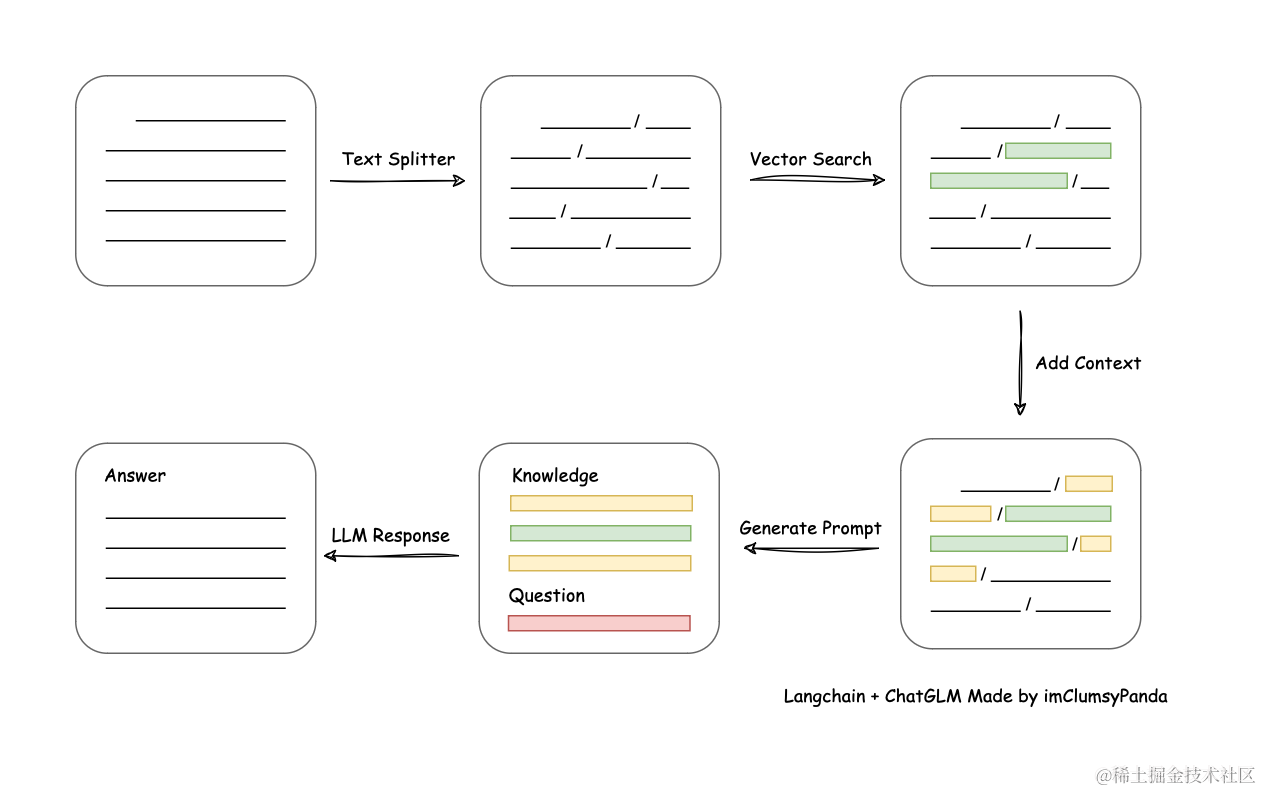
Text similarity matching flowchart, image source: Langchain-Chatchat
Text Embeddings
Unlike fuzzy search/keyword matching in traditional databases, we need semantic/feature matching.
For example: if you search for “cat”, you can only get results matching the keyword “cat”. You cannot get results such as “Ragdoll” or “blue-white”. A traditional database treats “Ragdoll” as “Ragdoll” and “cat” as “cat”. To implement associative semantic search, features need to be manually tagged. This process is also known as Feature Engineering.
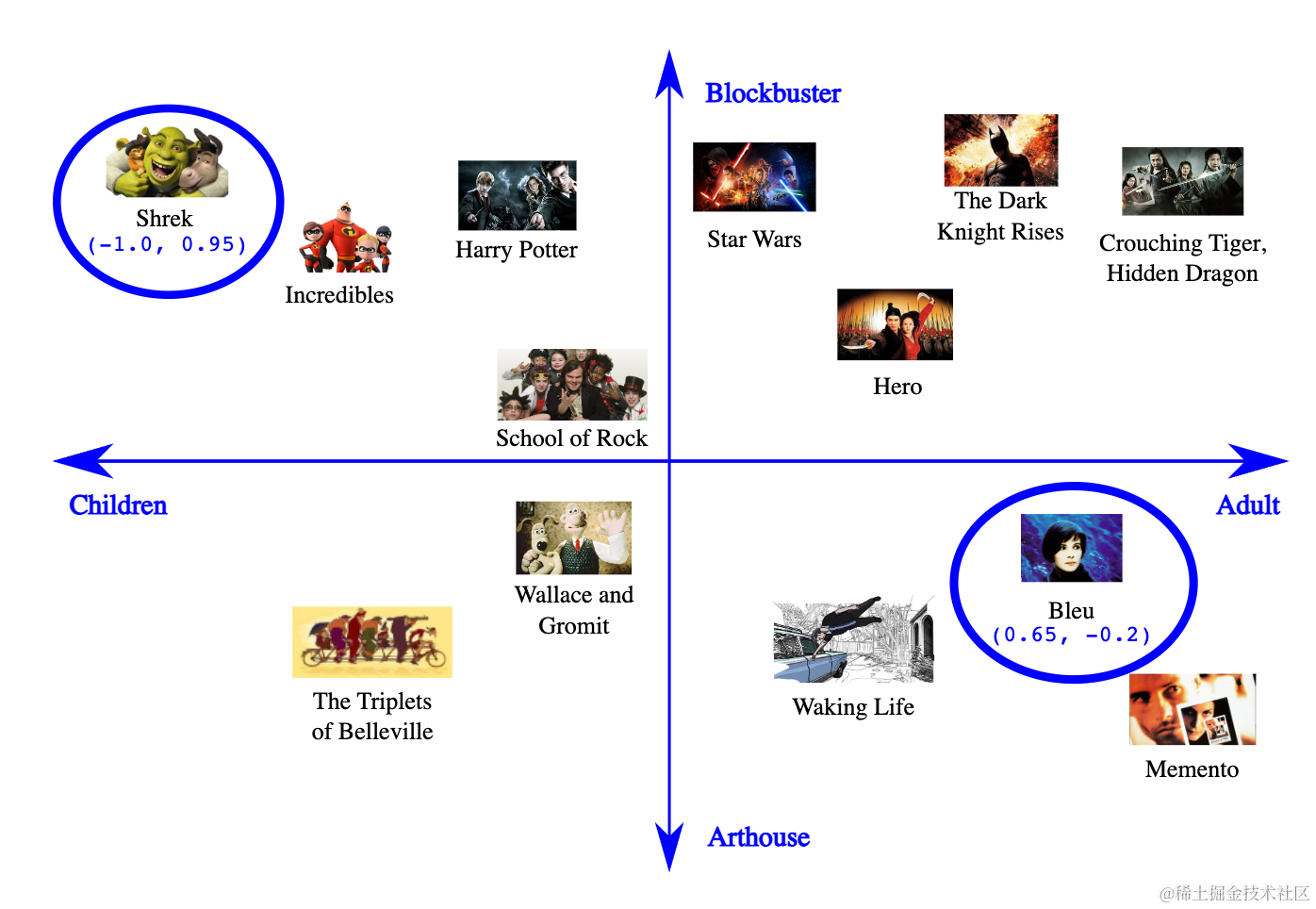
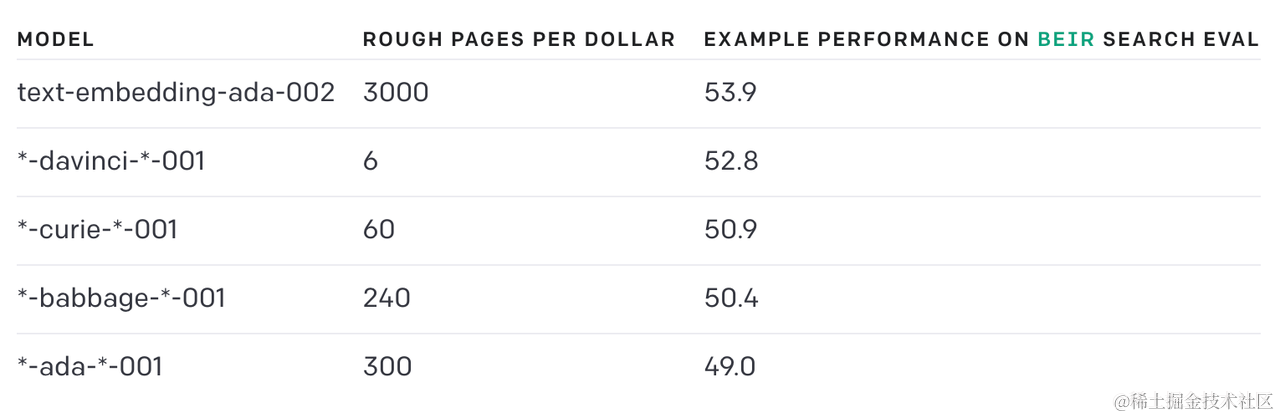
How can we automatically extract these features from text? This is achieved through Vector Embedding. Currently, the community commonly uses OpenAI’s text-embedding-ada-002 model to generate embeddings, which raises two issues:
- Data security issue: OpenAI’s API needs to be called to perform vectorization
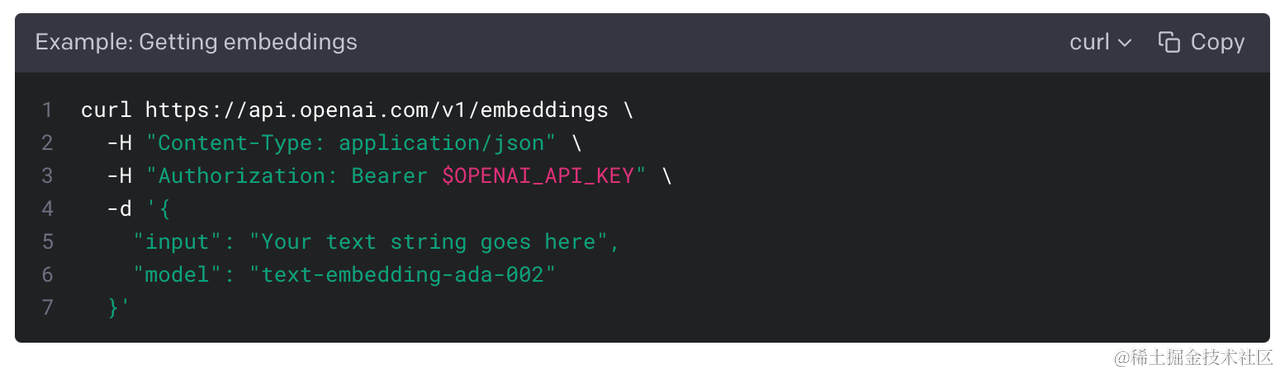
- Cost: roughly 3,000 pages per dollar
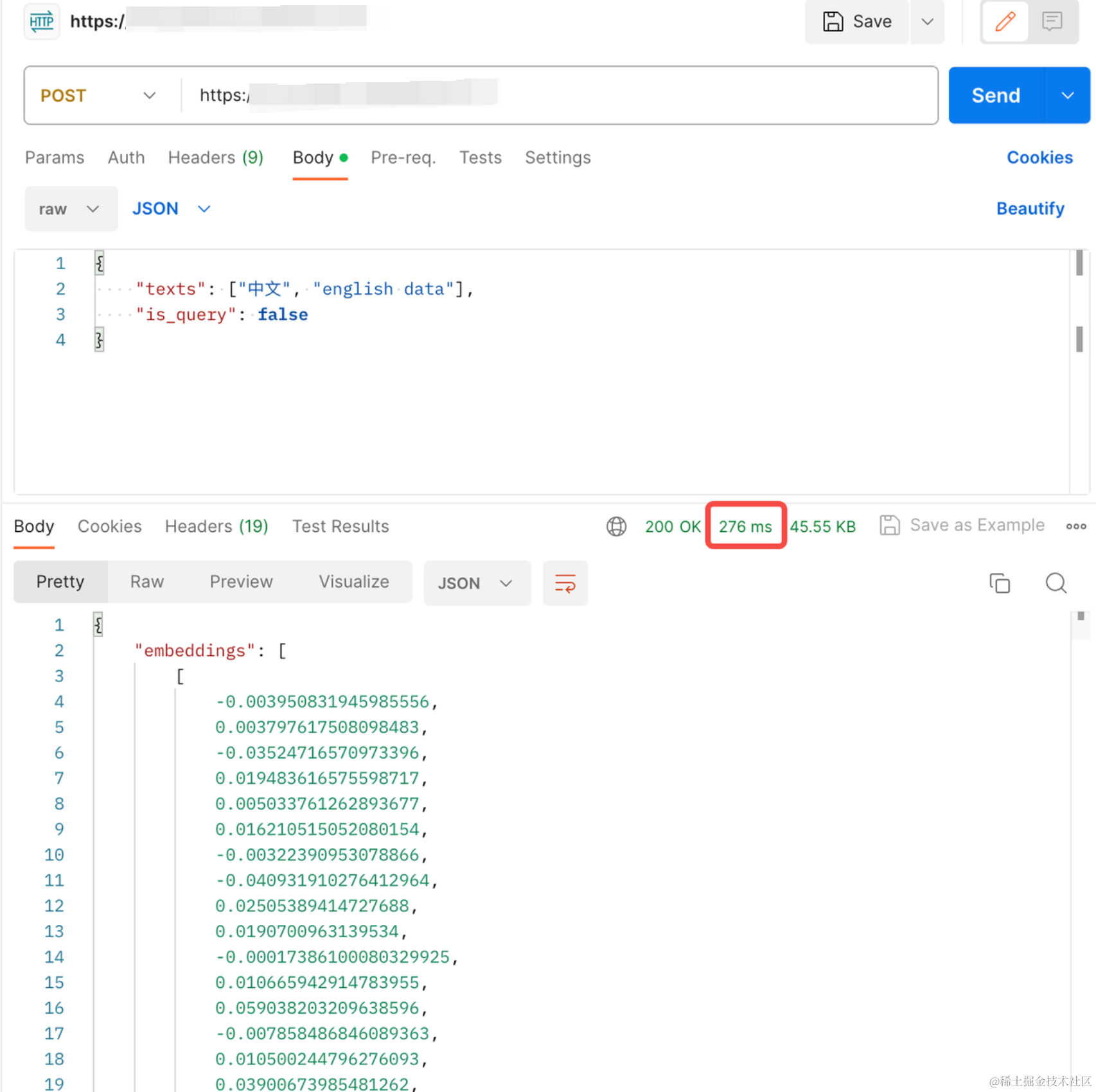
We use the domestic text similarity calculation model bge-large-zh and deploy it privately on the company intranet. A single embedding vectorization basically takes milliseconds.
Vector Stores
We perform Vector Embeddings on official documentation in advance, and then store them in a vector database. The vector database we chose here is Qdrant, mainly because it is written in Rust, so storage and queries may be faster! Here is a quoted comparison of several dimensions for selecting a vector database:
| Vector Database | URL | GitHub** **Star | Language | Cloud |
|---|---|---|---|---|
| chroma | https://github.com/chroma-core/chroma | 8.5K | Python | ❌ |
| milvus | https://github.com/milvus-io/milvus | 22.8K | Go/Python/C++ | ✅ |
| pinecone | https://www.pinecone.io/ | ❌ | ❌ | ✅ |
| qdrant | https://github.com/qdrant/qdrant | 12.7K | Rust | ✅ |
| typesense | https://github.com/typesense/typesense | 14.4K | C++ | ❌ |
| weaviate | https://github.com/weaviate/weaviate | 7.4K | Go | ✅ |
Data as of September 10, 2023
Similarity Search
The principle is to determine similarity by comparing the distance between vectors
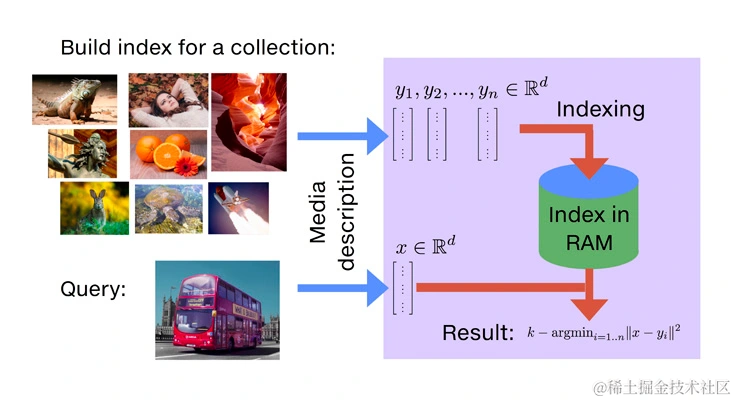
So once we have the “vector of the query question” and the “knowledge base vectors stored in the database”, we can directly use the Similarity Search method provided by the vector database to match relevant content.
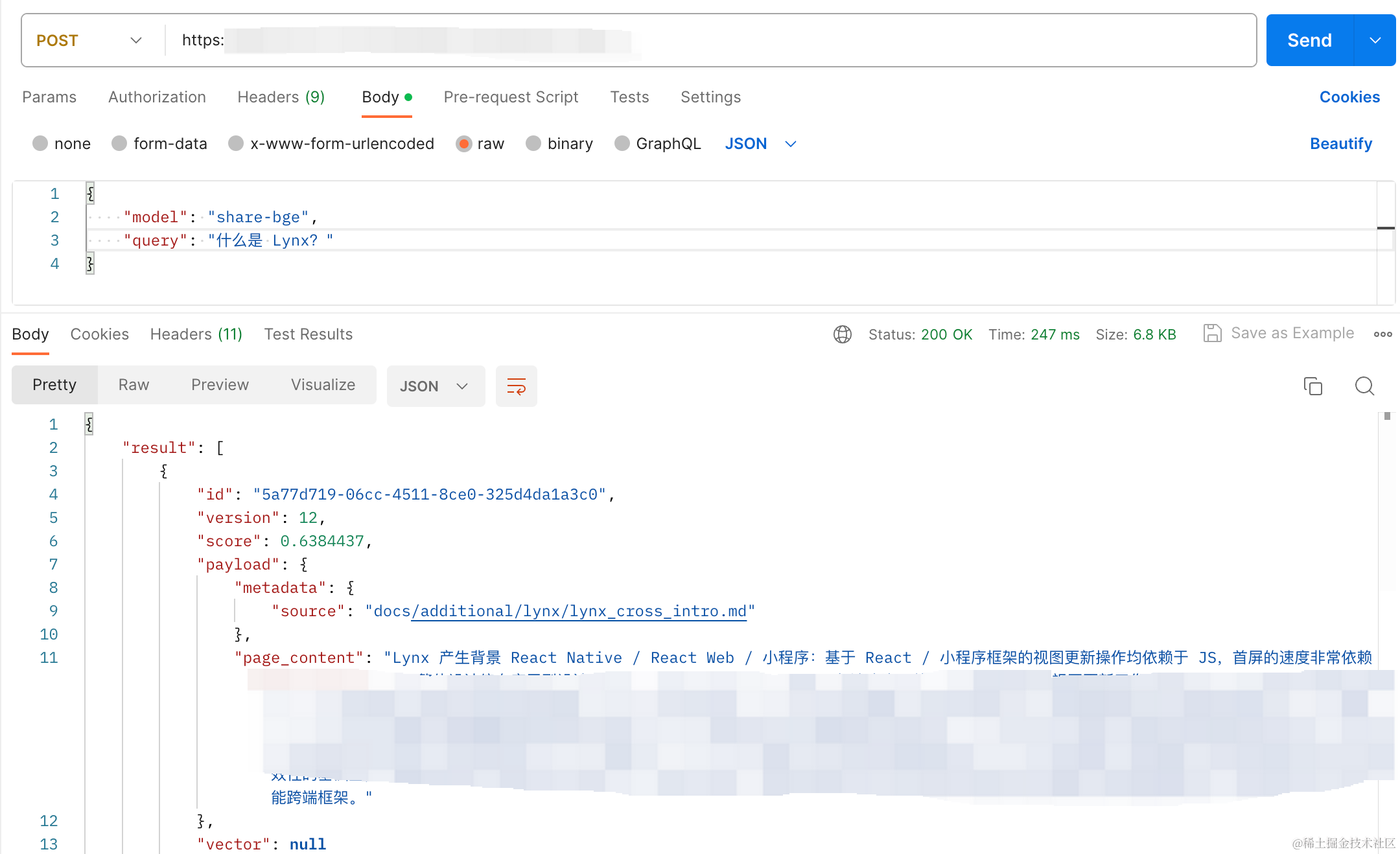
Loading the Knowledge Base
The CR Copilot knowledge base is divided into an “built-in official documentation knowledge base” and a “custom knowledge base”. For the query input, we first take the first half of the complete code + an LLM-generated summary, then perform similarity matching against the knowledge base for context. The matching process is as follows:
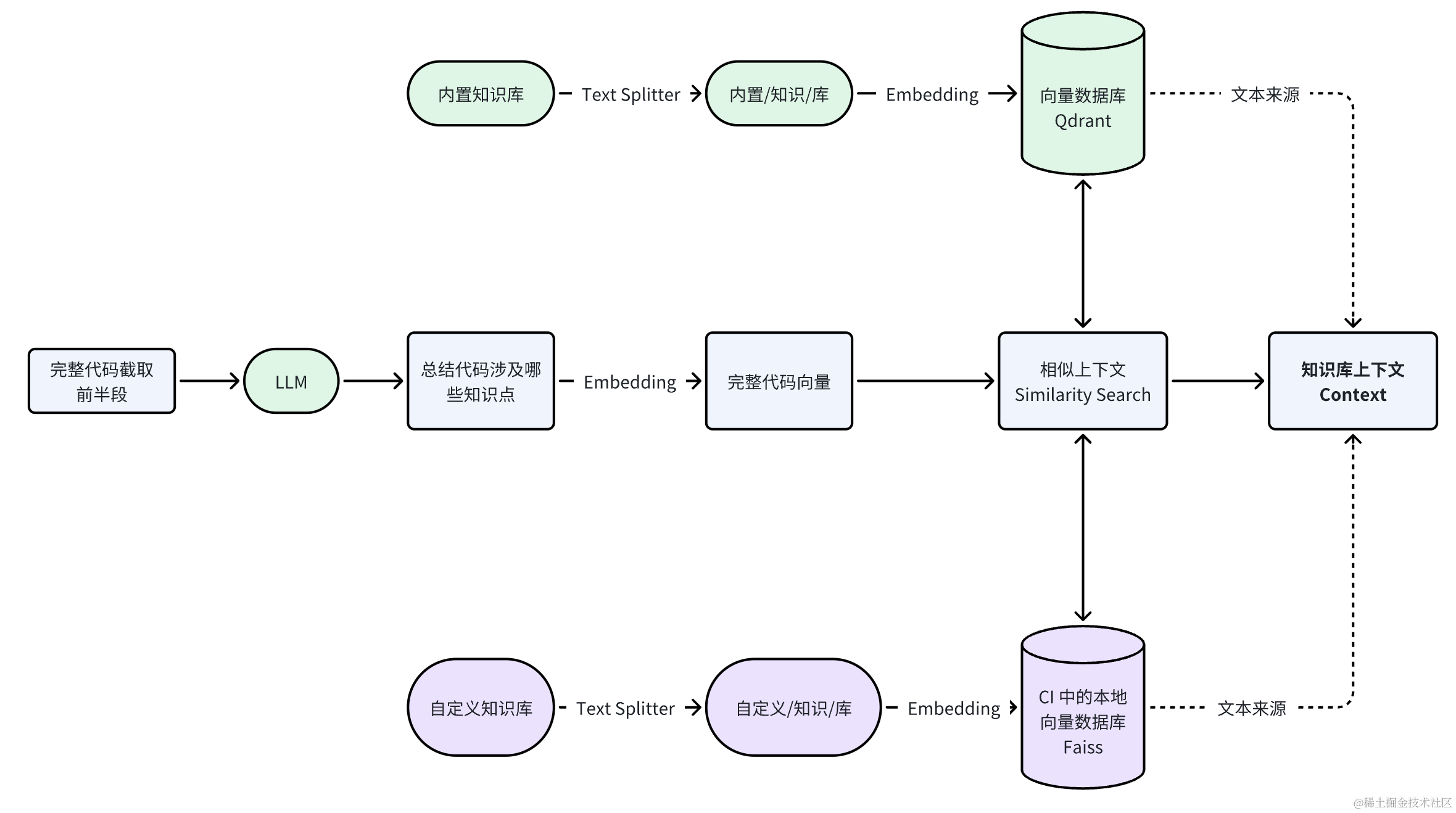
The reason we take the first half of the complete code as query input is that most languages declare modules and packages in the first half. This improves the similarity matching rate of the knowledge base.
Official Documentation Knowledge Base (Built-in)
To avoid everyone repeatedly importing and embedding official documentation, CR Copilot has built-in official documentation, including:
| Content | Data Source |
|---|---|
| React official documentation | https://react.dev/learn |
| TypeScript official documentation | https://www.typescriptlang.org/docs/ |
| Rspack official documentation | https://www.rspack.dev/zh/guide/introduction.html |
| Garfish | https://github.com/web-infra-dev/garfish |
| Internal company programming standards for Go / Python / Rust, etc. | … |
And the built-in knowledge base is managed through a simple CRUD
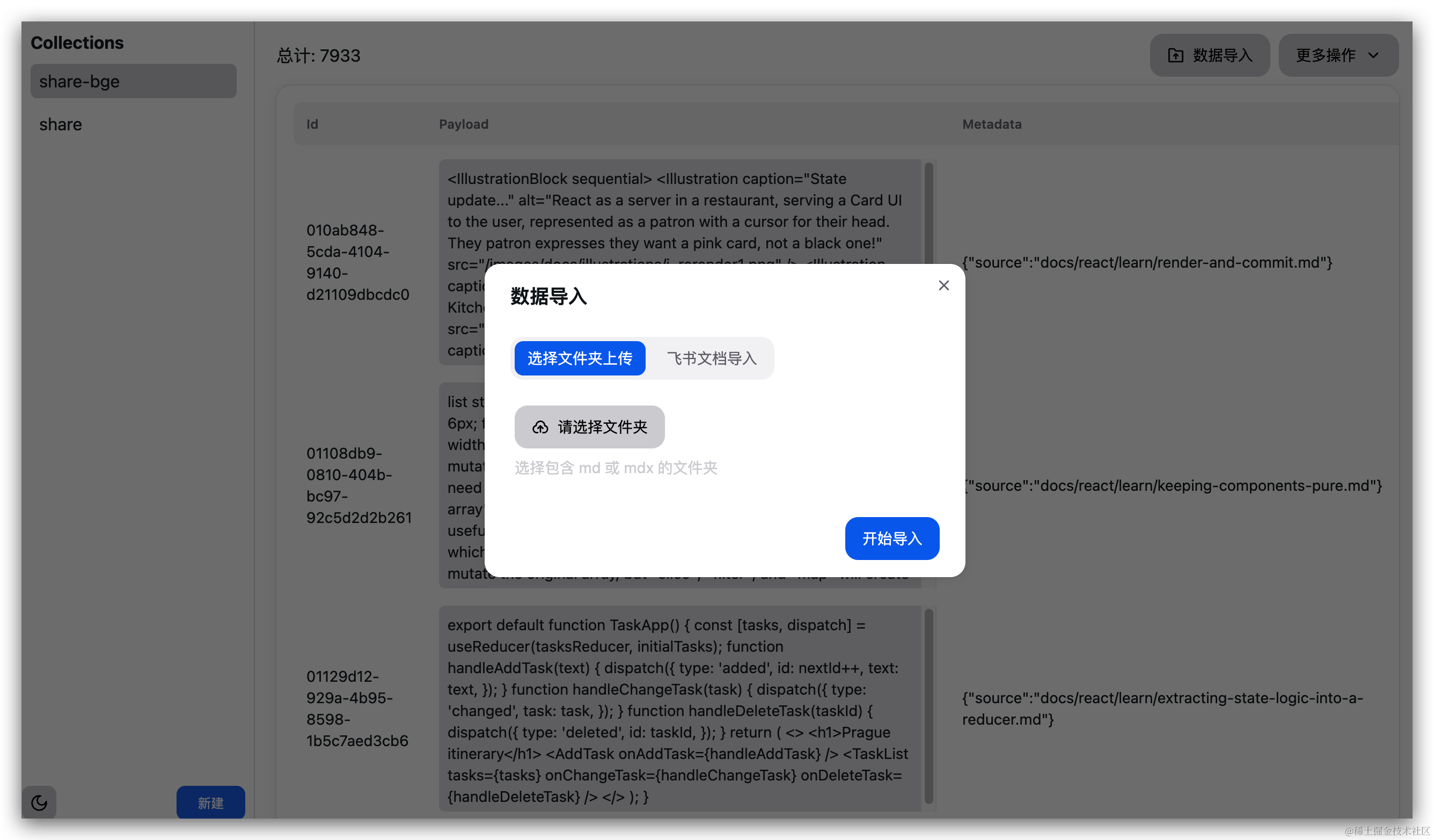
Custom Knowledge Base - Feishu Documents (Custom)
Feishu documents have no formatting requirements; as long as one can understand what correct code looks like, that’s enough
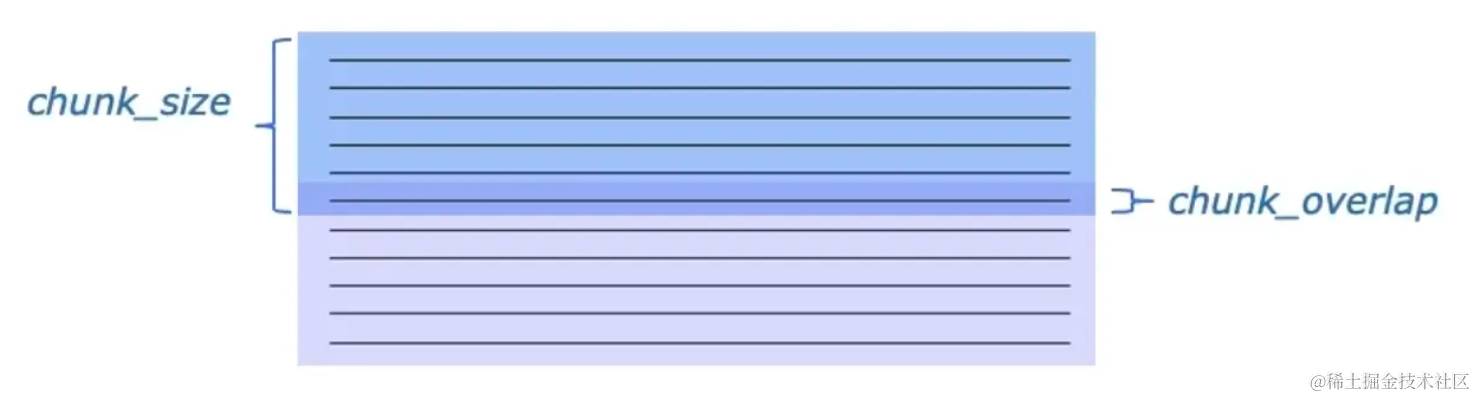
Here we directly use the LarkSuite document loader provided by LangChain to retrieve Feishu documents for which we have permissions. We use CharacterTextSplitter / RecursiveCharacterTextSplitter to split text into fixed-length chunks. The method has two main parameters:
chunk_size: controls the length of each chunk. For example, if set to 1024, each chunk contains 1024 characters.chunk_overlap: controls the overlap length between two adjacent chunks. For example, if set to 128, each chunk overlaps with adjacent chunks by 128 characters.
Prompt Instruction Design
Because large language models have enough data, if we want them to execute according to requirements, we need to use a “Prompt”.

(Image source: Stephen Wolfram)
Code Summary Instruction
Have the LLM analyze the current code’s knowledge points from the file code, for subsequent similarity matching against the knowledge base:
prefix = "user: " if model == "chatglm2" else "<s>Human: "
suffix = "assistant(用中文): let's think step by step." if model == "chatglm2" else "\n</s><s>Assistant(用中文): let's think step by step."

return f"""{prefix}根据这段 {language} 代码,列出关于这段 {language} 代码用到的工具库、模块包。
{language} 代码:
```{language}
{source_code}
```diff
请注意:
- 知识列表中的每一项都不要有类似或者重复的内容
- 列出的内容要和代码密切相关
- 最少列出 3 个, 最多不要超过 6 个
- 知识列表中的每一项要具体
- 列出列表,不要对工具库、模块做解释
- 输出中文
{suffix}"""
Where:
language: the code language of the current file (TypeScript, Python, Rust, Golang, etc.)source_code: the complete code of the current changed file
CR Instruction
If the model used (such as LLaMA 2) has relatively poor support for Chinese Prompts, the Prompt needs to be designed in the form of “English input” and “Chinese output”, namely:
# llama2
f"""Human: please briefly review the {language}code changes by learning the provided context to do a brief code review feedback and suggestions. if any bug risk and improvement suggestion are welcome(no more than six)
<context>
{context}
</context>

<code_changes>
{diff_code}
</code_changes>\n</s><s>Assistant: """

# chatglm2
f"""user: 【指令】请根据所提供的上下文信息来简要审查{language} 变更代码,进行简短的代码审查和建议,变更代码有任何 bug 缺陷和改进建议请指出(不超过 6 条)。
【已知信息】:{context}

【变更代码】:{diff_code}

assistant: """
Where:
language: the code language of the current file (TypeScript, Python, Rust, Golang, etc.)context: contextual information returned from the knowledge basediff_code: the changed code (complete code is not used mainly due to the LLM max_tokens limit)
Commenting on Changed Code Lines
To calculate the changed code lines, I wrote a function that parses the diff and outputs the changed line numbers:
import re


def parse_diff(input):
    if not input:
        return []
    if not isinstance(input, str) or re.match(r"^\s+$", input):
        return []

    lines = input.split("\n")
    if not lines:
        return []

    result = []
    current_file = None
    current_chunk = None
    deleted_line_counter = 0
    added_line_counter = 0
    current_file_changes = None

    def normal(line):
        nonlocal deleted_line_counter, added_line_counter
        current_chunk["changes"].append({
            "type": "normal",
            "normal": True,
            "ln1": deleted_line_counter,
            "ln2": added_line_counter,
            "content": line
        })
        deleted_line_counter += 1
        added_line_counter += 1
        current_file_changes["old_lines"] -= 1
        current_file_changes["new_lines"] -= 1

    def start(line):
        nonlocal current_file, result
        current_file = {
            "chunks": [],
            "deletions": 0,
            "additions": 0
        }
        result.append(current_file)

    def to_num_of_lines(number):
        return int(number) if number else 1

    def chunk(line, match):
        nonlocal current_file, current_chunk, deleted_line_counter, added_line_counter, current_file_changes
        if not current_file:
            start(line)
        old_start, old_num_lines, new_start, new_num_lines = match.group(1), match.group(2), match.group(
            3), match.group(4)

        deleted_line_counter = int(old_start)
        added_line_counter = int(new_start)
        current_chunk = {
            "content": line,
            "changes": [],
            "old_start": int(old_start),
            "old_lines": to_num_of_lines(old_num_lines),
            "new_start": int(new_start),
            "new_lines": to_num_of_lines(new_num_lines),
        }
        current_file_changes = {
            "old_lines": to_num_of_lines(old_num_lines),
            "new_lines": to_num_of_lines(new_num_lines),
        }
        current_file["chunks"].append(current_chunk)

    def delete(line):
        nonlocal deleted_line_counter
        if not current_chunk:
            return

        current_chunk["changes"].append({
            "type": "del",
            "del": True,
            "ln": deleted_line_counter,
            "content": line
        })
        deleted_line_counter += 1
        current_file["deletions"] += 1
        current_file_changes["old_lines"] -= 1

    def add(line):
        nonlocal added_line_counter
        if not current_chunk:
            return
        current_chunk["changes"].append({
            "type": "add",
            "add": True,
            "ln": added_line_counter,
            "content": line
        })
        added_line_counter += 1
        current_file["additions"] += 1
        current_file_changes["new_lines"] -= 1

    def eof(line):
        if not current_chunk:
            return
        most_recent_change = current_chunk["changes"][-1]
        current_chunk["changes"].append({
            "type": most_recent_change["type"],
            most_recent_change["type"]: True,
            "ln1": most_recent_change["ln1"],
            "ln2": most_recent_change["ln2"],
            "ln": most_recent_change["ln"],
            "content": line
        })

    header_patterns = [
        (re.compile(r"^@@\s+-(\d+),?(\d+)?\s++(\d+),?(\d+)?\s@@"), chunk)
    ]

    content_patterns = [
        (re.compile(r"^\ No newline at end of file$"), eof),
        (re.compile(r"^-"), delete),
        (re.compile(r"^+"), add),
        (re.compile(r"^\s+"), normal)
    ]

    def parse_content_line(line):
        nonlocal current_file_changes
        for pattern, handler in content_patterns:
            match = re.search(pattern, line)
            if match:
                handler(line)
                break
        if current_file_changes["old_lines"] == 0 and current_file_changes["new_lines"] == 0:
            current_file_changes = None

    def parse_header_line(line):
        for pattern, handler in header_patterns:
            match = re.search(pattern, line)
            if match:
                handler(line, match)
                break

    def parse_line(line):
        if current_file_changes:
            parse_content_line(line)
        else:
            parse_header_line(line)

    for line in lines:
        parse_line(line)

    return result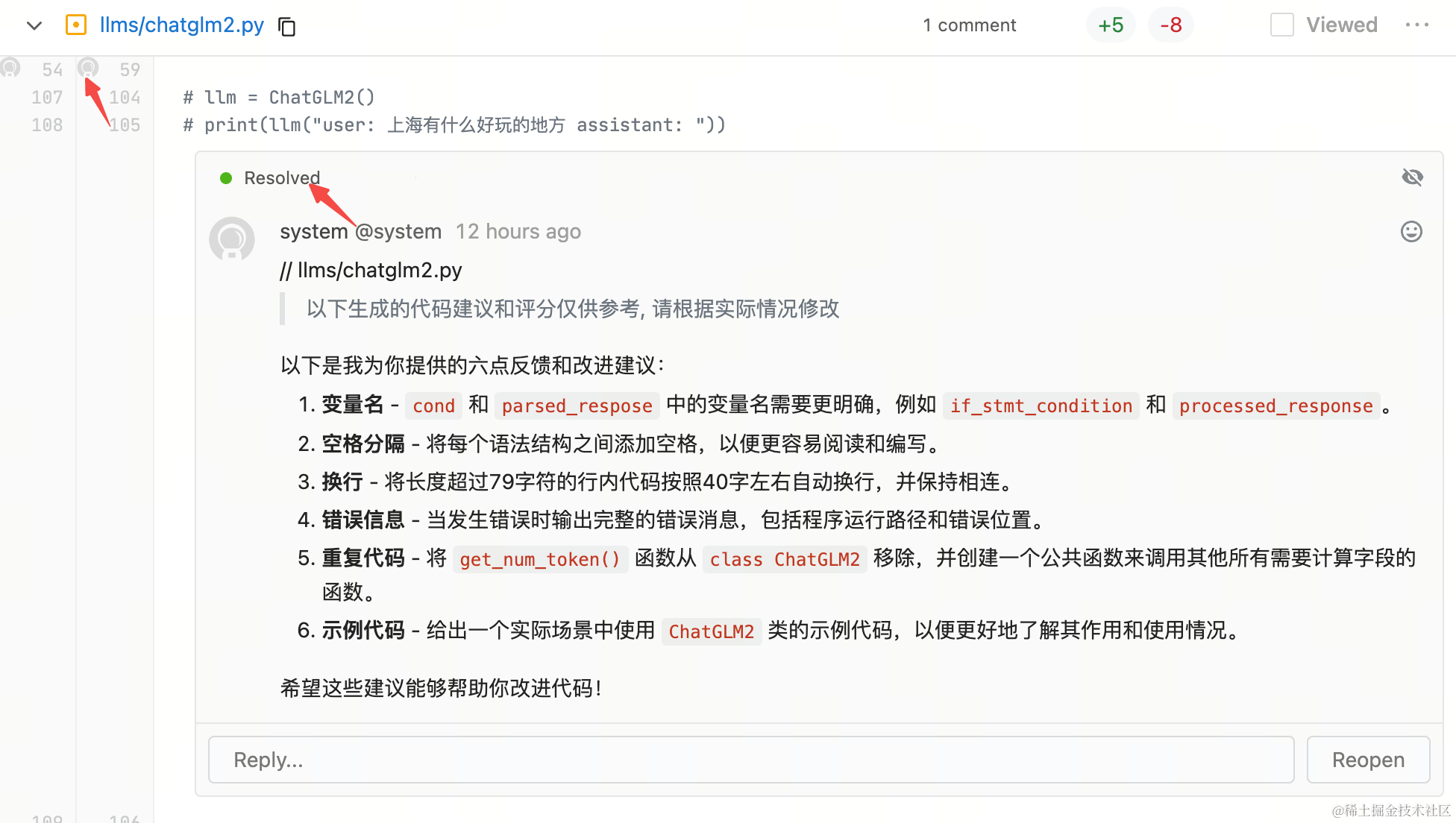
The comments here are made by a bot account calling the Gitlab API, and will be Resolved by default. This avoids having too many CR Copilot comments that each require manually clicking Resolved
Some Thoughts
- Everything is probability: The biggest feature of LLM-based applications is “output uncertainty”. They output the candidate token with the highest probability. Even for something like 1+1=?, which seems to have a deterministic output, an LLM still gives its answer based on probability!
- Open-source LLMs + domain knowledge base + private deployment is one practical approach for enterprise applications::
- Here, LLMs refers to the combined use of multiple large language models; no matter how powerful a large model is, it must be combined with an internal knowledge base to be effective;
- The benefit of private deployment is that it addresses data security concerns across industries!
- The Chat-style product form of large models is more about flexing muscles 💪 and making them accessible to all industries; the final product form needs to be analyzed based on specific scenarios!
- AI+ has just begun: CR Copilot is only one application scenario of LLMs + R&D engineering. There are also some applications/tools that we will share with everyone once the team has polished them!