Preface
This article is mainly intended for frontend and Node.js engineering teams. It introduces how to convert CR experience into ESLint rule sets more efficiently to raise the baseline of team engineering quality. The topics covered are:
- How to write them: Use ChatGPT to generate ESLint rules, and improve rule robustness through snapshot test cases
- How to configure them: Set up an ESLint project (mainly in a Monorepo), and run checks on incremental code during precommit and CI stages according to the rule-set requirements of different applications
The code demonstrated in this article can be found at: ycjcl868/monorepo#15, #16
Background
ESLint is a widely used JavaScript code linting tool that helps teams ensure code quality and consistency. However, ESLint’s default rule set may not meet the specific needs of every team. Therefore, customizing ESLint rule sets is a fairly common requirement for efficient team collaboration and development.
Pain Points
During development, teams that have used ESLint usually encounter the following pain points:
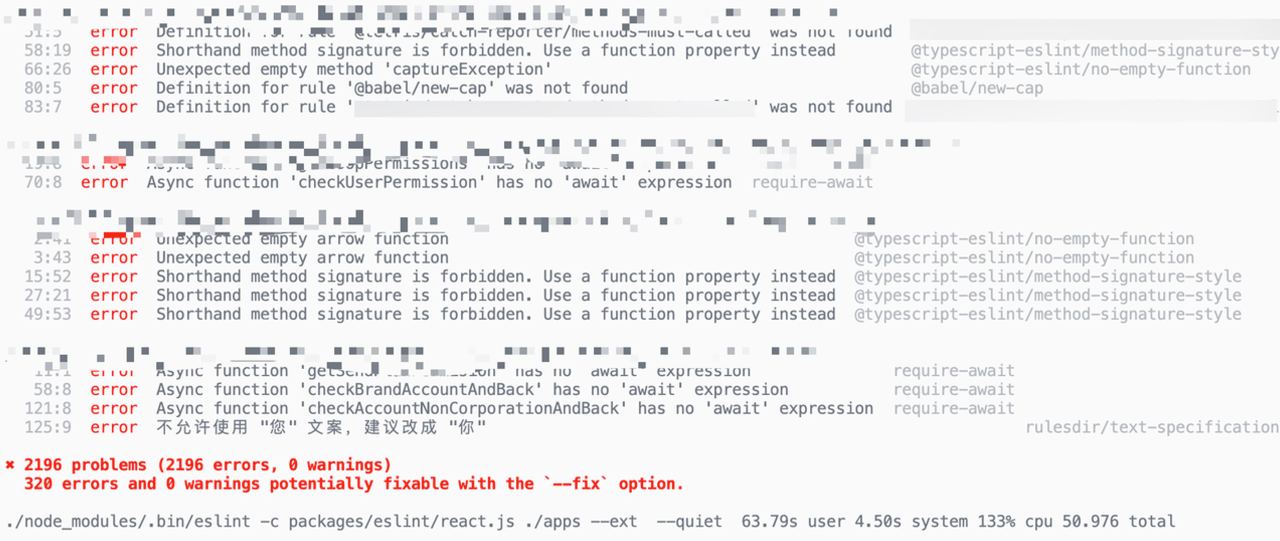
- Legacy code is hard to change: When taking over an existing project, most codebases do not come with ESLint configured. Modifying legacy code just to comply with rules is extremely risky!
- Many ineffective rules: In practice, many rules are too strict (for example, no-throw-literal, dot-notation, etc.)
- Rule customization is difficult: It is impossible to satisfy everyone. Each team has a different coding style, and strictly following industry/company coding standards can be very painful for the team. Meanwhile, writing an ESLint rule requires wrestling with the AST.
Results
The solutions to the above pain points are roughly:
- Incremental checks: Run ESLint checks only on the currently changed code
- Keep the good parts: Based on the company coding standards, disable ineffective rules and only enable rules that “will definitely catch bugs”
- Use ChatGPT: Generative AI is best suited for this kind of task. 99% of rules can be generated by ChatGPT
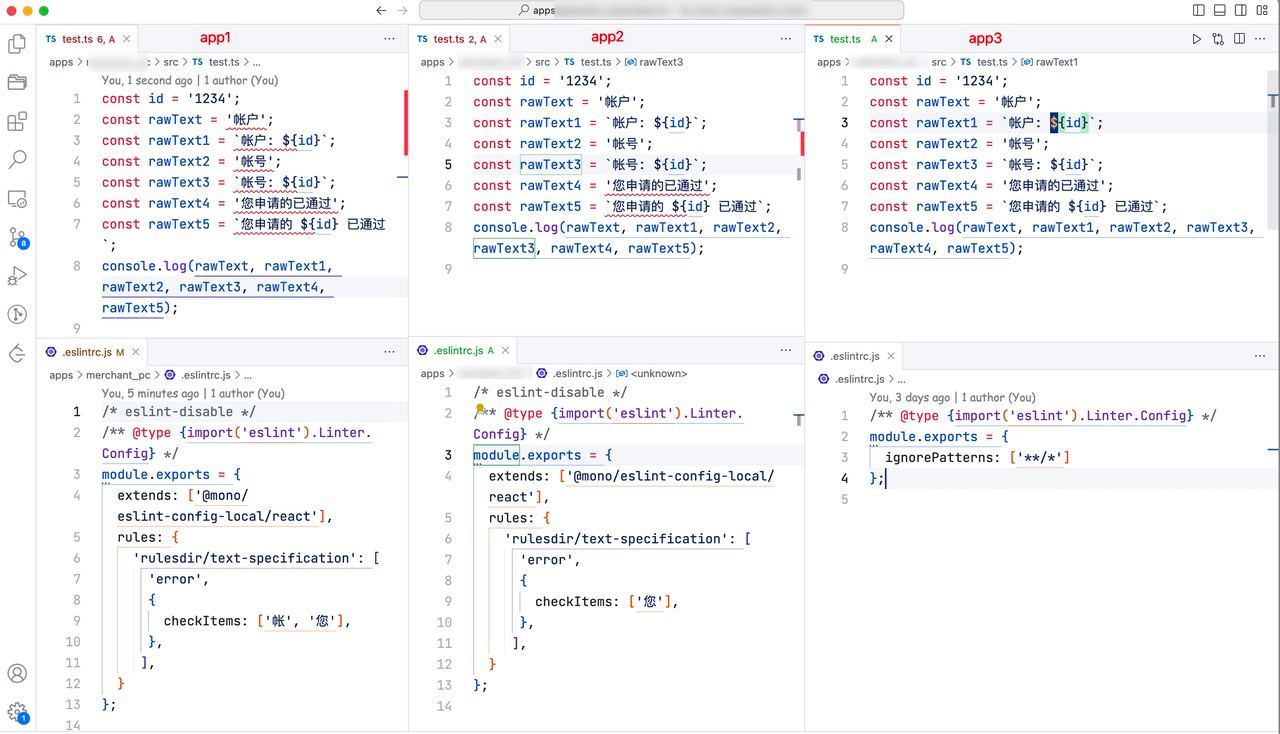
- React JSX 中不允许 number 数字类型直接和 &&(逻辑和) 使用
- 不允许使用”登陆”,建议改成”登录”
- 不允许使用 new Date()、Date(),建议使用 dayjs()
- “帐号” and “账户”
Ultimately, each project can customize its rules and run checks incrementally. If CI checks fail, a fix command will be provided, as shown below:
How to write them?
ChatGPT
At first, rules were generated directly in conversations with ChatGPT. Later, I found that by using a fixed prompt and providing three parameters—“rule description,” “correct code examples,” and “incorrect code examples”—AI could automatically generate rules.


 The prompt used is as follows (just to get the conversation started—feel free to share better prompts):
请帮我写一个 eslint 规则,只需要给出规则代码,规则要求:{description}。规则校验正确代码通过,错误代码不通过,以下是正确和错误代码示例:\n\n// 正确\n``js\n{correct_code}\n```\n\n// 错误\n``js\n{incorrect_code}\n``。Manual
Rules generated by ChatGPT are not a silver bullet. Currently, I have found that it cannot write TS-related rules, so this part can only be handled by manually writing the AST with the help of the @typescript-eslint/utils tool. Create a new rule file
packages/eslint/rules/{新规则}.js, and use tools such as AST Explorer and TS ESLint to write the rule:
/** @type {import('eslint').Rule.RuleModule} */
module.exports = {
  meta: {
    type: 'problem',
    docs: {
      description: '',
      category: 'Best Practices',
      recommended: true,
    },
  },
  create: function (context) {
    return {
        // AST 部分编写细节及 API 见:https://eslint.org/docs/latest/extend/custom-rules
    };
  },
};
TS Type Checking
Here is a very useful rule: in React JSX, number numeric types are not allowed to be used directly with && (logical AND). Otherwise, pages often end up rendering 0 directly instead of hello.
const Home = (props: { gender: number; text: string; obj: { gender: number } }) => {
  const { gender, text } = props;
  return (
    <div>
      {gender && <p>Hello</p>}
      {props?.obj?.gender && <p>Hello</p>}
      {foo() && <p>Hello</p>}
      {text && <p>Hello</p>}
    </div>
  );
};

function foo(): number {
  return 0;
}
This rule needs to be written with the help of typescript-eslint. It parses the code into a TSEsTree AST. The final rule code is as follows:
How to test?
Snapshot Test Cases
ESLint officially recommends writing rule test cases with RuleTester, but this undoubtedly increases the complexity of rule test cases, and you also need to handle the format of valid and invalid code.
// test/text-specification.test.js
const RuleTester = require('eslint').RuleTester
const rule = require('../rules/text-specification')

const tester = new RuleTester({
  parser: ...,
  parserOptions: { ecmaVersion: 2015 }
  ...一堆配置
})

tester.run('text-specification', rule, {
  valid: [
    {
      filename: 'test.js',
      code: `const a = "账号";\nconst b = "账户"\n`
    }
  ],
  invalid: [
    {
      filename: 'test.js',
      code: `const a = "帐号";\nconst b = "帐户"\n`
    }
  ],
}
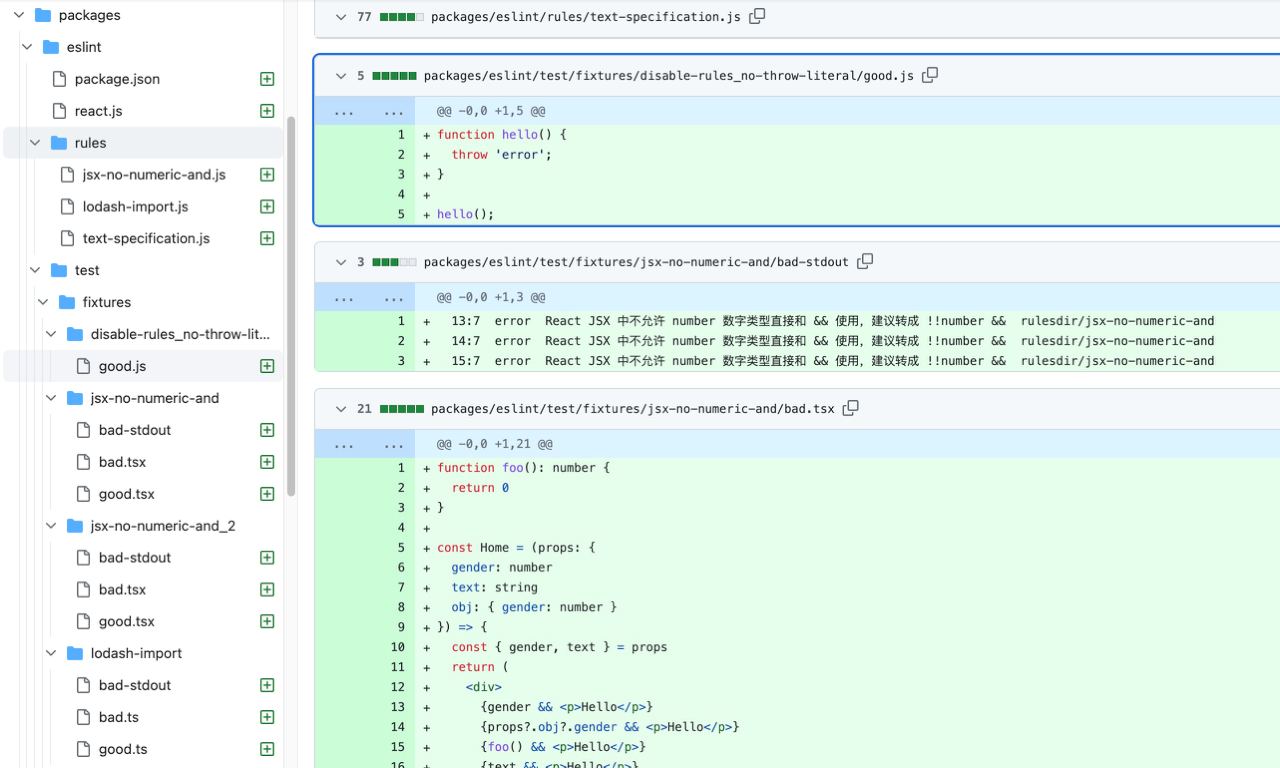
From the user’s perspective, a simpler snapshot approach is used here. Rule developers only need to add three snapshots: good, bad, and bad-stdout to complete the test case:
// test/text-specification/good?.(tsx|jsx|js|jsx)

const id = '1234';
const rawText = '账户';
const rawText1 = `账户: ${id}`;
console.log(rawText, rawText1);
// test/text-specification/bad
// test/text-specification/bad.(tsx|jsx|js|jsx)
const id = '1234';
const rawText = '帐户';
const rawText1 = `帐户: ${id}`;
console.log(rawText, rawText1);// test/text-specification/bad-stdout
2:17 error 不允许使用 "帐户" 文案,建议改成 "账户" rulesdir/text-specification
3:18 error 不允许使用 "帐户" 文案,建议改成 "账户" rulesdir/text-specificationRun the test cases:
$ vitest run -t text-specification

 ❯ test/index.test.ts (12)
   ↓ eslint react('disable-rules_no-throw-literal') (2) [skipped]
   ✓ eslint react('talent_text-specification') (2) 1636ms
   ❯ eslint react('talent_text-specification_2') (2)
     ✓ 'good' 796ms
     ⠏ 'bad'
   · eslint react('talent_text-specification_3') (2)
   ...
With snapshot test cases, the rule’s own functionality can become more robust:
How to configure them?
Here we use a single-repo Monorepo as an example to configure ESLint rule sets. The configuration approach for multiple repositories is the same as configuring rules for a single directory in a monorepo.
Directory Structure Diagram
There are mainly two parts:
- Full ESLint rule-set npm package: here we use
packages/eslint, with the package name@infras/eslint-config-local - Applications
apps/. In terms of ESLint requirements, there are generally three categories:- Use the default rules
app1 - Rule customization
app2: mainly enabling some rules - Disable/do not use lint
app3: deprecated applications that are no longer iterated on, where we do not want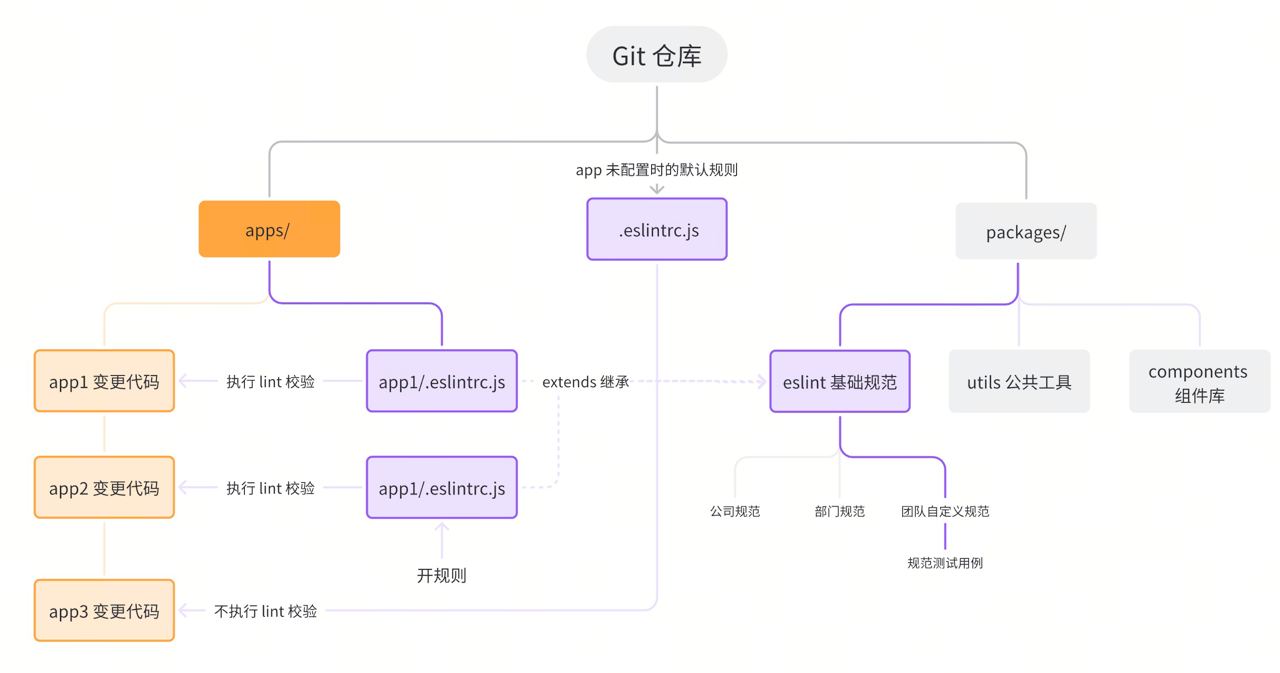
- Use the default rules
ESLint Rule-Set Local npm Package
ESLint rule sets often change quickly, so it is not recommended to use them by publishing packages. Instead, use them as local packages. The directory structure of the
packages/eslintnpm package is as follows:
// packages/eslint
- rules
    - {定制的规则1}.js
    - {定制的规则2}.js
- react.js
- node.js
- package.json
- test
    - fixtures // 快照测试用例
        - {定制的规则1}
            - good
            - bad
            - bad-stdout
            - config.js
package.json
First, take a look at package.json. It is mainly customized based on the company’s frontend coding standards:
{
  "name": "@infras/eslint-config-local",
	"private":true,
  "dependencies": {
    "@rushstack/eslint-patch": "^1.2.0",
    "@eslint-community/eslint-utils": "^4.4.0",
    "@typescript-eslint/utils": "^5.58.0",
    "eslint-plugin-rulesdir": "^0.2.2",  // 可以在本地目录中写 eslint 规则
    "@typescript-eslint/parser": "^5.47.0",
    "typescript": "^4.9.5"
  },
  "devDependencies": {
		"eslint": "^7.32.0",
    "@types/node": "^14.0.14",
    "glob": "^10.0.0",
    "vitest": "^0.29.7",
    "tsutils": "^3.21.0"
  },
  "scripts": {
    "dev": "vitest",
    "test": "vitest run"
  },
  "peerDependencies": {
    "eslint": "*"
  }
}
The package name must end with
eslint-config-*; otherwise, it cannot be extended when used. #creating-a-shareable-config
Rule Set react.js
Next, take a look at the full rule set for React applications, react.js (if there are other types, just add the corresponding rule-set files, such as vue.js, node.js, electron.js)
// 解决找不到依赖问题
require('@rushstack/eslint-patch/modern-module-resolution')

const path = require('path');
const rulesDirPlugin =require('eslint-plugin-rulesdir');rulesDirPlugin.RULES_DIR = path.join(__dirname,'rules');

/** @type {import('eslint').Linter.Config} */
module.exports = {
  root: true,
  extends: ['公司代码规范'],
  plugins: ['rulesdir'],
  parser: '@typescript-eslint/parser',
  parserOptions: {
    ecmaVersion: 11,
    sourceType: 'module',
    ecmaFeatures: {
      jsx: true,
      legacyDecorators: true
    },
    project: './tsconfig.json'
  },
  rules: {
    // 自定义规则
	  'rulesdir/text-specification': 'error',
    'rulesdir/jsx-no-numeric-and': 'error',
    'rulesdir/lodash-import': 'error'
		...
  },
};
Where:
- Disable
prettiercode style rules, so eslint focuses only on validating erroneous code - Rules starting with
rulesdir/*are team-customized rules (how to write them is covered later), using native JS files (no compilation is needed for rules to take effect immediately):rules/text-specification.js: text copy validationrules/jsx-no-numeric-and: avoid the issue where0 && <div />displays 0rules/lodash-import: frontend projects should preferlodash-esoverlodash
Quite a few “company-level coding standards” rules are disabled here. The principle is to use only rules that can catch real bugs.
Using It in Applications
Add the ESLint rule-set npm dependency in apps/*/package.json.
"devDependencies": {
+   "@infra/eslint-config-local": "workspace:*",
}
Use the Default Rules
Create a new .eslintrc.js in apps/{子应用}:
/* eslint-disable */
/** @type {import('eslint').Linter.Config} */
module.exports = {
  extends: ['@infra/eslint-config-local/react']
};
Rule Toggles
Create a new .eslintrc.js in apps/{子应用}, and enable/disable or configure specific rules in rules:
/* eslint-disable */
/** @type {import('eslint').Linter.Config} */
module.exports = {
  extends: ['@infra/eslint-config-local/react'],
  rules: {
     "rulesdir/text-specification": ["error", {
       checkItems: ['帐'], // 根据需要
    }]
  },
};
All ESLint rules are placed under packages/eslint. Applications only enable/disable rules when using them.
Completely Disable/Do Not Use lint
Do not create apps/{子应用}/.eslintrc.js. In this case, the rules in the root .eslintrc.js will be used (that is, ignorePatterns ignores all files from checks):
/* eslint-disable */
/** @type {import('eslint').Linter.Config} */
module.exports = {
  ignorePatterns: ['**/*']
};
Engineering
To systematically and strictly enforce ESLint rules, eslint checks are run on incremental code in two stages:
- Before Git commit: Run eslint checks locally on changed code
- During CI MR stage: Check the code in the current MR (mainly to prevent bypassing local checks with
git commit -n)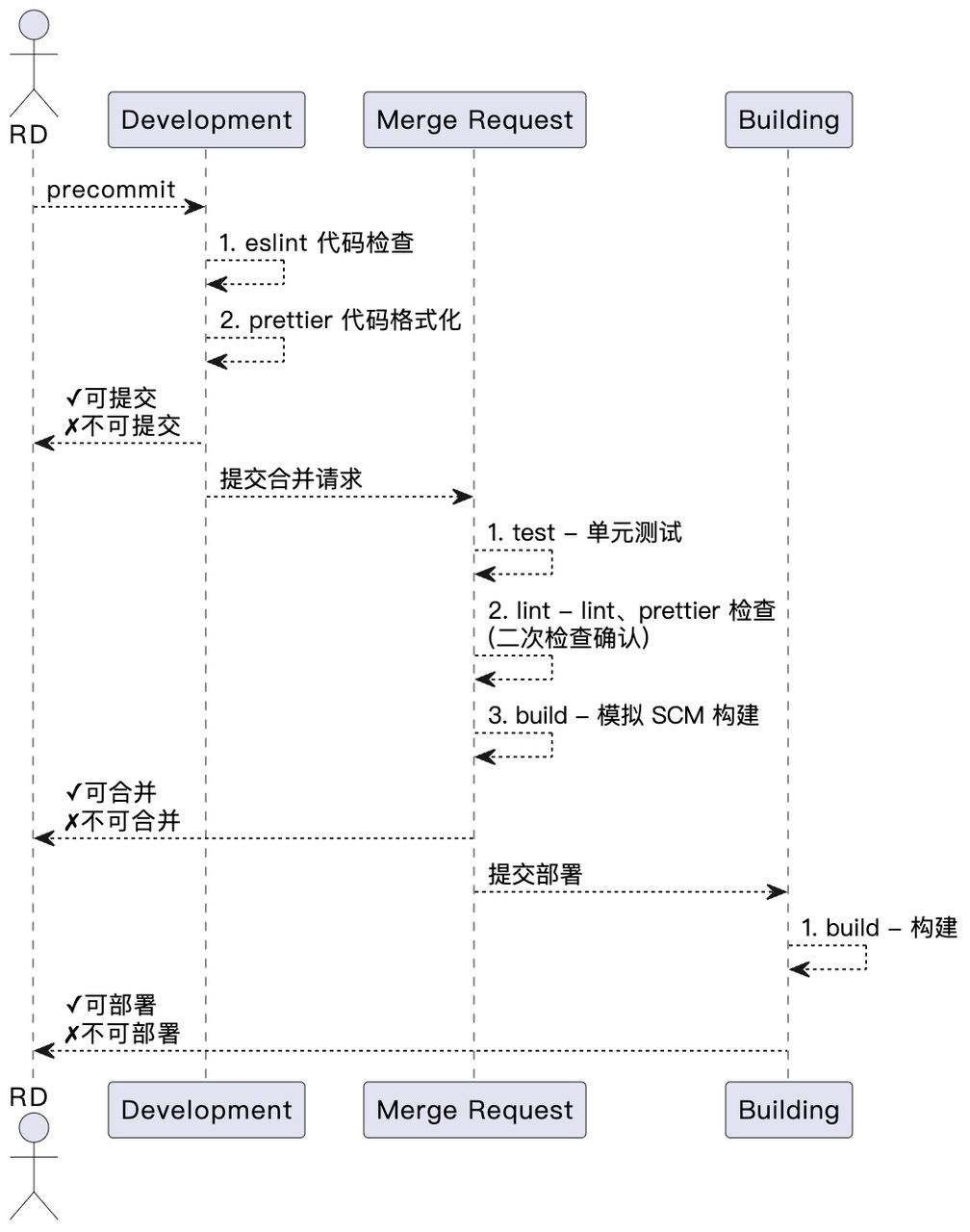
Git Commit (precommit)
Here we use the mature combination of husky + lint-staged. The main changes are:
- Root directory
package.json
{
  "name": "name",
  "version": "0.0.1",
  "devDependencies": {
    "eslint": "^7.32.0",
+   "husky": "^8.0.3",
+   "lint-staged": "^13.2.0"
  }
}
- Run husky installation
$ npx husky install
$ npx husky add .husky/pre-commit "npx lint-staged"- Configure the validation commands to run in the root
.lintstagedrc.json
{
  "**/*.{js,ts,jsx,tsx}": [
    "./node_modules/.bin/eslint --no-error-on-unmatched-pattern",
    "./node_modules/.bin/prettier --write"
  ]
}
This way, rule checks will be executed every time you run git commit:
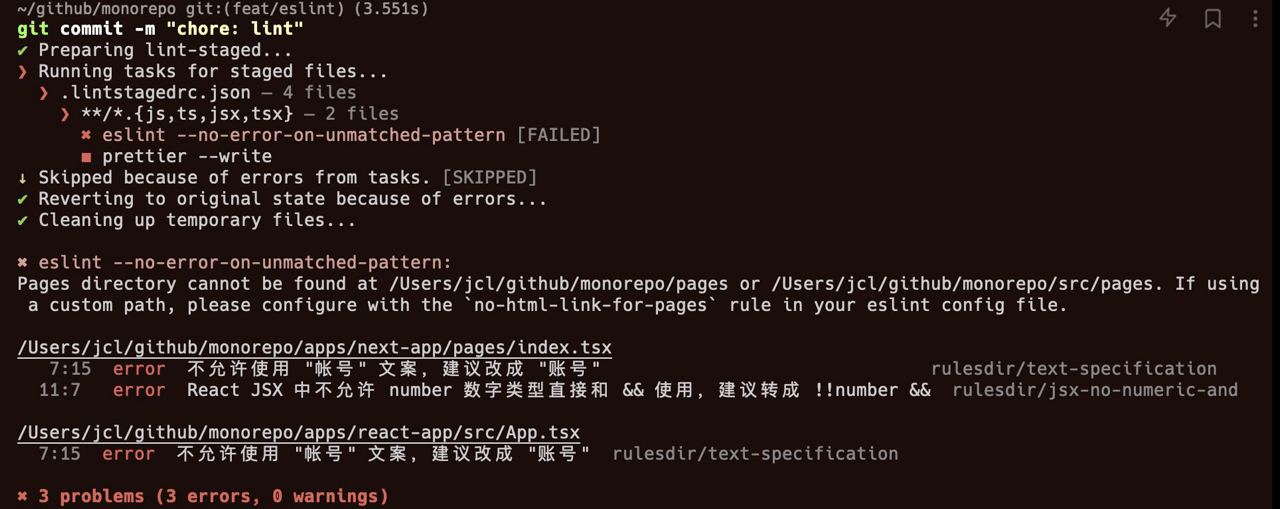
CI
To improve CR efficiency in CI, no CI pass, no CR. The CI configuration includes several optimizations:
- Use
git diffto filter out changed files in the MR for incremental checks - Configure Lint CI separately, so lint can run faster and give developers quicker feedback (after a push, you can usually know the validation result within about 1 minute)
 The complete configuration is as follows:
# .github/workflows/lint.yml
name: Lint staged
on: [push]
jobs:
  eslint:
    runs-on: ubuntu-latest
    steps:
      - uses: actions/checkout@v2
      - name: install pnpm
        shell: bash
        run: |
          PNPM_VER=$(jq -r '.packageManager | if .[0:5] == "pnpm@" then .[5:] else "packageManager in package.json does not start with pnpm@\n" | halt_error(1)  end' package.json)
          echo installing pnpm version $PNPM_VER
          npm i -g pnpm@$PNPM_VER
      - uses: technote-space/get-diff-action@v6
        with:
          PATTERNS: |
            apps/**/*.+(ts|tsx|jsx|js)
            .github/workflows/lint.yml
      - uses: actions/setup-node@v3
        if: env.GIT_DIFF
        with:
          node-version: '18'
          cache: 'pnpm'
          cache-dependency-path: '**/pnpm-lock.yaml'
      - run: echo ${{ env.GIT_DIFF }}
      - run: pnpm install --ignore-scripts
        if: env.GIT_DIFF
      - name: Eslint Checker
        if: env.GIT_DIFF
        run: |
          echo "修复命令 npx eslint --no-error-on-unmatched-pattern --fix --quiet ${{ env.GIT_DIFF_FILTERED }}"
          pnpm eslint --no-error-on-unmatched-pattern --quiet ${{ env.GIT_DIFF_FILTERED }}
Some Thoughts
- Only team-customized eslint rules have high value
- 99% of rules should be completed by AIGC (AI-generated content)