Subtitle: “MCP brings a new paradigm for layered development of applications and tools”
Preface: Recently everyone has been talking about MCP, and I’ve noticed that one of the most important points has been overlooked: “decoupling tool providers from application developers through a standardized protocol.” This will lead to a paradigm shift in AI Agent application development (similar to the separation of frontend and backend development in Web application development).
This article uses the development of the Agent TARS application as an example to introduce, in as much detail as possible, the role MCP plays in the “development paradigm” and “tool ecosystem expansion.”
Glossary
| Term | Explanation |
|---|---|
| AI Agent | In the LLM context, an AI Agent is an intelligent entity that can autonomously understand intent, plan and make decisions, and execute complex tasks. An Agent is not an upgraded version of ChatGPT; it does not just tell you “how to do it,” but actually helps you do it. If Copilot is the co-pilot, then the Agent is the pilot. Similar to the human process of “getting things done,” the core capabilities of an Agent can be summarized as a loop of three steps: Perception, Planning, and Action. |
| Copilot | Copilot refers to an AI-based assistant tool, usually integrated with specific software or applications, designed to help users improve productivity. Copilot systems analyze user behavior, input, data, and history to provide real-time suggestions, automate tasks, or enhance functionality, helping users make decisions or simplify operations. |
| MCP | Model Context Protocol is an open protocol that standardizes how applications provide context to LLMs. You can think of MCP as the USB-C port for AI applications. Just as USB-C provides a standard way for your devices to connect to various peripherals and accessories, MCP provides a standard way for your AI models to connect to different data sources and tools. |
| Agent TARS | An open-source multimodal AI agent that provides seamless integration with various real-world tools. |
| RESTful API | RESTful is a software architectural style and design style, not a standard. It simply provides a set of design principles and constraints. It is primarily used for software involving client-server interactions. |
Background
AI has evolved from the earliest Chatbot that could only converse, to Copilot that assists human decision-making, and then to Agent that can autonomously perceive and act. AI’s level of involvement in tasks continues to increase. This requires AI to have richer task Context and the Tools needed to take action.
Pain Points
The lack of standardized context and toolsets leads to three major pain points for developers:
-
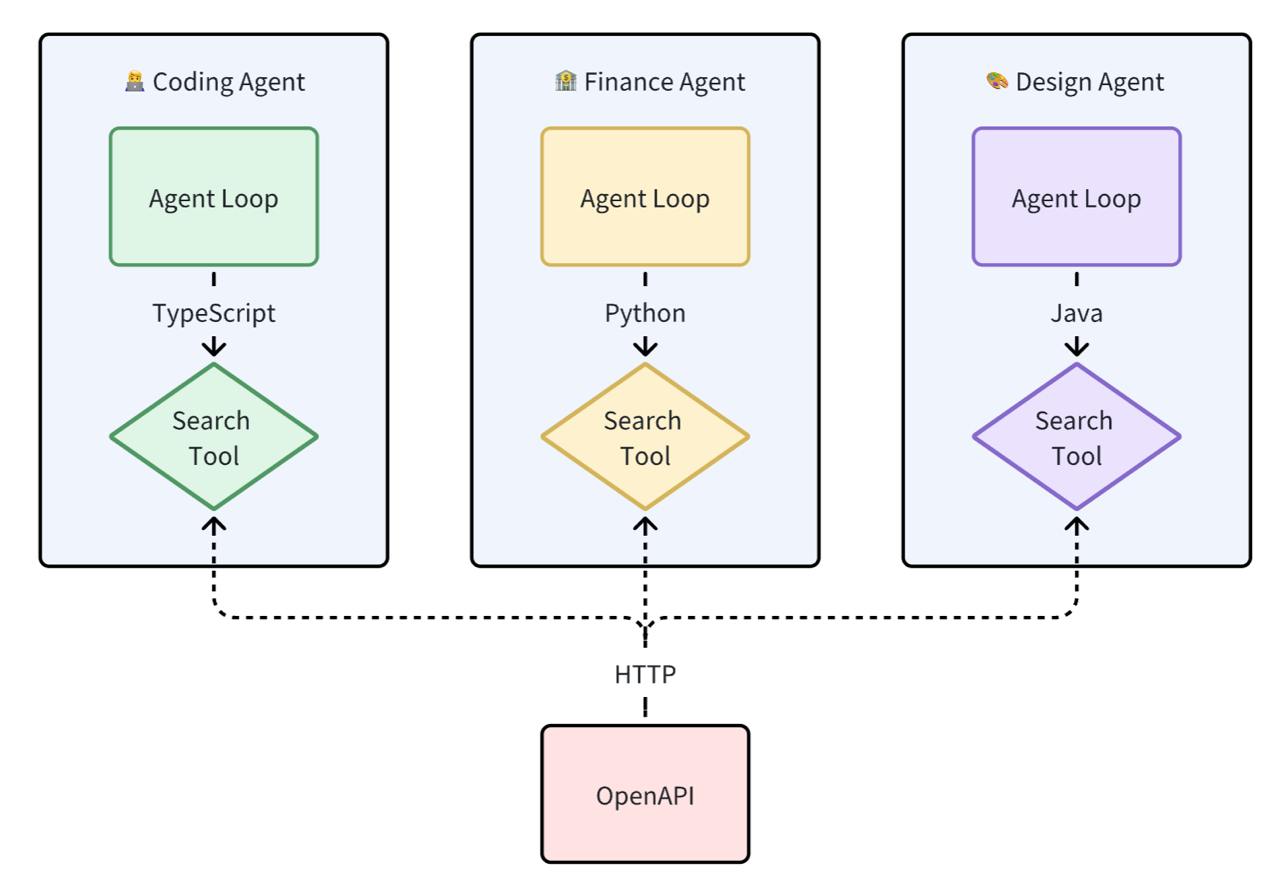
High development coupling: Tool developers need to deeply understand the internal implementation details of the Agent and write tool code at the Agent layer. This makes tool development and debugging difficult.
-
Poor tool reusability: Because each tool implementation is coupled into the Agent application code, even when an adapter layer is implemented via an API, there are still differences in the input and output parameters provided to the LLM. From a programming language perspective, reuse across programming languages is not possible.
-
Fragmented ecosystem: Tool providers can only provide OpenAPI. Due to the lack of standards, Tools in different Agent ecosystems are incompatible with each other.
Goal
“All problems in computer science can be solved by another level of indirection” — Butler Lampson In computer science, any problem can be solved with a layer of abstraction.
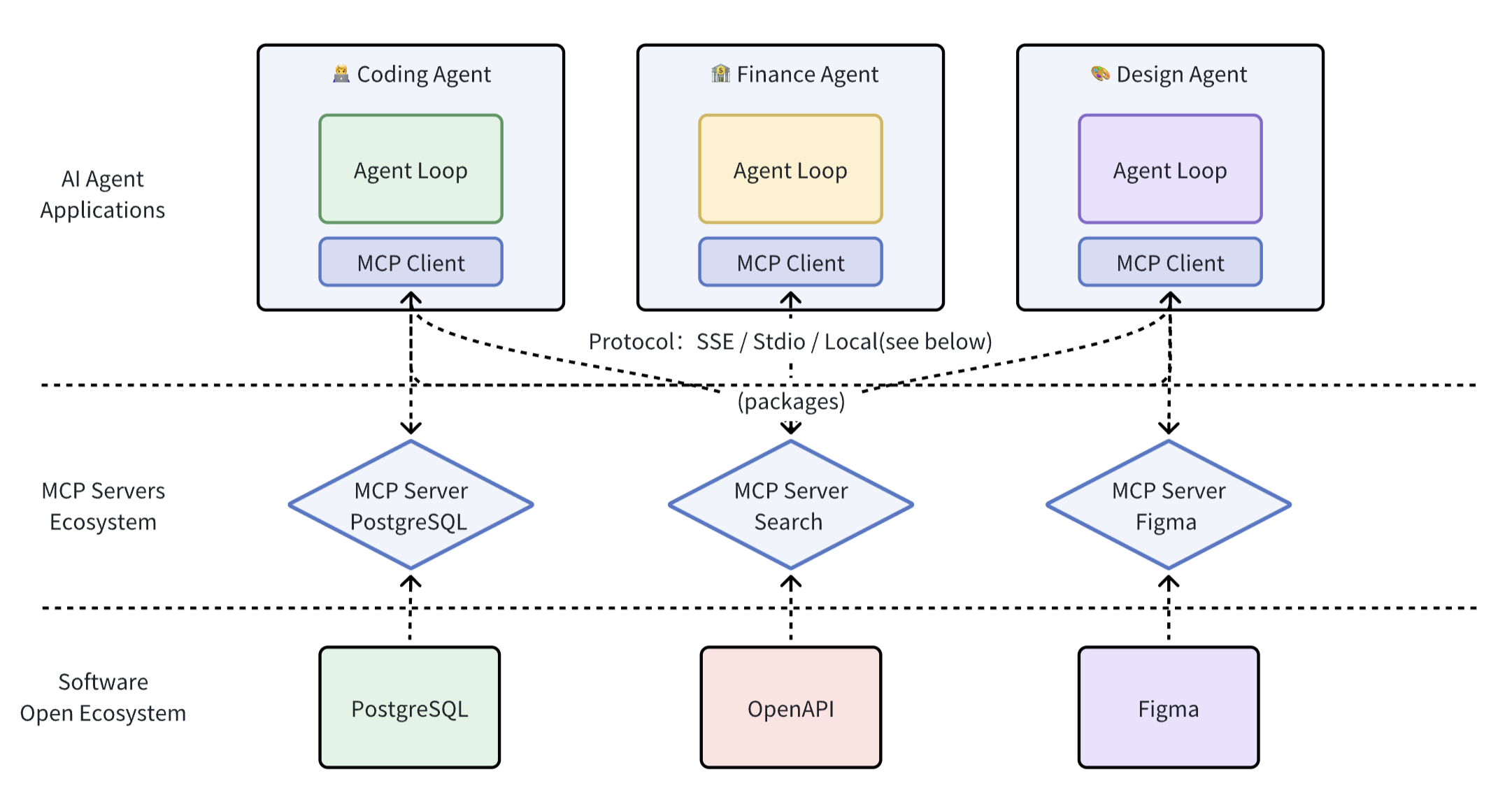
Decouple tools from the Agent layer and turn them into a separate MCP Server layer, standardizing both development and invocation. MCP Server provides the upper-layer Agent with standardized ways to call context and tools.
Demo
See the role MCP plays in AI Agent applications through three examples:
| Instruction | Replay | MCP Servers Used | Notes |
|---|---|---|---|
| Analyze a stock from a technical perspective, then buy 3 shares at market price | Replay  | Brokerage MCP, Filesystem MCP | This does not constitute investment advice. The order was placed using a simulated brokerage account. |
| What are the CPU, memory, and network speeds on my machine? | Replay  | Command-line MCP, Code Execution MCP | |
| Find the top 5 products with the most upvotes on ProductHunt | Replay 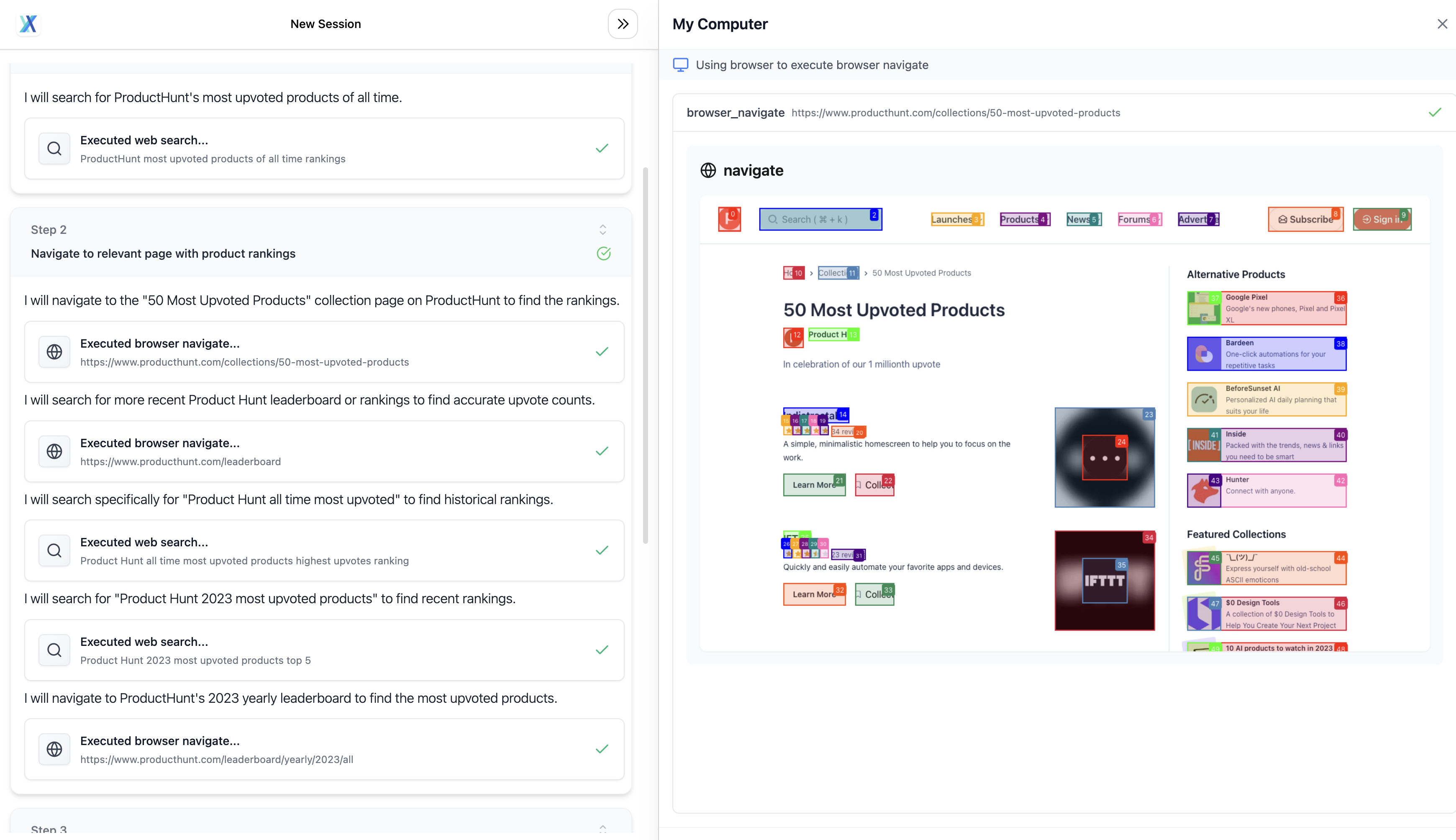 | Browser Operation MCP |
The custom MCP entry point is not currently open. The third-party MCP Servers above were manually mounted during testing. More: https://agent-tars.com/showcase
Introduction
What is MCP?
Model Context Protocol is a standard protocol introduced by Anthropic for communication between LLM applications and external data sources (Resources) or tools (Tools). It follows the basic message format of JSON-RPC 2.0. You can think of MCP as the USB-C interface for AI applications, which standardizes how applications provide context to LLMs.
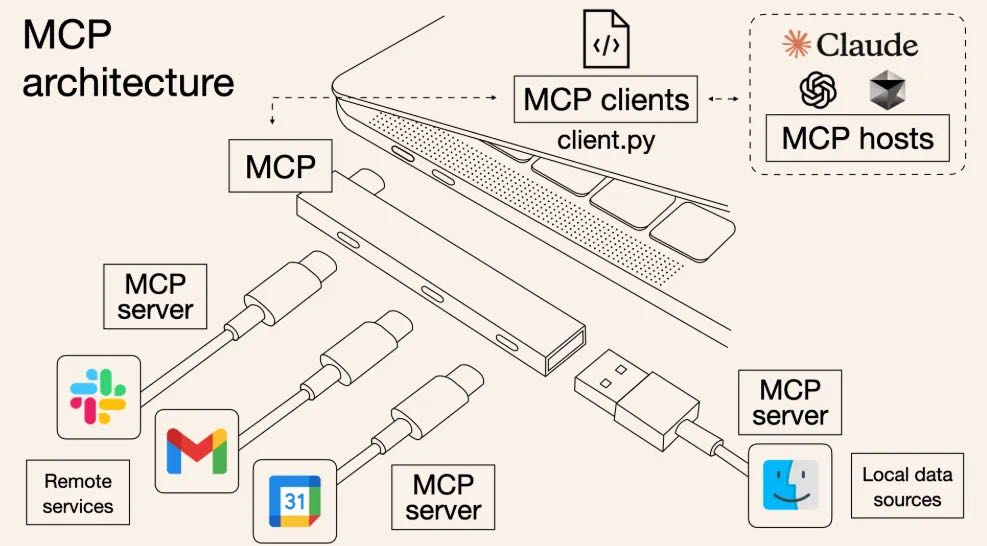
The architecture diagram is as follows:
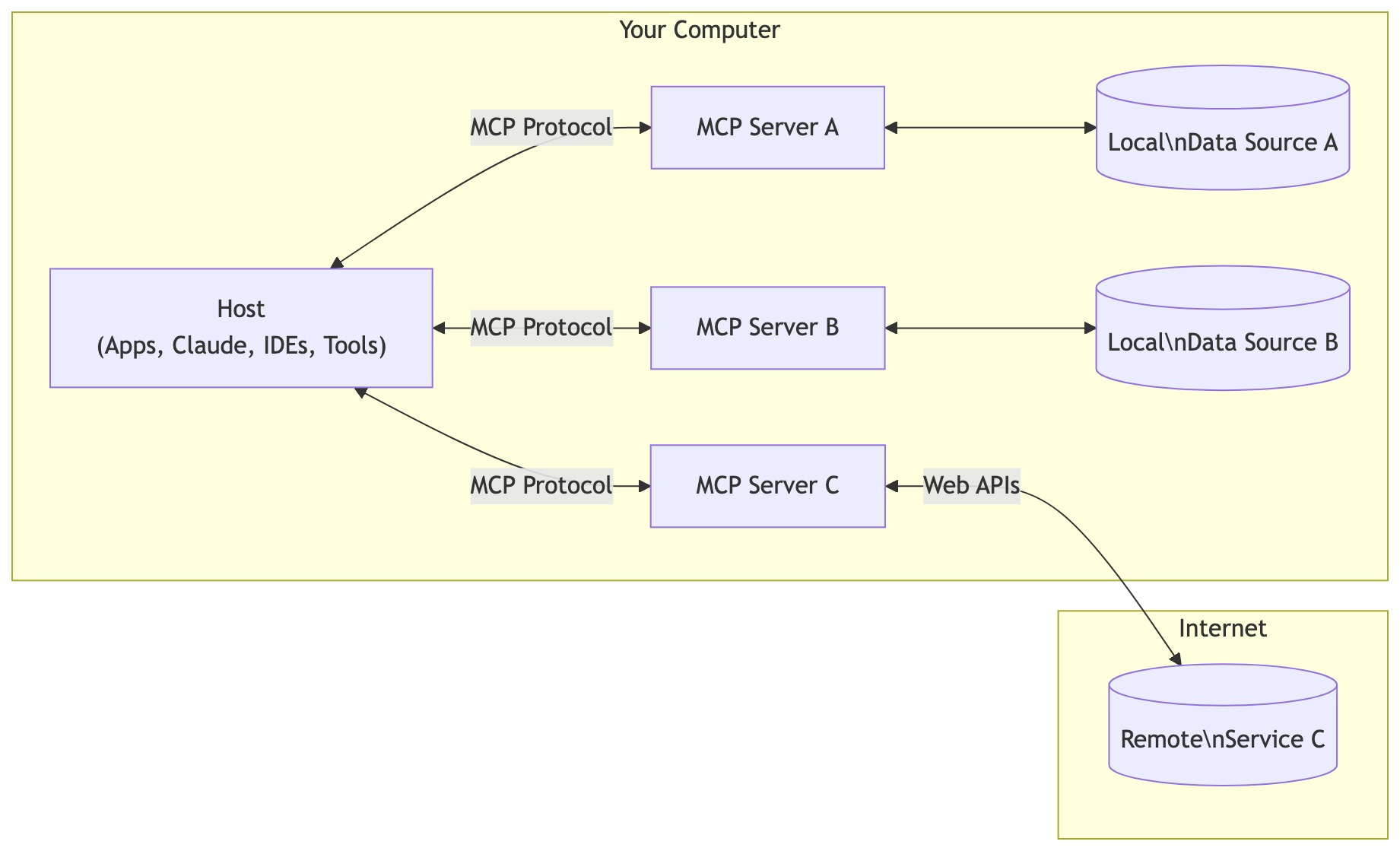
- MCP Client: Communicates with Servers through the MCP protocol and maintains a 1:1 connection
- MCP Servers: Context providers that expose external data sources (Resources), tools (Tools), prompts (Prompts), etc., for the Client to call.
- Language support: TypeScript and Python, Java, Kotlin, C#
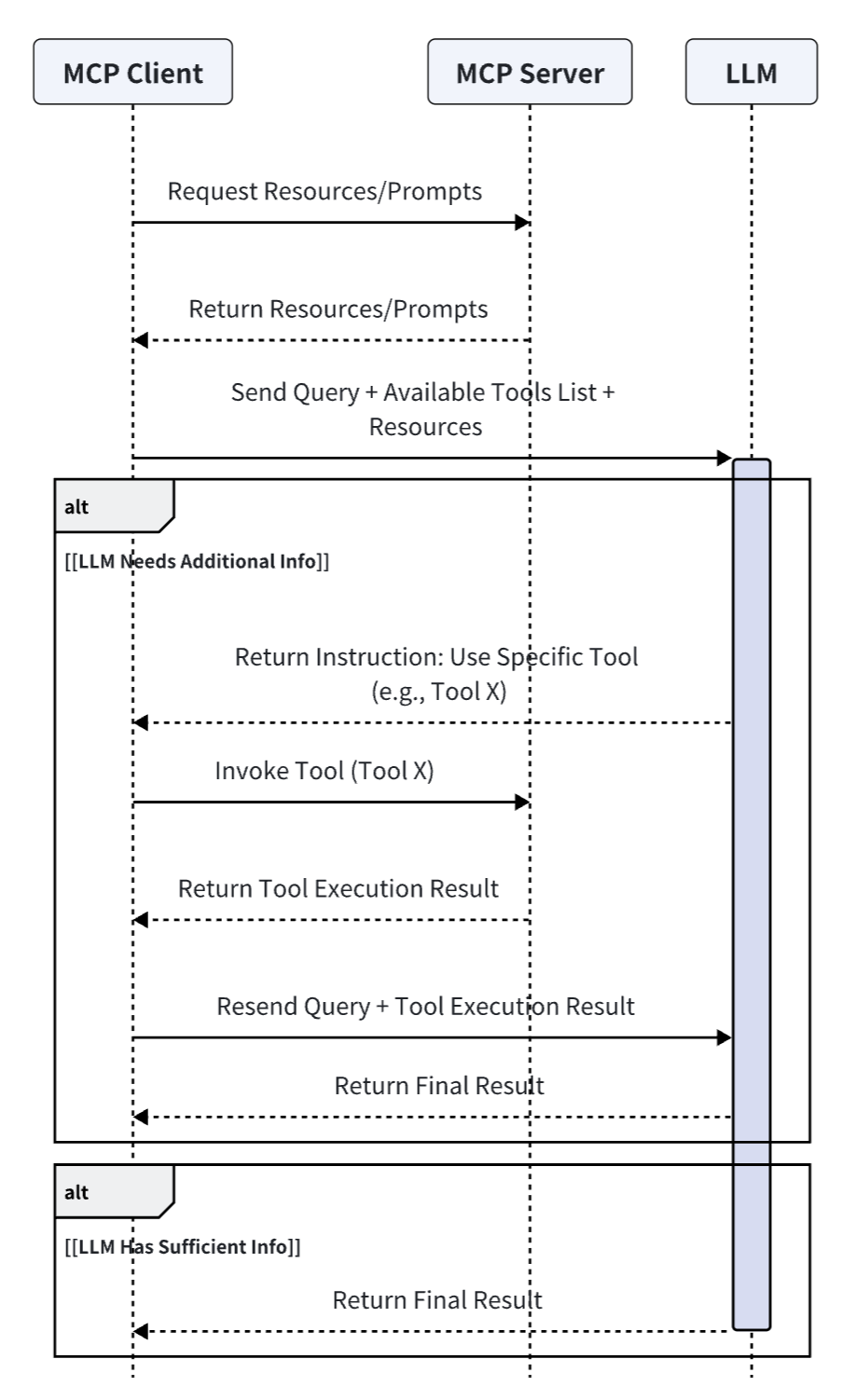
Flowchart
In one sentence, MCP provides the context required by the LLM: Resources, Prompts, and Tools.
What is the difference between MCP and Function Call?
| MCP | Function Call | |
|---|---|---|
| Definition | A standard interface for integrating models with other devices, including: Tools, Resources, and Prompts | Connects models to external data and systems, listing Tools in a flat structure. The difference from MCP Tool is that MCP Tool functions specify protocol conventions for input and output. |
| Protocol | JSON-RPC, supporting bidirectional communication (though it is not used much yet), discoverability, and update notification capabilities. 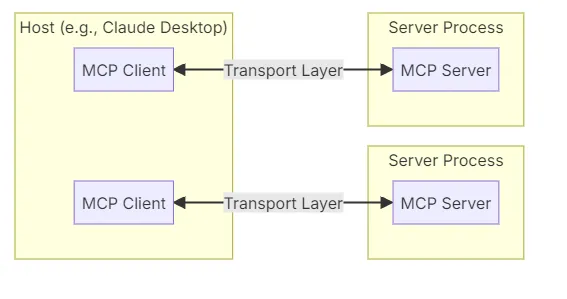 | JSON-Schema, static function calls. 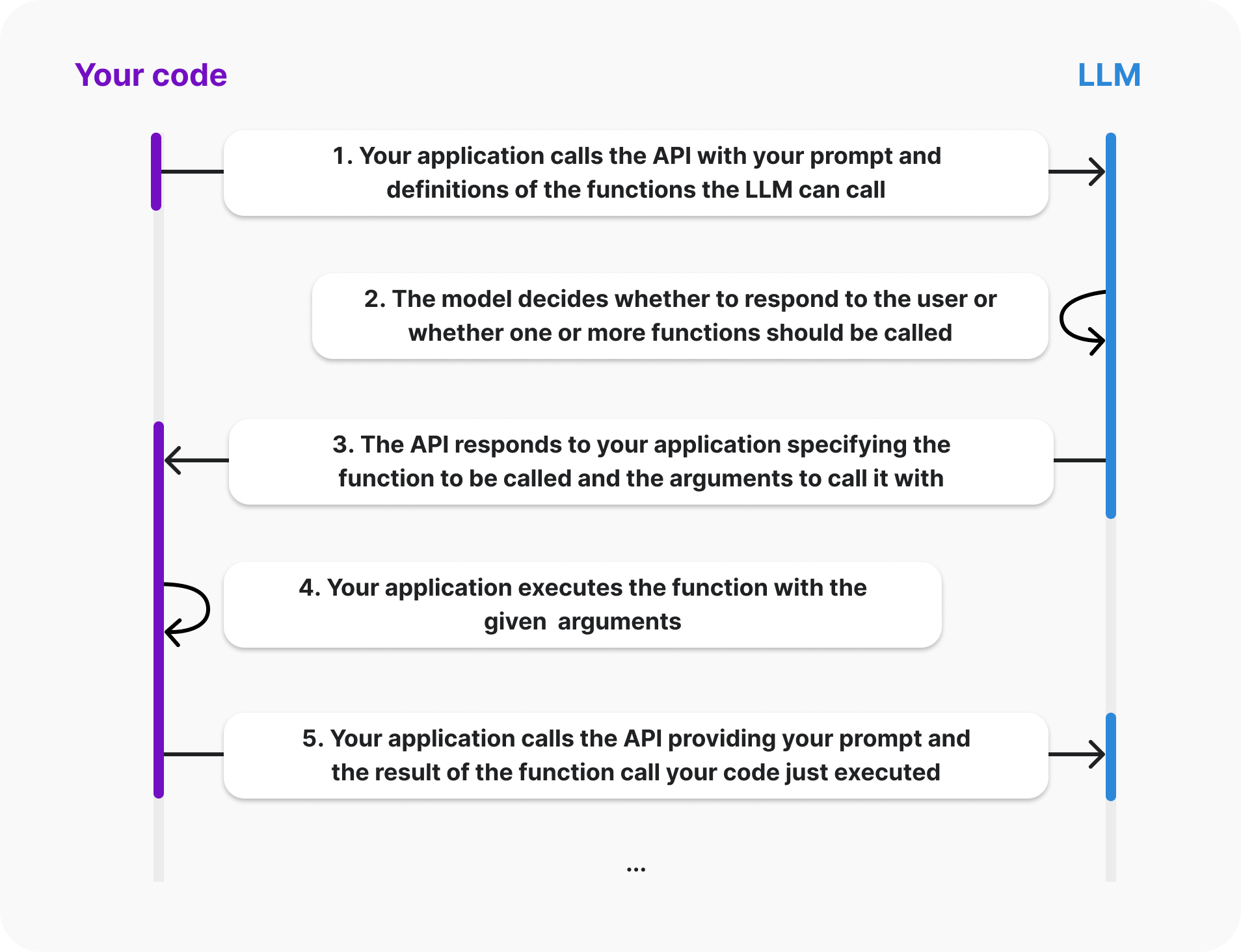 |
| Invocation method | Stdio / SSE / same-process call (see below) | Same-process call / functions corresponding to the programming language |
| Applicable scenarios | More suitable for dynamic and complex interaction scenarios | A single specific tool or static function execution call |
| System integration difficulty | High | Simple |
| Engineering maturity | High | Low |
Understanding MCP through frontend-backend separation
In early Web development, when JSP and PHP were popular, frontend interactive pages were coupled with backend logic. This resulted in high development complexity, difficult code maintenance, inconvenient frontend-backend collaboration, and difficulty meeting the higher user experience and performance requirements of modern Web applications.
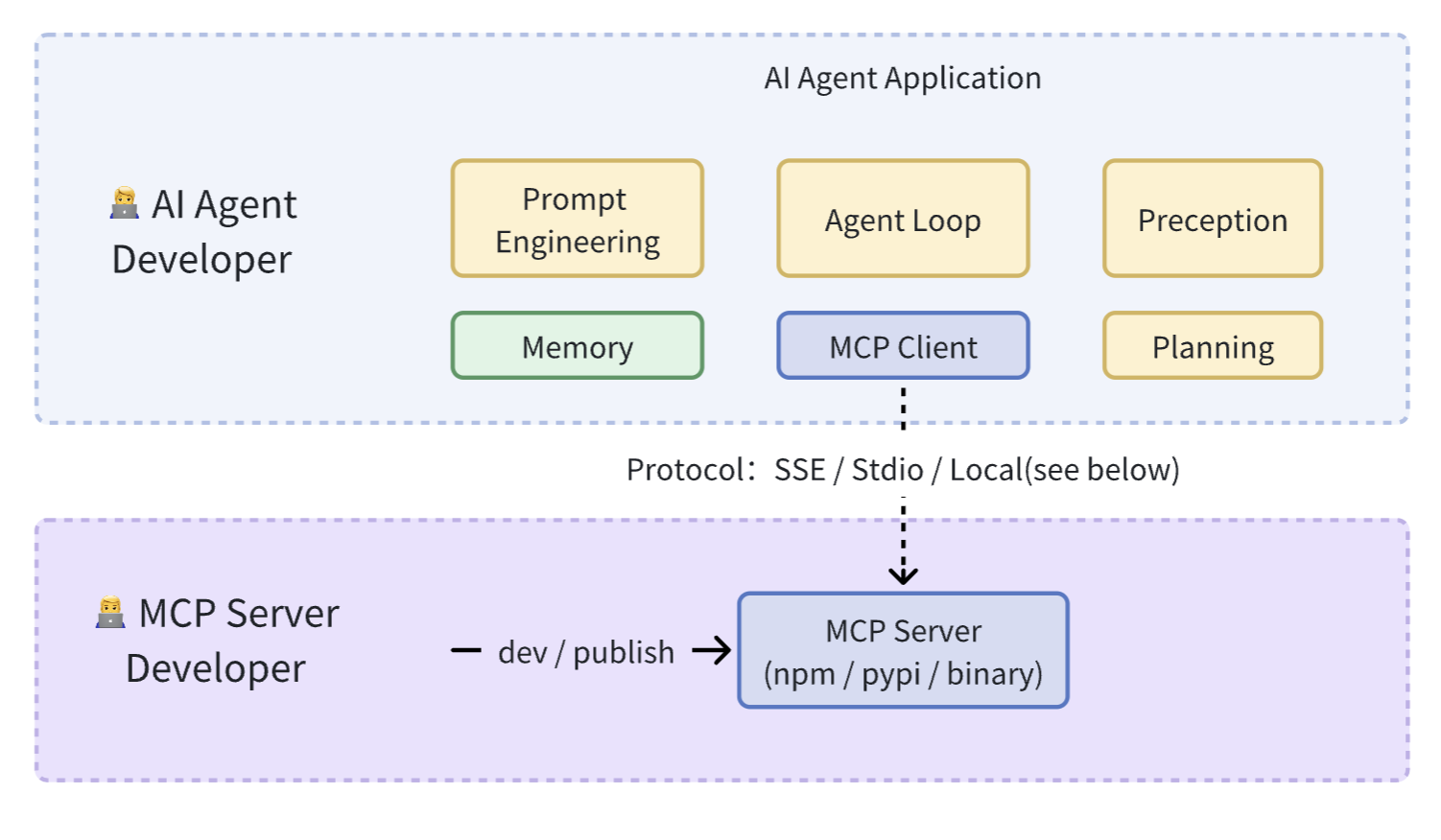
AJAX, Node.js, and RESTful API promoted frontend-backend separation. Correspondingly, MCP is also implementing “tool layering” in AI development:
-
Frontend-backend separation: The frontend focuses on the UI, while the backend focuses on API interfaces;
-
MCP layering: Allows tool developers and Agent developers to focus on their own responsibilities. Iteration of tool quality and functionality does not need to be perceived by Agent developers. This layering allows AI Agent developers to combine tools like building blocks and quickly construct complex AI applications.
Practice
Overall Design
Using the development and integration of the MCP Browser tool as an example, let’s walk through the concrete implementation step by step.
This content cannot currently be displayed outside Feishu Docs.
When designing the Browser MCP Server, we did not adopt the official stdio call approach (i.e., cross-process invocation via npx). The reason was to lower the barrier to entry and avoid requiring users to install Npm, Node.js, or UV before first use, which would affect the out-of-the-box experience of the Agent (related issue#64).
Therefore, the design of Agent tools is divided into two categories:
- Built-in MCP Servers: Fully comply with the MCP specification, while supporting both Stdio and function calls. (In other words, “develop Function Call using the MCP standard ”)
- Extended MCP Servers: For users who need extended functionality, assuming they already have an Npm or UV environment by default, thus supporting more flexible extension methods.
MCP Server Development
Using mcp-server-browser as an example, it is essentially an npm package. The package.json configuration is as follows:
{
  "name": "mcp-server-browser",
  "version": "0.0.1",
  "type": "module",
  "bin": {
    "mcp-server-browser": "dist/index.cjs"
  },
  "main": "dist/server.cjs",
  "module": "dist/server.js",
  "types": "dist/server.d.ts",
  "files": [
    "dist"
  ],
  "scripts": {
    "build": "rm -rf dist && rslib build && shx chmod +x dist/*.{js,cjs}",
    "dev": "npx -y @modelcontextprotocol/inspector tsx src/index.ts"
  }
}binspecifies the entry file for stdio invocationmainandmodulespecify the entry files for same-process invocation through Function Call
Development (dev)
In practice, using Inspector to develop and debug MCP Server works quite well. The Agent and tools are decoupled, so tools can be debugged and developed independently.
Run npm run dev directly to start a Playground, which includes debuggable MCP Server features (Prompts, Resources, Tools, etc.)
$ npx -y @modelcontextprotocol/inspector tsx src/index.ts
Starting MCP inspector...
New SSE connection

Spawned stdio transport
Connected MCP client to backing server transport
Created web app transport
Set up MCP proxy

🔍 MCP Inspector is up and running at http://localhost:5173 🚀
Note: When using Inspector to debug and develop a Server, console.log cannot be displayed, which does make debugging a bit troublesome.
Implementation (Implement)
Entry Point (Entry)
To allow the built-in MCP Server to be used as a Function call same-process invocation, three shared methods are exported in the entry file src/server.ts:
listTools: List all functionscallTool: Call a specific functionclose: Cleanup function after the Server is no longer used
// src/server.ts
export const client: Pick<Client, 'callTool' | 'listTools' | 'close'> = {
  callTool,
  listTools,
  close,
};
At the same time, for Stdio invocation support, simply import the module in src/index.ts.
#!/usr/bin/env node
// src/index.ts
import { client as mcpBrowserClient } from "./server.js";

const server = new Server(
  {
    name: "example-servers/puppeteer",
    version: "0.1.0",
  },
  {
    capabilities: {
      tools: {},
    },
  }
);
// listTools
server.setRequestHandler(ListToolsRequestSchema, mcpBrowserClient.listTools);
// callTool
server.setRequestHandler(CallToolRequestSchema, async (request) =>
  return await mcpBrowserClient.callTool(request.params);
);

async function runServer() {
  const transport = new StdioServerTransport();
  await server.connect(transport);
}

runServer().catch(console.error);

process.stdin.on("close", () => {
  console.error("Browser MCP Server closed");
  server.close();
});
Tool Definition (Definition)
The MCP protocol requires using JSON Schema to constrain tool input and output parameters. Based on practice, it is recommended to use zod to define a set of Zod Schemas, and then convert zod to JSON Schema when exporting to MCP.
import { z } from 'zod';

const toolsMap = {
  browser_navigate: {
    description: 'Navigate to a URL',
    inputSchema: z.object({
      url: z.string(),
    }),
    handle: async (args) => {
      // Implements
      const clickableElements = ['...']
      return {
        content: [
          {
            type: 'text',
            text: `Navigated to ${args.url}\nclickable elements: ${clickableElements}`,
          },
        ],
        isError: false,
      }
    }
  },
  browser_scroll: {
    name: 'browser_scroll',
    description: 'Scroll the page',
    inputSchema: z.object({
      amount: z
        .number()
        .describe('Pixels to scroll (positive for down, negative for up)'),
    }),
    handle: async (args) => {
      return {
        content: [
          {
            type: 'text',
            text: `Scrolled ${actualScroll} pixels. ${
              isAtBottom
                ? 'Reached the bottom of the page.'
                : 'Did not reach the bottom of the page.'
            }`,
          },
        ],
        isError: false,
      };
    }
  },
  // more
};

const callTool = async ({ name, arguments: toolArgs }) => {
  return handlers[name].handle(toolArgs);
}Tips: Unlike OpenAPI, which returns structured data, MCP return values are designed specifically for LLM models. To better connect models and tools, the returned text and the tool’s
descriptionshould be more semantic, thereby improving the model’s understanding and increasing the success rate of tool calls. For example, after each execution ofbrowser_scroll, it should return the page’s scroll status (such as remaining pixels to the bottom, whether the bottom has been reached, etc.). This allows the model to provide appropriate parameters precisely the next time it calls the tool.
Agent Integration
After developing the MCP Server, it needs to be integrated into the Agent application. In principle, the Agent does not need to care about the specific details of the tools, input parameters, and output parameters provided by MCP Servers.
MCP Servers Configuration
MCP Servers configuration is divided into “built-in Servers” and “user-extended Servers.” Built-in Servers are invoked through same-process Function Call to ensure the Agent application works out of the box for novice users. Extended Servers are provided to advanced users to extend the upper limits of Agent capabilities.
{
    // Internal MCP Servers(same-process call)
    fileSystem: {
      name: 'fileSystem',
      localClient: mcpFsClient,
    },
    commands: {
      name: 'commands',
      localClient: mcpCommandClient,
    },
    browser: {
      name: 'browser',
      localClient: mcpBrowserClient,
    },

    // External MCP Servers(remote call)
    fetch: {
      command: 'uvx',
      args: ['mcp-server-fetch'],
    },
    longbridge: {
      command: 'longport-mcp',
      args: [],
      env: {}
    }
}
MCP Client
The core task of MCP Client is to integrate MCP Servers using different invocation methods (Stdio / SSE / Function Call). The Stdio and SSE methods directly reuse the official example. Here we mainly introduce how we support Function Call invocation in the Client.
Function Call Invocation
export type MCPServer<ServerNames extends string = string> = {
  name: ServerNames;
  status: 'activate' | 'error';
  description?: string;
  env?: Record<string, string>;
+ /** same-process call, same as function call */
+ localClient?: Pick<Client, 'callTool' | 'listTools' | 'close'>;
  /** Stdio server */
  command?: string;
  args?: string[];
};
MCP Client is called as follows:
import { client as mcpBrowserClient } from '@agent-infra/mcp-server-browser';

 const client = new MCPClient([
    {
      name: 'browser',
      description: 'web browser tools',
      localClient: mcpBrowserClient,
    }
]);

const mcpTools = await client.listTools();

const response = await openai.chat.completions.create({
  model,
  messages,
  // Different model vendors need to convert to the corresponding tools data format.
  tools: convertToTools(tools),
  tool_choice: 'auto',
});
At this point, the overall MCP workflow has been fully implemented, covering all aspects from Server configuration and Client integration to connection with the Agent. More MCP details/code have been open-sourced on Github: Agent integration, mcp-client, mcp-servers
Thoughts
Ecosystem
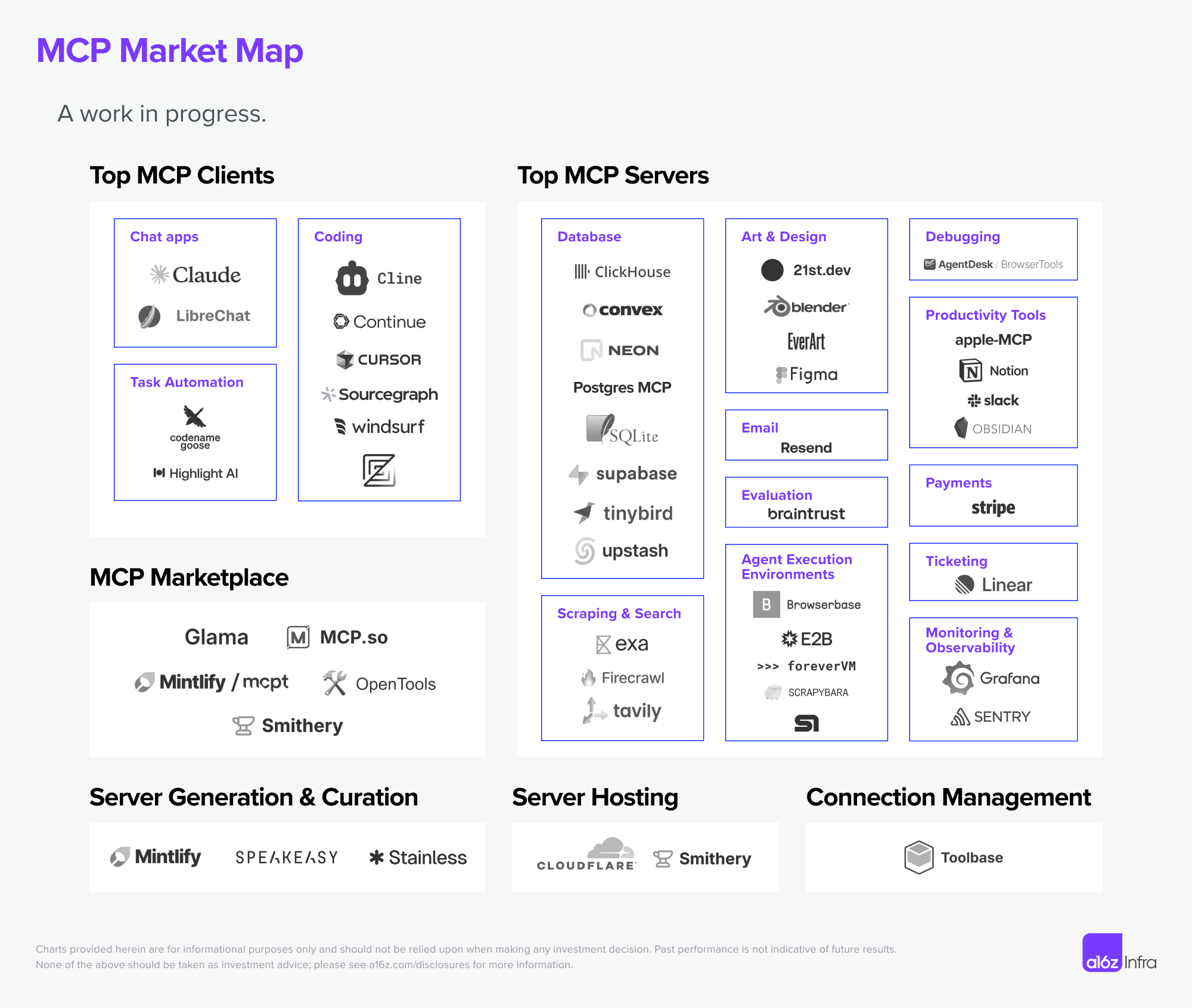
The MCP ecosystem continues to grow, with more and more applications supporting MCP, and open platforms also providing MCP Server. There are also services like Cloudflare, Composio, and Zapier that host MCP using SSE (i.e., connecting to one MCP Endpoint means connecting to a batch of MCP Servers). For the Stdio approach, the ideal scenario is for MCP Servers and the Agent system to run in the same Docker container.
Future
- Current MCP development is still very early, and it lacks a complete engineering framework for constraints and standardization.
- According to the MCP Roadmap, there are three main priorities in the future:
- Remote MCP Support: authentication, service discovery, and stateless services. This is clearly moving toward a K8S architecture, so that production-grade, scalable MCP services can be built. According to the recent RFC Replace HTTP+SSE with new “Streamable HTTP” transport, support for Streamable HTTP enables low-latency, bidirectional transmission.
- Agent Support: Improve complex Agent workflows in different domains and better handle human-computer interaction.
- Developer Ecosystem: More developers participate in building the entire MCP Servers ecosystem that provides context to models.
- MCP model invocation and RL reinforcement learning: If MCP becomes the future standard, whether Agent applications can accurately call various MCPs will become a key capability that model RL needs to support in the future. Unlike Function Call models, MCP is a dynamic tool library, and models need to have generalized understanding of newly added MCPs.
- Agent K8S: Although a standardized communication protocol has been established between LLMs and context, a unified standard for interaction protocols between Agents has not yet emerged, and a series of production-grade issues such as Agent service discovery, recovery, and monitoring remain to be solved. Currently, ANP (Agent Network Protocol) is exploring and experimenting in this area.
References
- a16z explains MCP in detail, and the future of AI tools
- How to Build an MCP Server Fast: A Step-by-Step Tutorial
- Three major trends of the agent internet: the connection paradigm is being completely reconstructed
- With MCP, AI becomes complete
- Silicon Valley 101: The dawn before the AI Agent boom: Manus is not good enough, but daybreak is near
- The Ultimate Guide to MCP