Module Package Design Practices in a Monorepo
Preface
This article is mainly for frontend and Node.js developers. It discusses, through practical examples, how to organize applications and modules in a Monorepo:
- How to design a shared configuration package (configs, types, utils, enums, etc.) that can be used simultaneously in frontend, Node.js, Vite, and other projects
- How should a UI component library be bundled? How can a component library support server-side rendering (SSR)? What are some good best practices?
- How can we use module packages written in native languages such as Rust / C++ / Golang?
The demo repository for this article is available at: monorepo (using pnpm; other Monorepo tools work similarly)
Why design module packages?
As more and more code accumulates in a Monorepo, especially with multiple people collaborating, you will inevitably encounter the following problems:
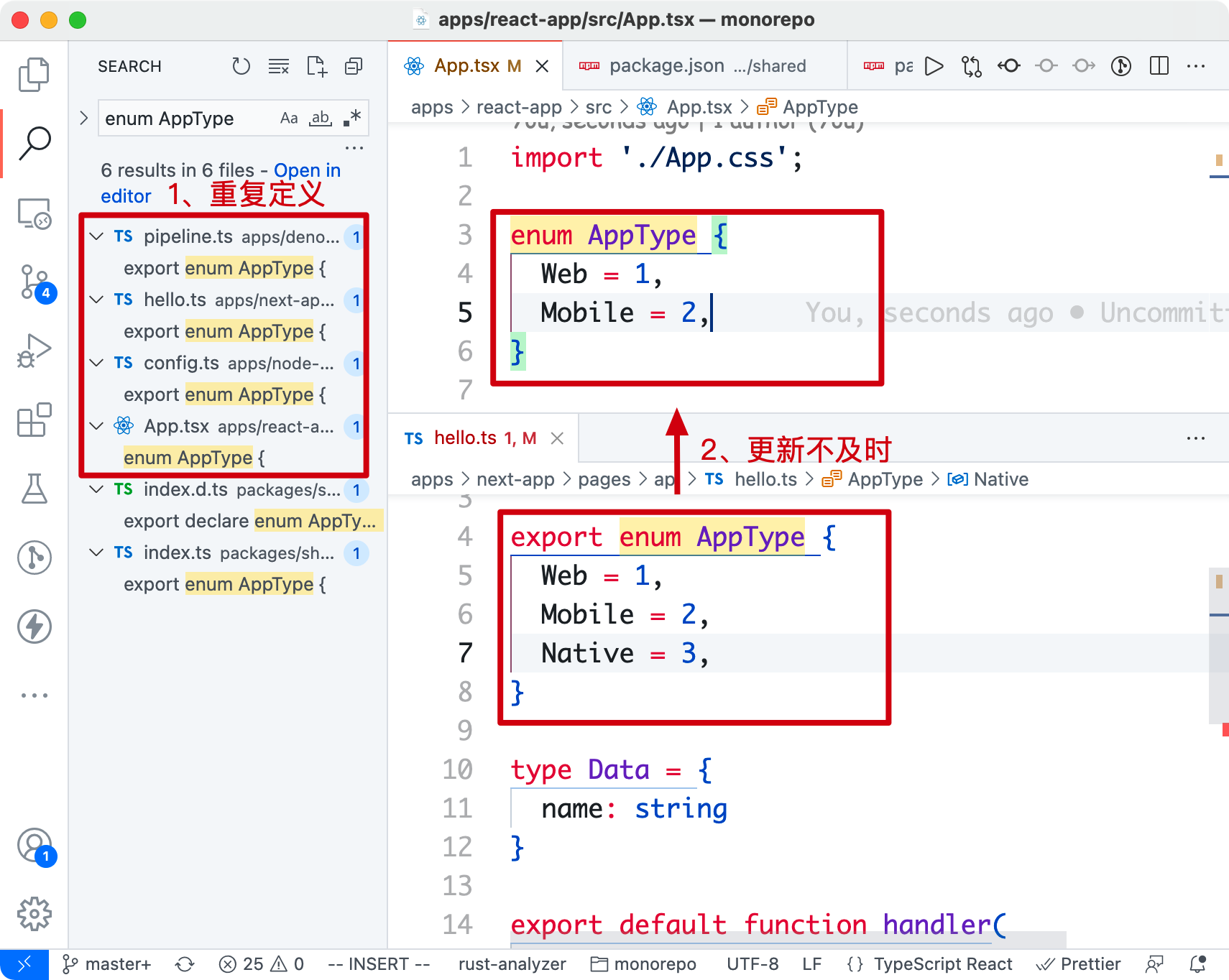
- Duplicate definitions: Utility methods, types, and configurations are redefined across different applications, making maintenance difficult. (For example, the definition of an application type
AppTypemay appear in more than 10 places, many of which are still outdated definitions; projects use configs; identical configs such astsconfig.json, prettier, etc. are written over and over again.)
- Dependency management issues: To solve reuse problems, we also tried publishing modules as npm packages first. But after publishing, we had to update the dependency versions in application package.json files, which was very tedious back and forth.
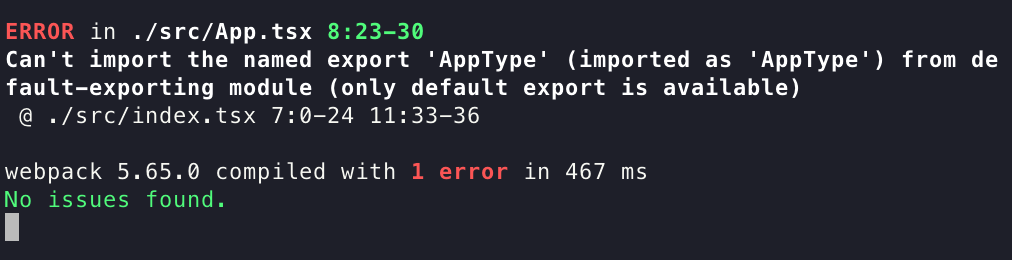
- Cross-project usage issues: Isomorphism means that a module runs in both frontend and backend projects, and is compatible with different module package specifications (CommonJS, ESM, etc.). Without a well-designed package structure, projects often fail during compilation and bundling ❌.
What types of module packages are there?
For historical reasons, JavaScript module systems have never had a unified specification. The rough evolution is: CJS → AMD → CMD → UMD → ESM. This introduces quite a bit of trouble when designing a module used across applications.
Before designing a module package, it is necessary to first understand the mainstream module types and specifications today (esm, cjs, umd).
Module type/format/specification | Description | Export syntax | Usage syntax | Notes |
esm(ES Modules) | JavaScript’s official standardized module system (draft), which took nearly 10 years to standardize. Applicable to: * Browser * Node.js ≥ 12.17 | export default foo export const foo = 1; export { bar as foo } from ” | import foo from ‘name’ import { foo } from ‘name’ import { foo as bar } from ‘name’ | * JS standard; prefer using this module format * Tree Shaking friendly |
cjs(CommonJS) | Node.js module standard; each file is a module. Applicable to: * Node.js | module.exports = foo exports .foo = 1; | const foo = require (‘name’); const { foo } = require(‘name’); | * Not Tree Shaking friendly * Frontend projects can also use the cjs format, relying on build tools (webpack / rollup) |
umd(Universal Module Definition) | Strictly speaking, umd is not a specification; it is just a community-created generic format that combines package modules and is compatible with CJS and AMD formats. On the browser side, it is used to mount global variables (such as window.*)Applicable to: * Browser (external scenarios) * Node.js (less common) | (function (root, factory) { if (// amd) { } else if (//cjs) { } else (//global) { } })(this, function() {}) | window.React window.ReactDOM $ |
Based on the module comparison above, the best practice for choosing a module specification at this stage is:
- Shared configuration modules (cross frontend/backend): produce both ESM and CJS packages (Node.js runtime support for ESM is still not great at the moment)
- UI component libraries: produce ESM, CJS, and UMD packages (umd is mainly used so frontend projects can externalize dependencies and reduce build time)
- Node.js-oriented projects: currently only need to produce CJS format
package.json module declarations
If module design is an art, then package.json is the instruction manual for that art! In actual development, many developers cannot correctly configure package.json.
Basic information
Most fields come from the official npm definition and describe the basic information of a package:
// package.json
{
    // 包名(示例:import {} from 'your-lib')
    "name": "your-lib",
    "version": "1.0.0",
    "description": "一句话介绍你的包",
    // 发布到 npm 上的目录,不同于 `.npmignore` 黑名单,`files` 是白名单
    "files": ["dist", "es", "lib"],
    // 安全神器,不发到 npm 上
    "private": true,

    /**
     * 包依赖
     */
    // 运行时依赖,包消费者会安装的依赖
    "dependencies": {
        "lodash": "^4.17.21",
        // ❌ "webpack": "^5.0.0",
        // ❌ "react": "^17.0.0" 不推荐将 react 写进依赖
    },
    "peerDependencies": {
       "react": "^16.0.0 || ^17.0.0",
       "react-dom": "^16.0.0 || ^17.0.0"
    },
    // 开发时依赖,使用方不会安装到,只为包开发者服务
    "devDependencies": {
        "rollup": "^2.60.2",
        "eslint": "^8.5.0",
        "react": "^16.0.0",
        "react-dom": "^16.0.0"
    }
}
Points to note here:
version
Follow semver semantic versioning (validation tool). The format is generally {major}.{minor}.{patch}.
major: major feature/functional updates that affect how users use it;minor: new features that do not affect how users use it;patch: bug fixes / no user impact
Let’s look at a few error-prone examples:
- Publishing an alpha/beta version: version 1.0.1 has already been published, and the next beta version is to be published:
- ❌ Publish 1.0.1-beta.1
- ✅ Publish 1.0.2-beta.1
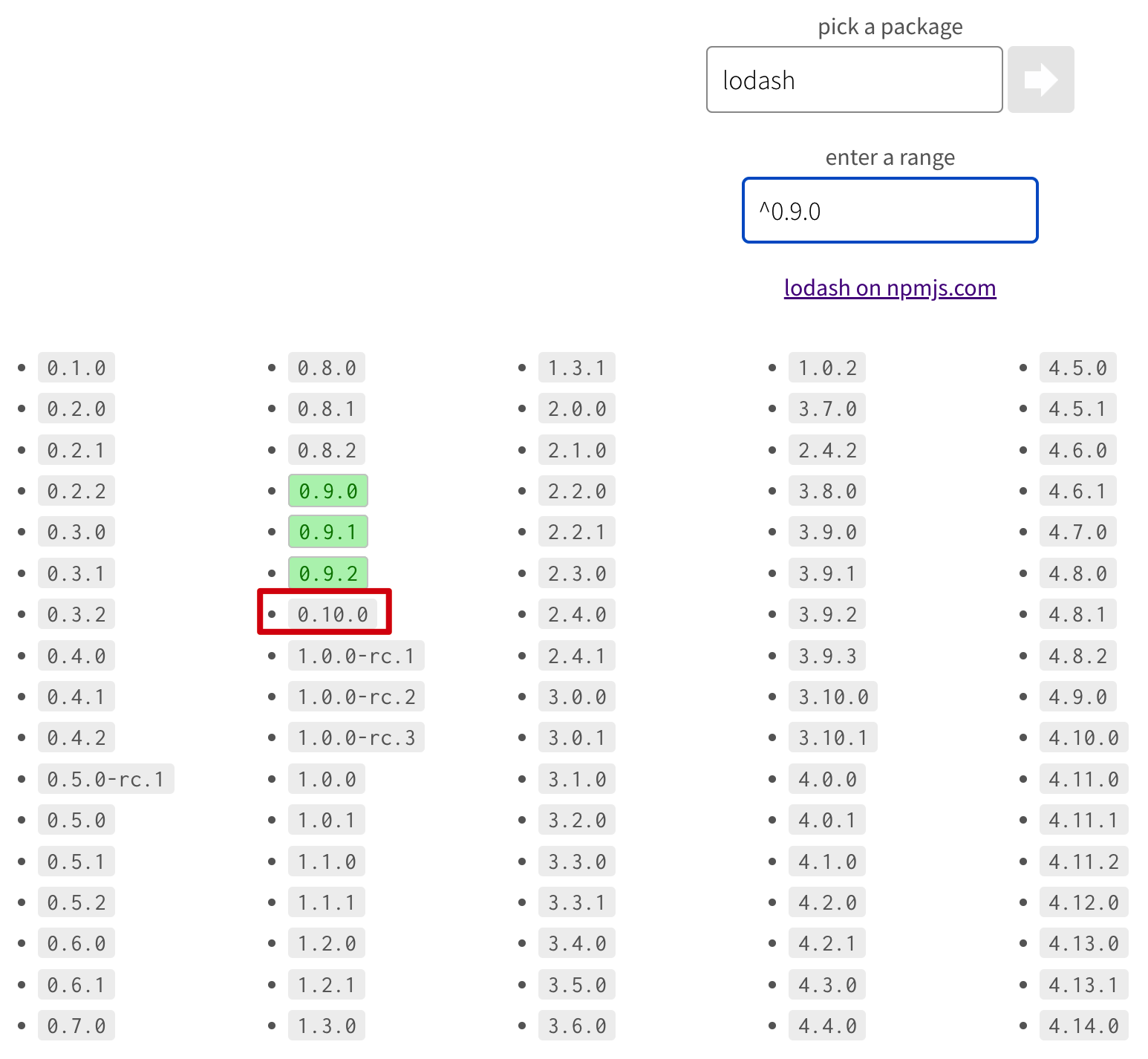
- ^0.x.y version matching issue. For example: if the user configures
"^0.9.0", it will not match version 0.10.0 (as shown below). It is recommended to start official releases from 1.x.
dependencies, devDependencies, peerDependencies
Dependencies of a module package are something many module developers easily get wrong. Here, producer refers to the module package developer, and consumer refers to the application using the module package.
dependencies: runtime dependencies. Module consumers will install the dependencies listed here. Not recommended:- ❌ “webpack”: “^5.0.0”: consumers will install webpack, unless this module package fully encapsulates webpack functionality and the application does not need to install it
- ❌ “react”: “^17.0.0”: consumers will install the react dependency, which may introduce multiple React instances
devDependencies: development dependencies. Consumers will not install them; they only serve the producer. For example:- ✅ “rollup”: “^2.60.2”
- ✅ “webpack”: “^5.0.0”
- ✅ “react”: “^17.0.0”
peerDependencies: host dependencies. They specify dependencies that must be installed before the current module package is used. This configuration is somewhat controversial. After npm 7, dependencies are automatically installed by default, while pnpm and yarn currently do not do this.- ✅ “react”: “^16.0.0 || ^17.0.0”
private
For packages that should not be published, remember to set this to true to avoid accidentally running npm publish and publishing them externally, causing security issues.
# packages/private/package.json
{
  "private": true
}

$ npm publish
npm ERR! code EPRIVATE
npm ERR! This package has been marked as private
npm ERR! Remove the 'private' field from the package.json to publish it.
Module types
Declare which module format the current package belongs to (cjs, esm), and load different module types under different conditions. The configuration fields come from:
Single entry (main, module, browser)
If it is a single-entry package and is always exported from the package name via import from 'your-lib', you can configure it as follows:
{
    // -----单入口----
    // 入口文件(使用 cjs 规范)
    "main": "lib/index.js",
    // 入口文件(使用 esm 规范)
    "module": "es/index.js",
    // 包类型导出
    "typings": "typings/index.d.ts",
    // 浏览器入口
    "browser": "dist/index.js",
    "sideEffects": false
}
Parameter descriptions:
main: entry file in cjs formatmodule: entry file in esm formatbrowser: used on the browser side, configured as es or umd format. Mainly used with webpack < 5 (which does not support theexportsconfiguration)sideEffects: side-effect configuration, mainly used for Tree Shaking. Setting it tofalsetells bundlers that they can safely perform Tree Shaking.
Multiple entries (exports, browser)
For multi-entry packages, such as import from 'your-lib/react' and import from 'your-lib/vue', the recommended configuration is:
{
     // ----多入口---
    "exports": {
        "./react": {
            "import": "dist/react/index.js",
            "require": "dist/react/index.cjs"
        },
        "./vue": {
            "import": "dist/vue/index.js",
            "require": "dist/vue/index.cjs"
        }
    },
    "browser": {
        "./react": "dist/react/index.js",
        "./vue": "dist/vue/index.js"
    },
    "sideEffects": false
}
Parameter descriptions:
exports: a module export proposal introduced by Node.js. Its benefit is that it can define exported module paths and support using packages in different formats (esm, cjs) in different environments (Node.js, browser, etc.)browserandsideEffectshave the same meanings as above
After understanding package.json, let’s start from common module packages and see how to design them.
How to design module packages?
Initialize a Monorepo sample project (including apps and packages). The directory structure is as follows (where apps contains common application types):
- apps(前端、后端)
    - deno-app
    - next-app
    - node-app
    - react-app
    - umi-app
    - vite-app
    - vite-react-app
- packages(模块包)
    - shared(共享配置模块)
        - configs
            - tsconfig.base.json
        - types
        - utils
            - index.ts
        - package.json
    - ui(组件库)
        - react
        - vue
        - package.json
    - native(Rust/C++ 原生模块编译成 npm,用在 Node.js)
        - src
            - lib.rs
        - package.json
- .npmrc
- package.json
- pnpm-workspace.yaml
The design of each module package is introduced in the following steps:
- How to use it in an application?
- How to build it?
- How to configure package.json?
- Result demonstration
Shared configuration module (packages/shared)
Now we want to solve reuse of enums, configs, and utility methods, and hope they can be used in all projects at the same time.
Usage
Usage in applications is as follows:
- Declare the module dependency in the project.
workspace:*means using the shared module package from the current Monorepo.
// apps/*/package.json
{
  "dependencies": {
     "@infras/shared": "workspace:*"
  }
}
To make it more convenient to debug Monorepo package modules, we use the pnpm workspace protocol here (yarn also supports this protocol).
- Use
importin the project to reference the esm format,requireto reference the cjs format, and common project configs such astsconfig.json.
// apps/*/index.{ts,tsx,jsx}
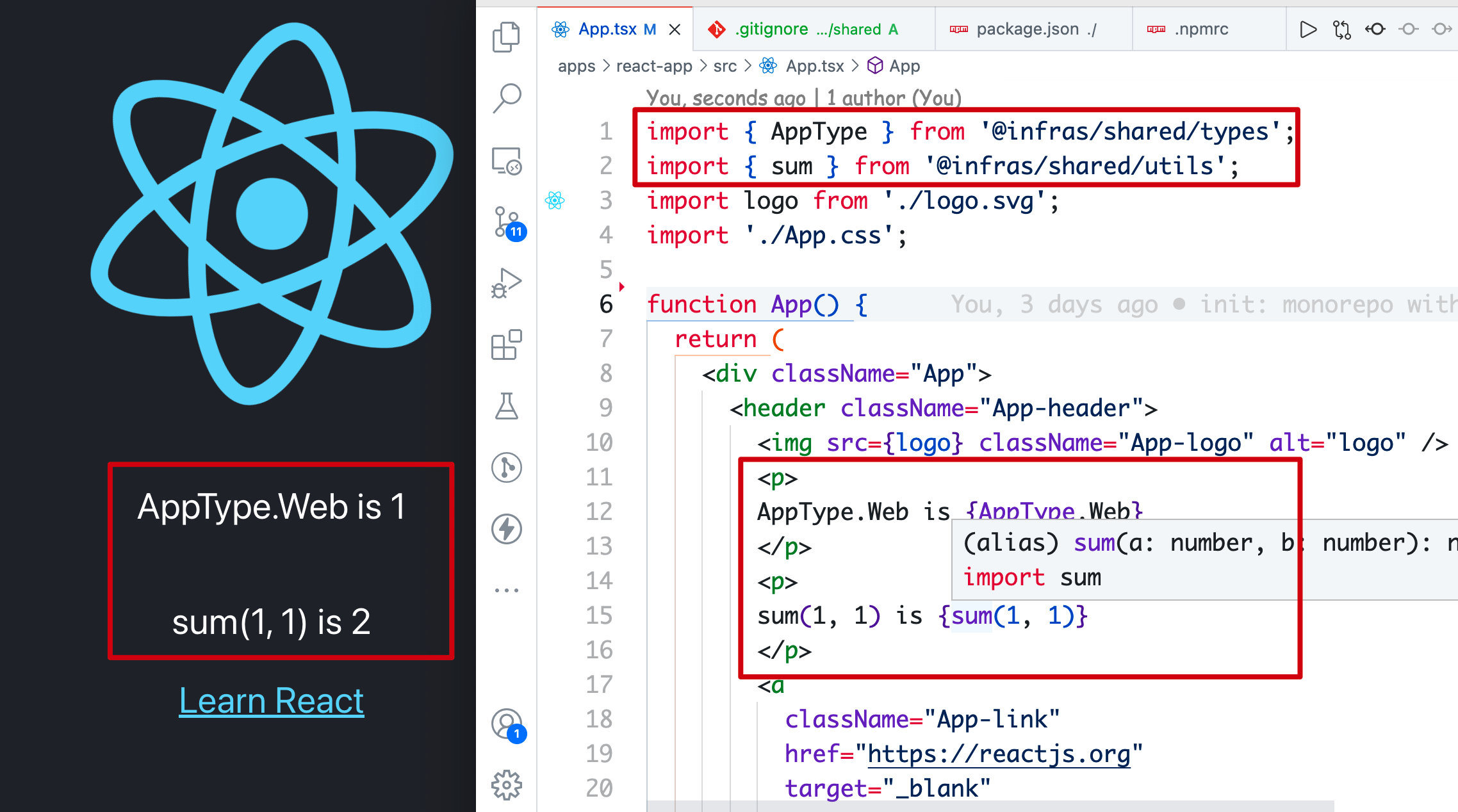
import { AppType } from '@infras/shared/types';
import { sum } from '@infras/shared/utils';

console.log(AppType.Web); // 1
console.log(sum(1, 1));   // 2

// apps/*/index.js
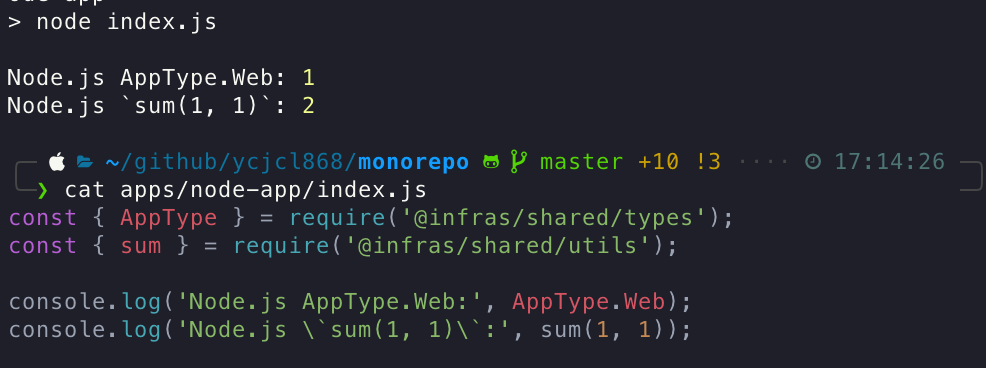
const { AppType } = require('@infras/shared/types');
const { sum } = require('@infras/shared/utils');

// apps/*/tsconfig.json
{
- "extends": "../../../tsconfig.base.json"
+ "extends": "@infras/shared/configs/tsconfig.base.json"
}
Build esm and cjs formats
As mentioned above, we ultimately produce both esm and cjs packages so consumers can use them as needed. So which build tool should we use?
Available compilation/bundling tools here:
- Transformer (compilation): babeljs, TypeScript, esbuild
- Bundler: Rollup, esbuild, webpack, tsup, unbuild
Difference between the two: compilation (a → a’, b → b’), bundling (ab → c, All in One)
After practice, we chose tsup, which can quickly and conveniently build esm and cjs packages out of the box, with types included.
Why use tsup instead of tsc/rollup/babel: shared configuration modules can actually be solved with tsc alone, and do not need rollup’s rich ecosystem. Tool configuration is also verbose and troublesome. Another point is that tsup is faster in terms of compilation and bundling speed.
The bundling configuration tsup.config.ts is as follows:
// packages/shared/tsup.config.ts
import { defineConfig } from 'tsup';

export default defineConfig({
  entry: ['utils/index.ts', "types/index.ts"],
  clean: true,
  dts: true,
  outDir: "dist",
  format: ['cjs', 'esm']
});
Running **tsup** will generate the **dist** directory, with the following structure:
# packages/shared
- dist
    - utils
        - index.js(cjs)
        - index.mjs(esm)
    - types
        - index.js
        - index.mjs
- utils
- types
- package.json
Note: The reason the multi-entry
utilsandtypesdirectories are not placed undersrcis to provide better TS type support in Monorepo projects! In practice, this is a sleight of hand: type hints point to source ts files, while actual usage points to the dist output directory, for example:
- shared
- dist
- react
- index.js (entry loaded by application builds)
- react
- index.ts (entry for editor type hints)
package.json
The package.json for a general-purpose module package is as follows. Since it has multiple entries, the combination of exports and browser is used here to export cjs and esm format packages.
// packages/shared/package.json
{
  "name": "@infras/shared",
  "version": "0.0.1",
  "description": "An infrastructure monorepo shared library for all projects and apps.",
  "browser": {
    "./types": "./dist/types/index.mjs",
    "./utils": "./dist/utils/index.mjs"
  },
  "exports": {
    "./types": {
      "import": "./dist/types/index.mjs",
      "require": "./dist/types/index.js"
    },
    "./utils": {
      "import": "./dist/utils/index.mjs",
      "require": "./dist/utils/index.js"
    }
  },
  "scripts": {
    "prepare": "npm run build",
    "dev": "tsup --watch",
    "build": "tsup"
  },
  "devDependencies": {
    "tsup": "^5.10.3"
  }
}
scripts.prepare: After adding the prepare build script to the module package, it will run at the following times:- Compile before publishing (equivalent to
prepublishOnly) - Local npm install will execute it (unlike
postinstall, which runs on every install and may cause errors for consumers when thetsupdependency does not exist)
- Compile before publishing (equivalent to
Also, when using
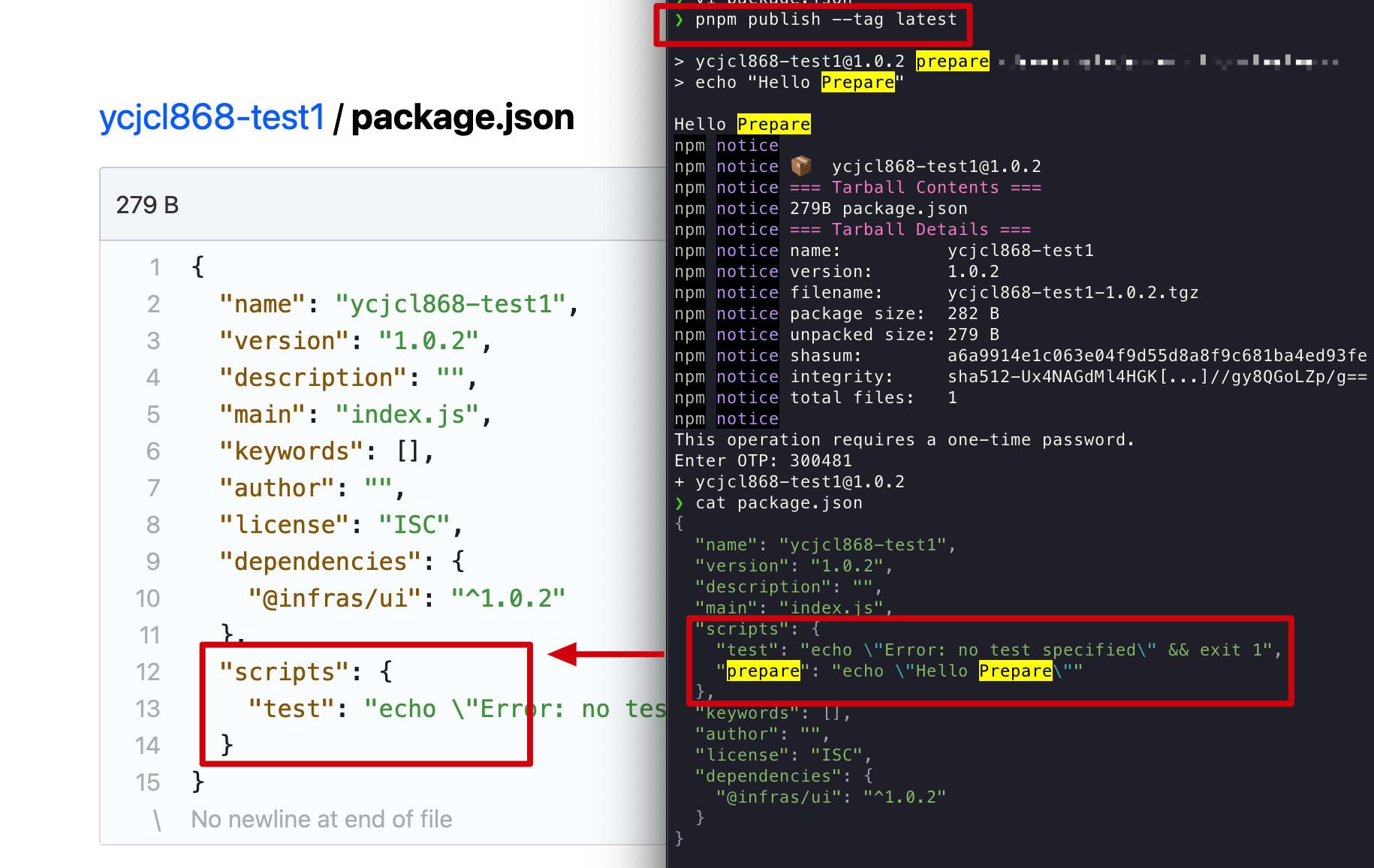
pnpm publishto publish a package,scripts.preparewill be removed (source implementation)
Running
Use it in a frontend project: pnpm start --filter "react-app"
Use it in a Node.js project with pnpm start --filter "node-app":
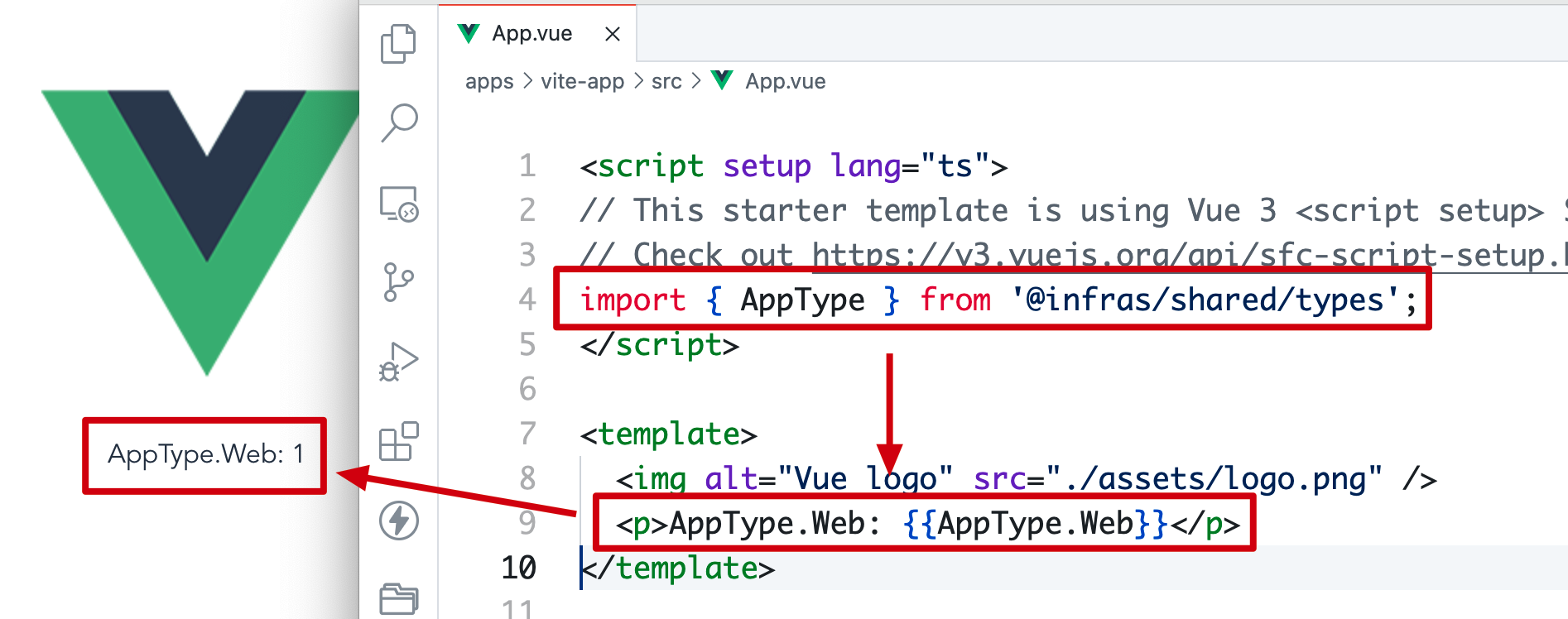
Use it in Vite with pnpm start --filter "vite-app":
UI component library module (packages/ui)
In a Monorepo micro-frontend architecture, reusing component libraries can effectively improve R&D efficiency.
Usage
Applications/projects import it as follows:
- Declare the module dependency in the project.
workspace:*means using the ui module package from the current Monorepo. If it is not a Vite application, you need to configuredependenciesMeta['``@infras/ui'].``injected: true
// apps/*/package.json
{
  "dependencies": {
     "@infras/ui": "workspace:*"
  },
  // 非 Vite 应用
  "dependenciesMeta": {
    "@infras/ui": {
      "injected": true
    }
  }
}
Origin of dependenciesMeta
The dependenciesMeta configuration here is very interesting. It comes from pnpm (≥ 6.20) and is used to solve the Invalid hook call problem caused by multiple React version instances in a Monorepo.
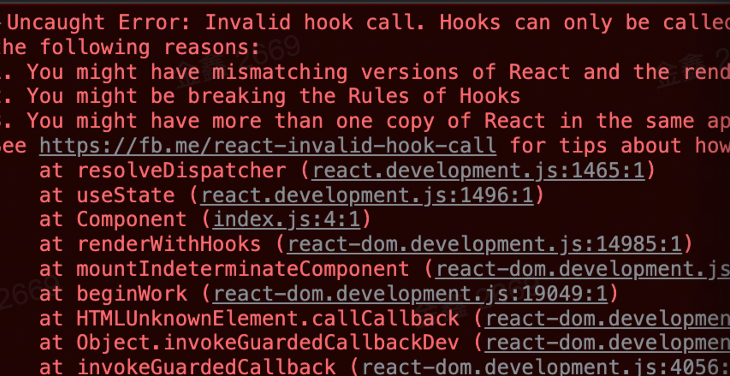
The cause of the issue is that the React version in the UI component library’s devDependencies differs from the React version in the application. In the dependency structure below, the application uses React@17, while the component library uses React@16. (Issues: react#13991, pnpm#3558, rushstack#2820, component multiple instance problem, etc.):
--- react-app
 |  |- react@17.0.0
 |- @infras/ui
 |  |- react@16.0.0 <- devDependencies
Before this, there were two approaches to solving this problem:
-
Specify the react version. At the frontend application layer, specify a concrete react version during bundling and building to force the versions to be unified.
-
Dependency hoisting. Prefer the latest version of react, but the application’s actual version usage can still be problematic. (pnpm#hoist)
The dependenciesMeta introduced after pnpm 6.20 essentially hard-links the UI component library package into the application, solving the problems of local development for react component libraries and peerDependencies:
 apps
   node_modules
     @infras/ui
-      node_modules
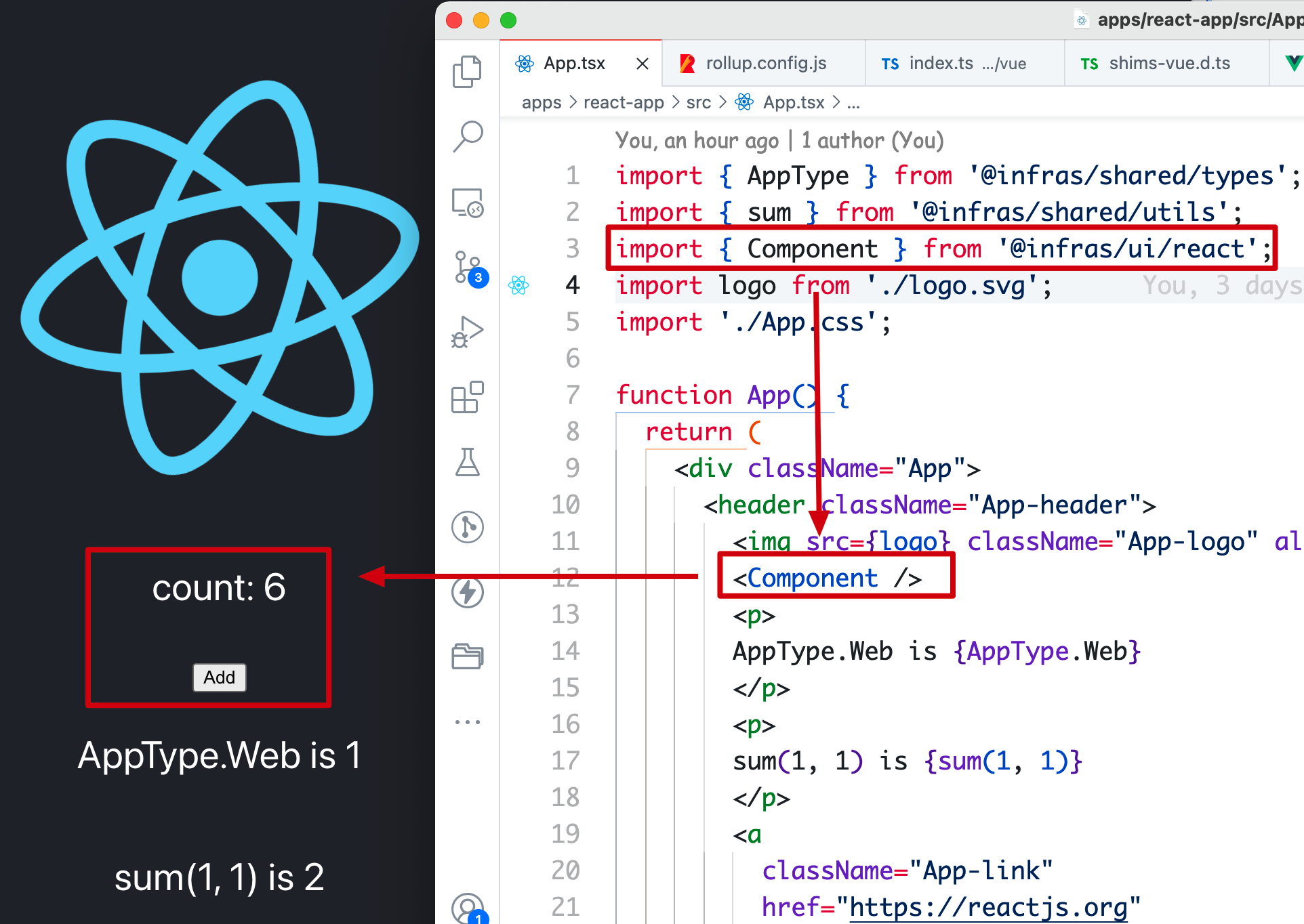
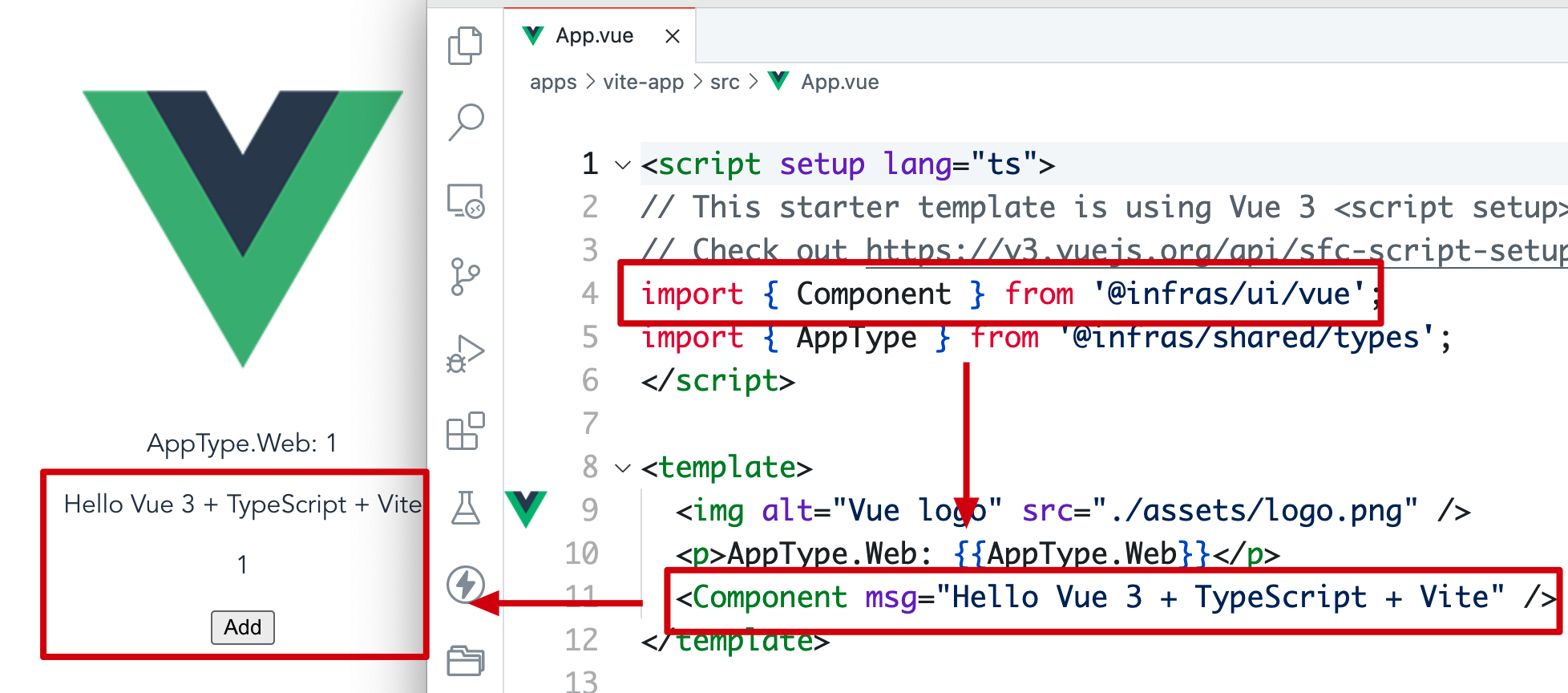
- Frontend usage: import the component library in React and Vue projects respectively
// React 应用: apps/*/index.{ts,tsx,jsx}
import { Component } from '@infras/ui/react';
<Component />

// Vue 应用: apps/*/index.vue
<script setup lang="ts">
import { Component } from '@infras/ui/vue';
</script>
<template>
    <Component />
</template>
For components from different frontend frameworks, it is not recommended to export them from a single entry (i.e.
import { ReactC, VueC } from 'ui'), because this makes on-demand compilation in applications much more troublesome!
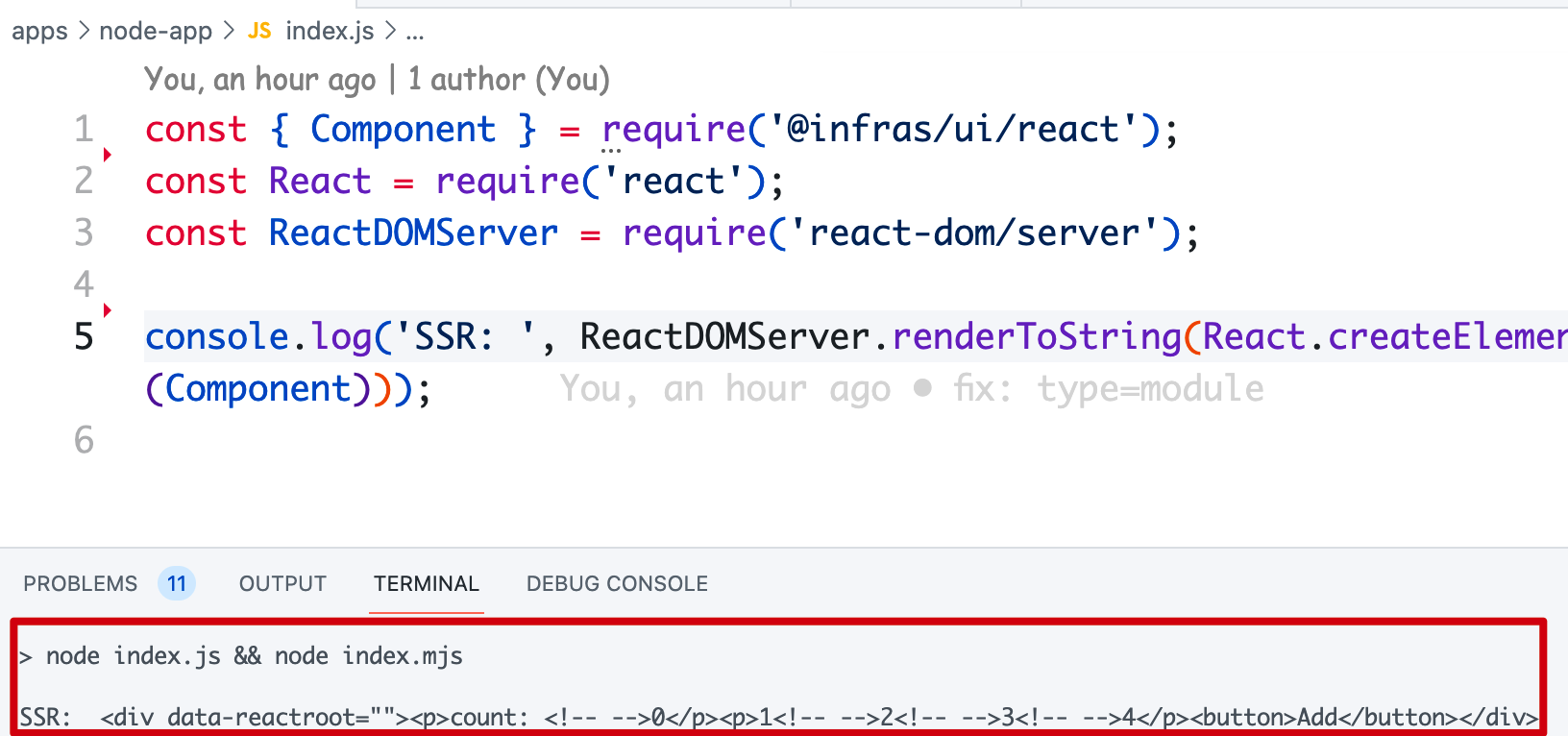
- Server-side rendering for components
// apps/node-app/index.js
const { Component } = require('@infras/ui/react');
const React = require('react');
const ReactDOMServer = require('react-dom/server');

console.log('SSR: ', ReactDOMServer.renderToString(React.createElement(Component)));
To build both React and Vue component library modules, the package directory is roughly designed as follows:
# packages/ui
- react
    - Component.tsx
    - index.ts
- vue
    - Component.vue
    - index.ts
- package.json
Build esm, cjs, and umd
A quick question: why do large component libraries generally need to build cjs format, and what scenario does it target?
Choose Rollup to bundle both React and Vue component libraries. There are several points to note:
- Configure package formats as esm, cjs, and umd
- Externalize react, react-dom, and vue. Component libraries are not recommended to bundle frameworks such as React and Vue inside.
The rollup configuration is as follows:
// packages/ui/rollup.config.js
import { defineConfig } from 'rollup';
...

export default defineConfig([
  {
    input: 'react/index.tsx',
    external: ['react', 'react-dom'],
    plugins: [...],
    output: [
      {
        name,
        file: './dist/react/index.js',
        format: 'umd',
        globals: {
          react: 'React',
          'react-dom': 'ReactDOM'
        }
      },
      {
        name,
        file: './es/react/index.js',
        format: 'es',
      },
      {
        name,
        file: './lib/react/index.cjs',
        format: 'commonjs',
      }
    ]
  },
  {
    input: 'vue/index.ts',
    external: ['vue'],
    plugins: [...],
    output: [
      {
        name,
        file: './dist/vue/index.js',
        format: 'umd',
        globals: {
          vue: 'vue',
        }
      },
      {
        name,
        file: './es/vue/index.js',
        format: 'es',
      },
      {
        name,
        file: './lib/vue/index.cjs',
        format: 'commonjs',
      }
    ]
  }
])
After running rollup --config rollup.config.js, the **dist**, **es**, and **lib** directories will be generated:
# packages/ui
- dist
    - react
    - vue
- es
    - react
    - vue
- lib
    - react
    - vue
- react
- vue
- package.json
package.json
The package.json of the component library is also multi-entry. Like the general-purpose module, it uses a combination of exports to export packages in cjs, esm, and umd formats.
{
  "name": "@infras/ui",
  "version": "1.0.0",
  "description": "An infrastructure monorepo ui library for all front-end apps.",
  "browser": {
    "./react": "./es/react/index.js",
    "./vue": "./es/vue/index.js"
  },
  "exports": {
    "./react": {
      "import": "./es/react/index.js",
      "require": "./lib/react/index.cjs",
      "default": "./dist/react/index.js"
    },
    "./vue": {
      "import": "./es/vue/index.js",
      "require": "./lib/vue/index.cjs",
      "default": "./dist/vue/index.js"
    }
  },
  "scripts": {
    "start": "npm run dev",
    "dev": "rollup --config rollup.config.js --watch",
    "build": "rollup --config rollup.config.js",
    "prepare": "npm run build",
    "prepublishOnly": "npm run build"
  },
  "peerDependencies": {
    "react": "^16.0.0 || ^17.0.0",
    "react-dom": "^16.0.0 || ^17.0.0",
    "vue": "^3.0.0"
  },
  "devDependencies": {
    "typescript": "^4.5.2",
    "@babel/...": "",
    "rollup/...": "^2.60.2"
  }
}
There is one especially important point to note in the package.json declaration for component libraries:
- Add the browser configuration to the component library; otherwise, webpack ≤ 4 will report
Module not found: Error: Can't resolve '模块名'
{
+ "browser": {
+   "./react": "./es/react/index.js",
+   "./vue": "./es/vue/index.js"
+ },
}
Reason: Webpack below 5 does not support the exports configuration webpack#9509. Webpack 4 prioritizes browser, while Webpack 5 prioritizes exports.
Running
Start the React application (pnpm start --filter "react-app"):
Start the Vue application (pnpm start --filter "vite-app"):
Server-side rendering (pnpm start --filter "node-app"):
Native language modules (packages/native)
Interestingly, we can use npm package modules written in Rust / Golang in a Monorepo to handle CPU-intensive tasks.
Usage
Usage in a Node.js application is as follows:
- Declare the native language module dependency in the project
// apps/node-app/package.json
{
  "dependencies": {
     "@infras/rs": "workspace:*"
  }
}
- Call it in Node.js:
// apps/node-app/index.js
const { sum } = require('@infras/rs');
console.log('Rust \`sum(1, 1)\`:', sum(1, 1)); // 2

// apps/node-app/index.mjs
import { sum } from '@infras/rs';
Build cjs
Here we use napi-rs to initialize an npm module package built with Rust. napi-rs does not build an esm-format package; instead, it chooses cjs format to be compatible with esm (related: node#40541).
# packages/rs
- src
    - lib.rs
- npm
- index.js
- index.d.ts
- package.json
- Cargo.toml
package.json
The package.json initialized directly by napi-rs can be used without modification.
{
  "name": "@infras/rs",
  "version": "0.0.0",
  "type": "commonjs",
  "main": "index.js",
  "types": "index.d.ts",
  "devDependencies": {
    "@napi-rs/cli": "^2.0.0"
  },
  "scripts": {
    "prepare": "npm run build",
    "artifacts": "napi artifacts",
    "build": "napi build --platform --release",
    "build:debug": "napi build --platform",
    "version": "napi version"
  }
}
Running
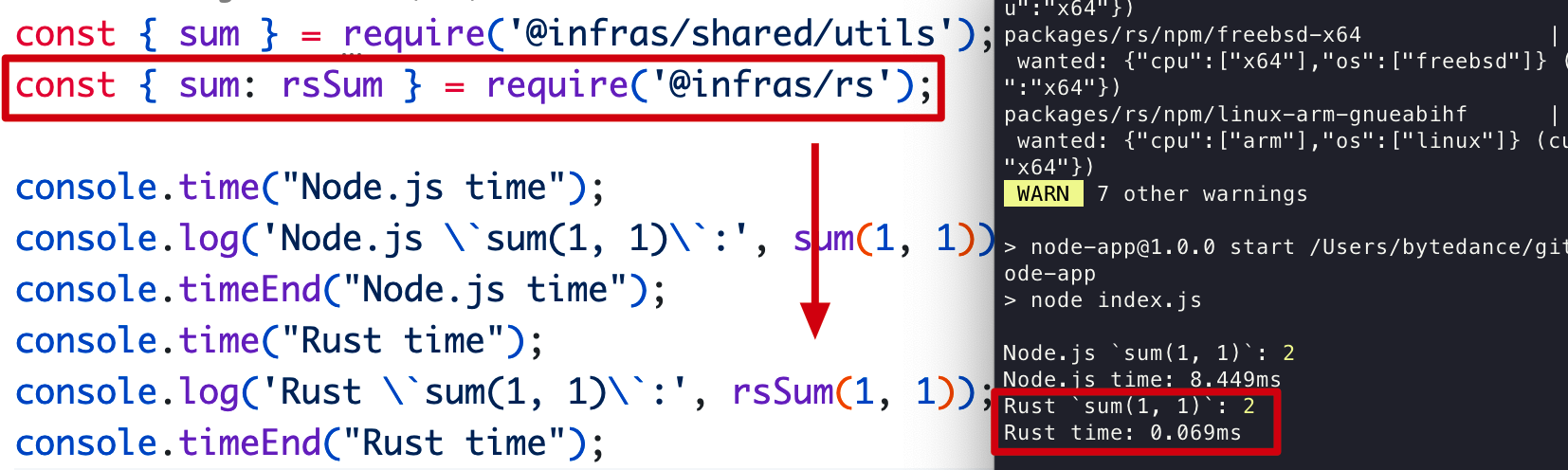
Run pnpm start --filter "node-app" in the Node project. As shown, the function compiled from Rust executes much faster than native Node.js (8.44 ms → 0.069ms).
Publishing module packages
If you need to publish packages, there are two approaches:
Publishing from the command line
To publish non-private: true module packages in the Monorepo to the npm registry, the simplest way is to run the publish command.
$ pnpm -r publish --tag latest
If you want to add a changelog for package publishing, refer to using-changesets
Publishing from the platform side
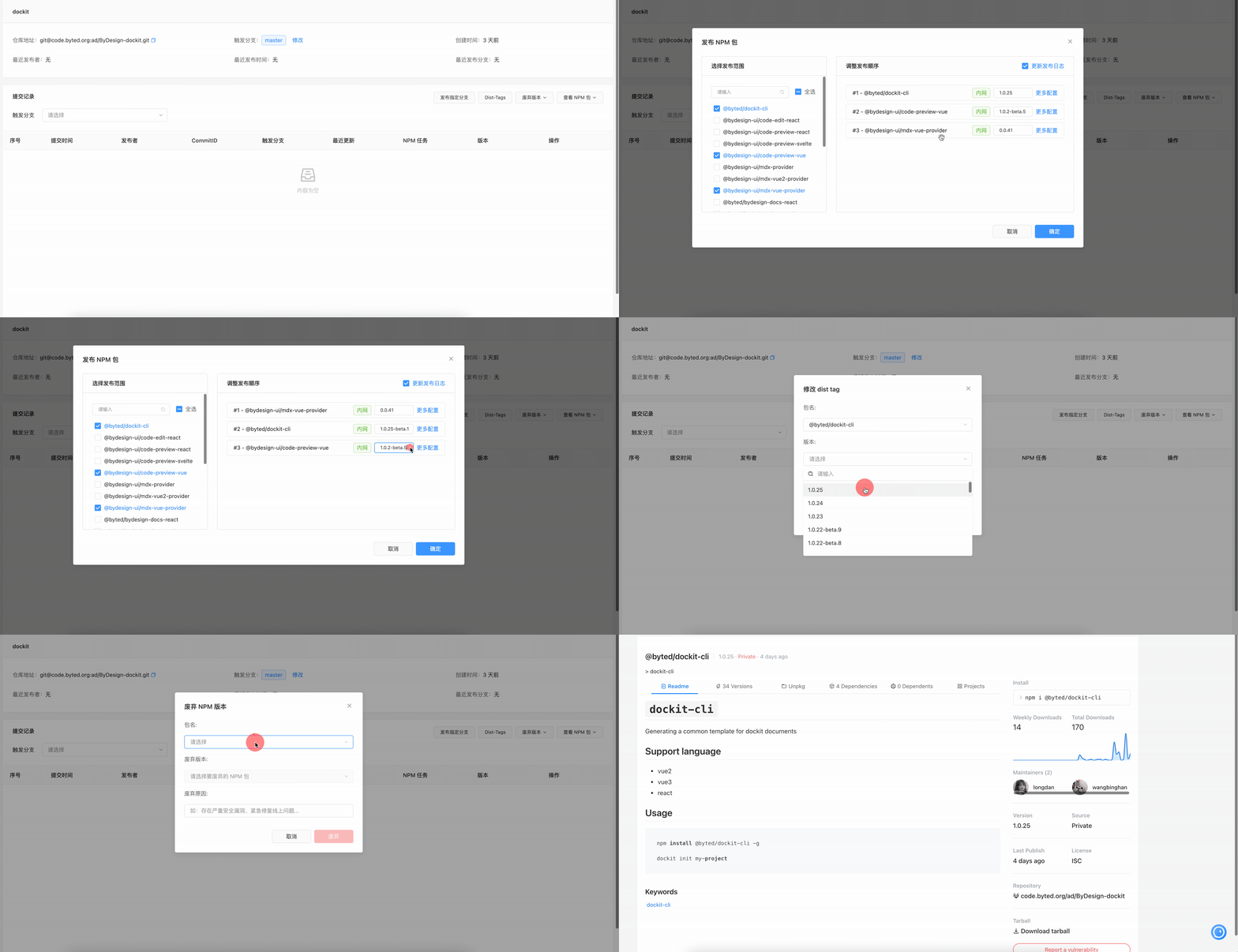
Of course, you can also use ByteDance’s internal AddOne platform to build, publish, and manage versions of npm packages online. Compared with command-line publishing, it is more standardized and better for package maintenance. Learn more.
Summary
By now, you should have a certain understanding of module standards and know how to design modules in common scenarios. Here is a summary:
- ESM First: For any module, prefer building the ESM format first. For multi-entry packages, using
**exports**andbrowser(if webpack < 5) can handle most module format issues. For single-entry packages, usemainandmodule. - Shared configuration modules (utils, types, enums, etc.) use the tsup bundler to generate both esm and cjs package types.
- Component libraries usually use rollup for bundling, generating esm, cjs, and umd package types. Also pay attention to the multiple-instance problem in React component libraries when versions are inconsistent.
References
- Modules: CommonJS modules | Node.js v14.18.2 Documentation
- ES modules: A cartoon deep-dive – Mozilla Hacks - the Web developer blog
- scripts | npm Docs
- defense-of-dot-js#proposal
- Node.JS (New) Package.json Exports Field
- JavaScript modules - JavaScript | MDN
- Authoring Libraries | webpack
- npm Blog Archive: Monorepos and npm
- Retrospective on pnpm monorepo multiple component instances and the peerDependencies dilemma
- Hooks + multiple instances of React
- jkrems/proposal-pkg-exports
- Import from subfolder of npm package - Tutorial Guruji
- Package.json with multiple entrypoints
- Publish ESM and CJS in a single package
- How to Create a Hybrid NPM Module for ESM and CommonJS.
- How should sideEffects in Webpack be used?